C1P V22 constant CPU load

Hi,
a friend just told me, that CO causes constantly 20% CPU load since the update to V22. When I look into the task manager I also see 8-10% constantly without doing anything.
Anyone else?
-

I see 1%.
That is not unexpected since C1 has some processes running that are likely to be constantly monitoring for potential activity.
-1 -
Session or catalog?
0 -

Hello Alexander,
I can confirm the high CPU load on Win10. On my laptop the load is between 12-15% even is C1 is idle (or should be). This is way too high.
Unfortunately the load is not increasing after a while. So the fan is running all the time... :-(I am using sessions.
Did you or your friend already contact the support?
0 -
@BeO: I tried both, sessions and catalogue. That doesn't seem to make a difference. Capture One was already running idle more than a day in the background when I had a look into task manager. So it doesn't look like any housekeeping to me.
My friend's installation suddenly stopped the high load after he had tried a panorama stitch. Really funny.
I haven't contacted support yet, but i will submit a ticket now.
0 -
@Alexander von Grafenstein:
I haven't contacted support yet, but i will submit a ticket now.
Great, I already submitted a ticket too, so let's hope that a solution is on it's way soon. :-)
The more people report this bug, the better. And of course the sooner it will be fixed. Hopefully. :-)0 -
I have the same problem and I wrote to the support last week thursday only a few hours after CO 22 was released.
Until today I have not received any answer.
(Permanent CPU load of 25... 28% also when CO is idle, fan runs constantly - that sucks, System: Win 10, Core(TM) i7-6567U CPU, 16GB RAM, Intel Iris 550 Graphics via CPU)
Of course it makes sense that as many users as possible make a service request about this topic - this shows the CO guys that it is not a problem of a single person.
1 -

Same thing here: 8-14% constant CPU load, with a Session of 79 images open, and C1 sitting idle.
I'm running C1P v22 on a Windows 10 Laptop, with Intel(R) Core(TM) i7-9750H CPU @ 2.60GHz processor, 32GB RAM, and NVIDIA GeForce RTX 2070.
1 -
Has someone here got some feedback from the support regarding this topic?
0 -
No. No sign of life from support - since 3 weeks.
0 -
I had the same problem with Capture One 22 for the last weeks. The CPU load never fell below 25 %.
Additionally I faced another issue after upgrading to version 22: When hardware acceleration is activated, the exported images had heavy artefacts and sometimes the export even threw an error. Browsing this forum, normally the display driver is suspected to be the cause of this problem, but I cannot remember to have done any update in the last time. But that's not topic of this thread.
I experimented a bit to fix this export issue and therefore removed the OpenCL kernel binaries as described here: https://support.captureone.com/hc/en-us/articles/360002404937-Troubleshooting-Hardware-Acceleration-in-case-of-viewing-processing-exporting-problems
Summary: This did not solve my export problems but the CPU-load bug has gone :-)
In idle mode Capture One does now not take more than 1 %.
This problem seems to be very obscure and it is unclear why reinitializing OpenCL helped to reduce the constant CPU load. But anyway, I think you could give it a try and check if it also helps in your case.
0 -
I tried some things described in the previous post respectively in the given link there. No result, unfortunately. My CPU load is still approx. 25% caused only by C1 in idle mode.
In detail: First I changed the user preferences in C1 concerning hardware acceleration to the settings "never". No result.
Then I deleted the files in the path C:\Users\User_Name\AppData\Local\CaptureOne\ImageCore. Result: Increasing CPU load to approx. 50% for approx 15 min., obviously C1 was recreating anything concerning "hardware accelaration". After approx. 15min the CPU load goes back to the (known) former level of approx. 25%. Leaving and restarting C1 had no effect.
=> No improvement concerning the high CPU load, I continue to wait for the effective remedy...
0 -
Sorry Markus,
I really hoped, this could be an appropriate workaround until they have fixed the problem in general.
Reading from your experience, I am not too optimistic, that my fortune will last long...
We need to wait until the support is going to answer and hope, that they can identify the problem.
Thank you for trying it out.
0 -
@Martin:
I tried your fix, unfortunately without success. The CPU load is as high as before.
Hopefully the support team is now back at work after the X-Mas days! :-)
0 -

This might be related to the bubble that shows over the rotation tool
Try to go there... if the bubble appears about auto rotate, just close it and see if it fixed the issue
By Default the rotation & flip tool is in the Lens tab..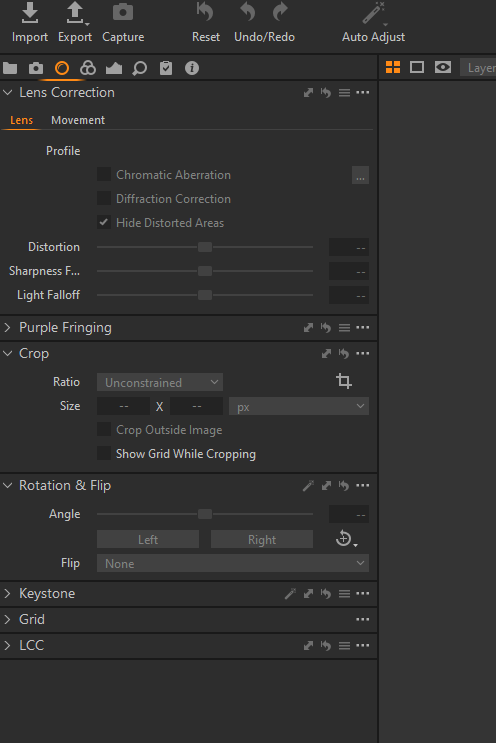 2
2 -
As crazy simple as it sounds, the last tip brought success!
After closing the bubble that contains a helpful hint about the new possibilities concerning auto-rotation with the button "I got it" inside the bubble, the CPU load fell back to normal values , means 1% or less - when C1 has "nothing to do".
Thank you 'TAX' for this crucial information!
Such a trivial cause... hard to believe...
The C1 programmers must have made a small mistake, which is actually not a big deal, but the fact that there was no hint or even a sign of life from C1 support makes the whole thing a bit annoying.
0 -
Thank you very much!
It really works for me!
Although it is completely crazy: why on earth could a help bubble, which was in my case not even visible, be the cause for such a high CPU load?Thanks again!
0 -
I tried all sorts of things to figure this out. Originally was thinking it was background processing of old, large catalogs, but found that there was 12% CPU even on a brand new, completely empty Catalog.
Dismissing the Tooltip Bubble that alerts the user to the new Autorotate feature also resolved the CPU issue on my Windows 10 installation. Thanks "TAX _ "!
0 -
My support request was answered today. The issue is known and should be fixed in today's release.
0

Post is closed for comments.
Comments
18 comments