Smart album truncates if moved below top level

I created a smart album named "Birds (all)" in my main catalog to contain all metadata instances of "bird" in any album. It had 1199 images. Normally, I leave all of my Smart Albums in their default position at the bottom of the Library listing, but today, I wanted to put it in a more logical place.
So, I moved (dragged)the Smart Album to Group Animals (misc)/Project Animals/Smart Album Birds at which point it only contained the first 223 images in the original smart album.
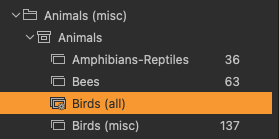
I then moved the Smart Album to the position between Group Animals (misc) and the Project Animals, and I was able to see all 1199 images.
It looks like a Smart Album does not show all images in it if it is moved into a Project. Is this a bug or a mysterious feature? Why can't you move a Smart Album into a project and have it behave the same as it did when it was created?
In case you are wondering why I have a Group named Animals (misc) with a project names Animals, the catalog structure with its redundancies is left over from the Aperture model I used before adopting Capture One 8 that always had projects. Now my Projects represent the file folders on mass storage.
-
Perhaps relevant, it takes 8 sections to view All Images, but 13 seconds to view a Smart Album in my almost 63000 image catalog. It does not make a difference if the Smart Album is 1000 or 3000 images in size. It looks like Capture One recompiles data to show the Smart Album every time you look at it. Perhaps it gets lost in doing this when the Smart Album is moved into a Project.
0 -
A smart album is only a stored filter. And it works in the scope of the project it is currently in. It is a feature.
0 -
So, when I dragged it into a project, it filtered that project as if it had been created there. Makes sense now that you point it out. It would be nice if you could nest smart albums like this: Animal Group/Vertebrate/Bird/species of bird. That would be asking Capture One to do a lot of work.
0

Post is closed for comments.
Comments
3 comments