Copy / Apply Layers Tool

When I am using the Copy/Apply tool in Capture One 22 is it possible to set things up so that any layers created in the Copy version are not carried through to the Apply version? I can set things up so that any cropping I have done in the Copy version is not carried over to the Apply version, but I haven't found a way to do this with layers other than deleting the layer in the Apply version. Help much appreciated. J
-
Goto to the Adjustments Clipboard and deselect the layers before hitting apply button
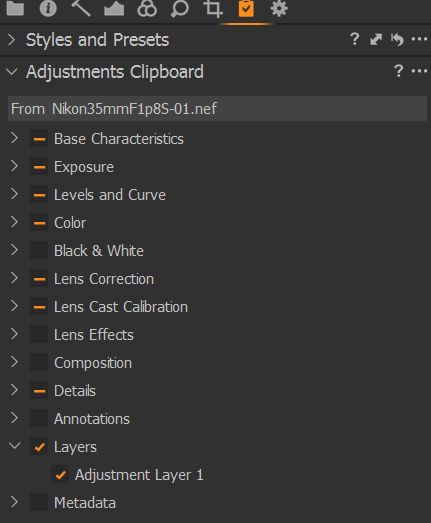 0
0 -
Many thanks BeO. As you say, I can do that but I would need to do it every time I don't want a layer to be applied to a subsequent image. That would take as long as deleting the layer in the Apply version. It is unusual for me to want to carry over layer(s) created in one image to subsequent images, so I was hoping to be able set things up so it doesn't happen as standard, in the same way that cropping can be set not to be carried over. J.
0 -

Jeremy,
Are you copying once and applying to several images or are these one-to-one copies?
There is no way that I am aware of to pre-set the non-selection of layers but if you work with a Floating Clipboard tool disabling any layer selection may be quicker and easier.
If the layer is set to be inactive before copying it will be applied but remain inactive in the edited variant to which it has been copied. Whether this helps you in any way I have no idea but I thought it might be a useful observation.
Other currently available options.
Deselect the Layers and create a style then apply the style to the new variant. (Probably not right for your needs but might work for some.)
Create a copy of the variant, remove the layer, copy and paste from the revised cloned variant then delete the variant if you know you will not need it again. That is probably a longer process than copying with the layer and deleting the layer afterward... but in some situations for some people, it might be a viable process flow.
Being able to set a default to exclude layers (by layer type or all layers) would be a good Feature Request, IMO.
0 -
Hello again SFA
It will vary depending on whether a sequence of images are similar or quite different. If similar, I will copy once and apply to several subsequent images. If quite different, it will be a one-to-one situation. Whichever, it is most unusual that I will ever want to a layer created for a specific image to be applied to subsequent images.
I take your point about setting a layer to be inactive before copying. However, this still involves a certain amount of clicking as I need to deactivate the layer, save the settings using the Copy/Apply 'up' arrow (which is how I normally do things), and then activate the layer again before moving on.
Likewise with your comment about creating a style or creating a copy of the variant, etc. Probably useful in certain circumstances, but not what I would normally require.
I'm probably being a little lazy although I will make the excuse that I'm trying to "improve workflow" :)
I will look on the Capture One website to see if I can submit a Feature Request.
Cheers. Jeremy
0 -
There is a specific section of the Forum for Feature requests. It seems to be monitored for new content.
You may also consider using the "Submit a request" option (see the top line of the forum page) but this sort of idea is one that may benefit from being in the public domain so that other members of the forum can easily add their support to the idea.
0 -
I have added the following to 'Submit a request'.
"When I am using the Copy/Apply tool in Capture One 22 it appears it is not possible to quickly set things up so that layers created in the Copy image are NOT carried through to the Apply image(s). There are several ways around this but they all involve a number of steps. I would like to be able to activate a setting to do this in the same way that cropping can be set not to be carried over."
0 -
I had contacted Capture One separately on this matter and today I received a reply saying they have forwarded my comments and suggestions to the Product Management team as something to consider in a future release.
0

Post is closed for comments.
Comments
7 comments