Wasting money!!! Capture One 21 horrible software!!!

Photojournalist since 2010, and LR users since 2010, switched from Lightroom to Capture One 21 in this year, and was really sad, CO21 working on my MacBook pro slow, I can not straight vertical and horizontal on my pictures automatically, this functions was added to CO22 and company asking $199 for update license, this is JOKE!!! I am working for wire companies and for live news and speed is critical for me, I do not have time drawing line for each photo for fix my horizon. Export process is so many steps and super duper slow...
Wasting money!!! Really upset. Refund my money...
-

I am not sure what the issue is here? The software didn't have the feature you're looking for so not sure how you can complain if you have to pay for an upgrade to get a version that does? The Adobe model is based on a subscription and you have the same (and often discounted) option with C1.
As for speed, you haven't stated what the specification of your system is or even how big the catalogues are you're using.
0 -
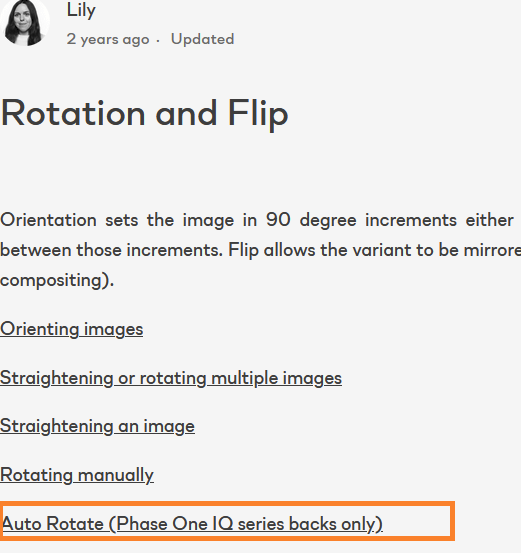
CO21 have magic wand in Rotation & Flip. But its not working, this my point, listing I am not trying ask free version of CO22 my point I am wasting my money, 21 have function but not working...
My catalogs is not to big, I am cleaning every single time, because again I am working for live news, not for archive.
0 -
I tired from Adobe subscription model, I prefer permanent version that's why switched to CO21
0 -
Yaroslav, when you switched to CaptureOne 21 it did not have the features you were missing. Didn't you notice that during your trial period?
Why are you mad they added it in the next version?
0 -
Yaroslav,
Maybe I missed something but it seems to me CO21 doesn't have an automatic rotation and flip, nor any magic wand for that. In addition, I own the last version of Lightroom and it looks very slow when compared to CO21 (or 22). What is your configuration ? Mine is an old MacBook Pro (late 2013) with 512 GB/16 GB and Nvidia GT750M, and CO21 (and CO22) is very fast, much faster than Lightroom.
0 -
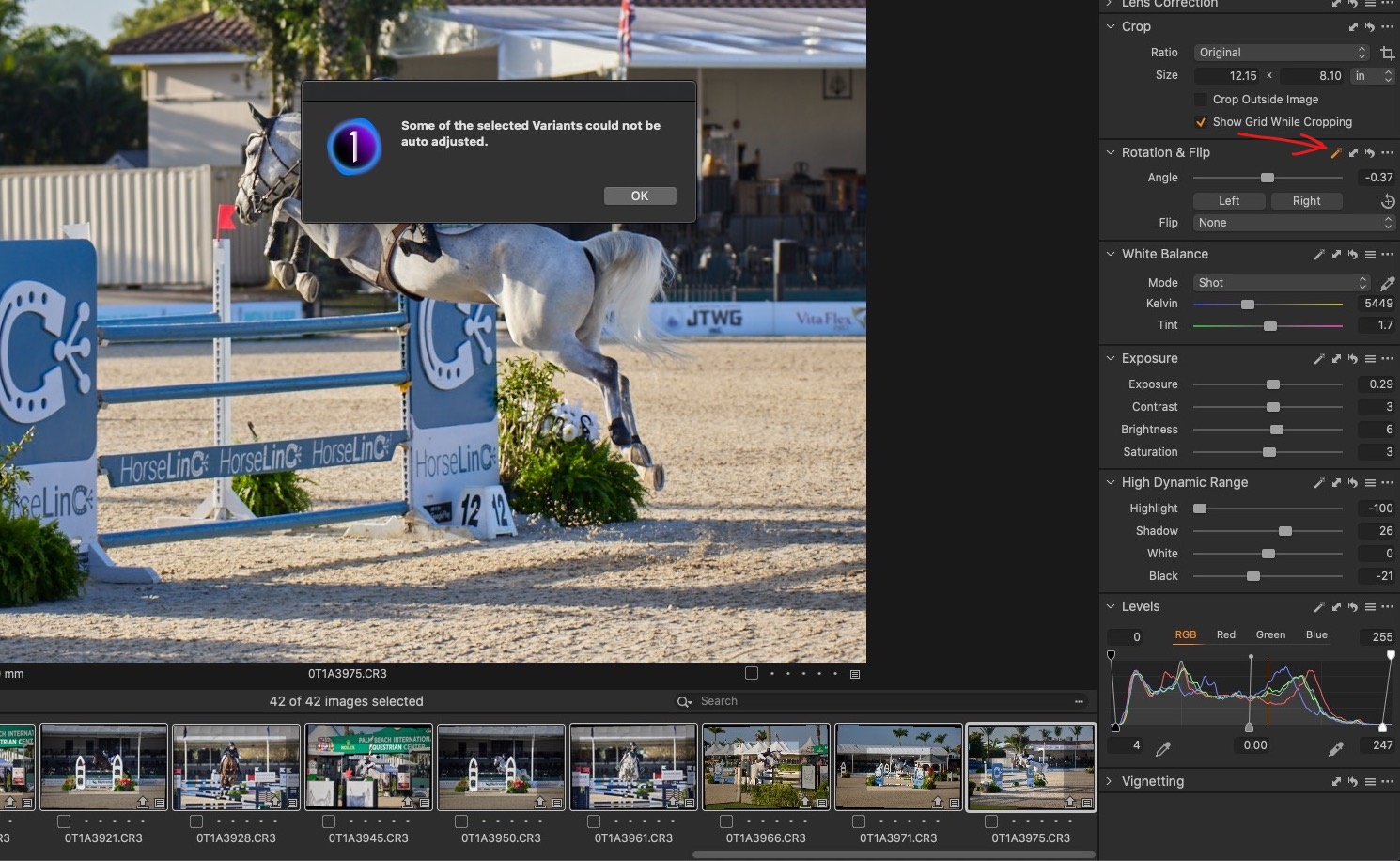
This functions on board, but its not working, and right now company want $199 extra for that, this is cheating
see screenshot
My config:
MacBook Pro late mid 2012
Core I5, 16GB, SSD500GB, Intel HD Graphics 4000
Of course if you edit 10 portraits per week with coffee mug - great software
I am flying around country and working on field, I don't have time for trial or something else
No technical issues with Lightroom, don't liked subscription model, but no issues
 0
0 -
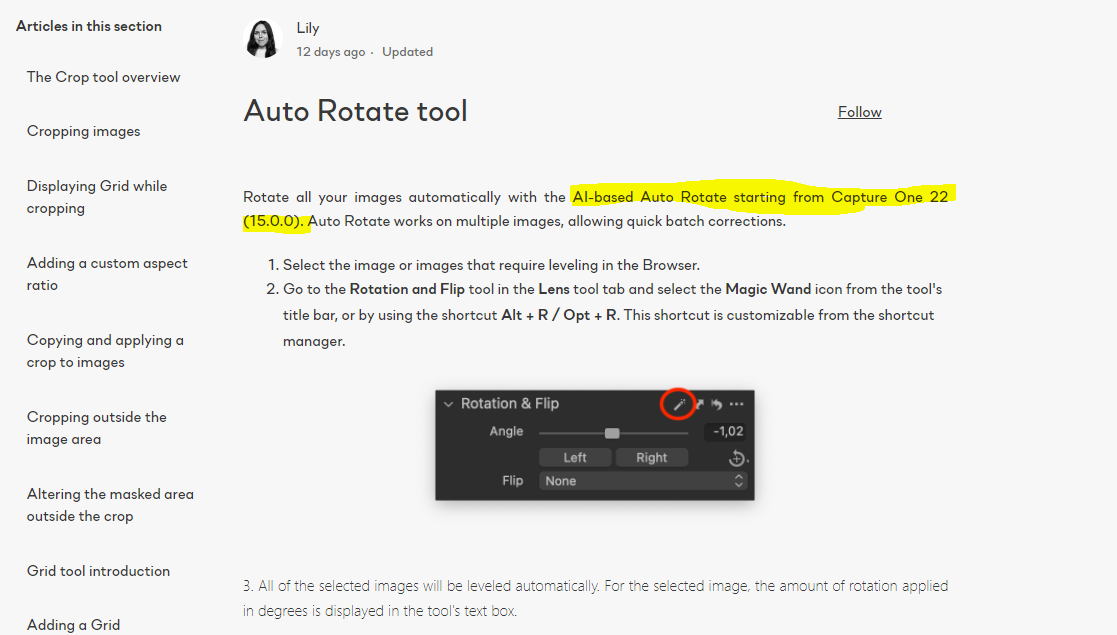
You forgot about this function working in CO22 (ver 15.0) for update from my CO21 to 22 $199 extra
 0
0 -
Also working terrible with my Photo Mechanic 6
0 -
I thought you were complaining that the auto-rotate function is on board with an older version, but does not work (instead showing the message box), and now C1 requests an upgrade price for v22 to make it work.
Auto-rotate was not possible when you bought your C1 21 version, and it is not C1's fault that you don't take enough time to assess your (presumably) second most important photo-related asset for your job, which is likely the photo editing tool, after your camera. Not their fault if you don't take responsibility to equip yourself with what you need for your job.
Especilly if auto rotate is your most important feature, and I think it is, as this function alone and how it works or doesn't work makes you call C1 a "horrible" software.
And with regards to your performance complaint, again, with such an old Mac you should have done your due diligence before buying a C1 license, or any photo-editing tool.
Export process is so many steps
Don't understand this either. If you take your time to set up an export recipe (10- 20 minutes for novices?) than export is one keyboard shortcut or one click away.
0 -
Yes this is horrible software for me and my experience, I asking refund, because company not confirmed that functions not working or hiding this function before new version, correct, I MUST, really??? I am buying product, and I must, this is joke... You are know something Consumer protection rights???
0 -

Yaroslav,
Use this link and when you add your request be sure to use the Request Type option related to "Refund and cancelation".
Most of the people whose names you will see in the forum are just Capture One users like yourself.
The link will take you to representatives of the company.
0 -
Thank you
0 -
Your sentences (as well as your attitude) is hard to understand for me. J
ust in case you don't know, contact to the company can be made here, maybe they are so nice to refund you:
https://support.captureone.com/hc/en-us/requests/new
(tip: be nice, because your mentioned protection rights don't cut here)
Good luck.
0 -
If its not working in Photo Mechanic then the problem is not the software!
0 -
Permanently deleted user
I'd suggest that pretty much everything here is user error or local computer problems.
0 -
Really guys, Are you read my post...??? Function is included to software, but not working... its company marketing way, why everything is worked with Lightroom, not perfect, but worked... make sense
0 -
If PM not working problem on both side, and PM and CO
0

Post is closed for comments.
Comments
18 comments