Folder not showing images in browser

Problem just cropped up with a newly created folder (ARW 05) in Windows Explorer being viewed in Capture One 22. I added some ARW images to the folder in Explorer. Normally, when I do this, the images appear in the browser for that folder in C1. All I am seeing in the browser area is the comment - 'No results found for the current filter(s)'.
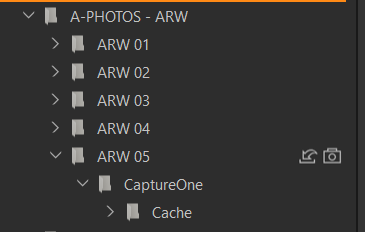
There are two small icons in the C1 ARW 05 folder as shown below. I'm not sure what they mean. I've done a fair amount of fiddling around, including deleting the folder from Explorer and from C1, rebooting C1, and then creating a new folder.
ARW folders 01 – 04 function normally. I have added new folders in the past without any problems. Anyone got any ideas? As is usually the case I’m probably missing something obvious. J.
-
The first icon represents the Selects collection, the second the Capture collection.
also shown here in the lib tool:
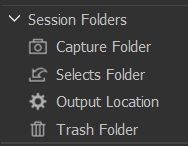
Somehow you *) or C1 set the Select folder the same as the Capture folder, which is maybe causing your issues.
*)You can goto any folder in the System Folders section of the lib tool in C1, right click and "Set as xxx folder".
Maybe consult the documentation about session folders and favorites to get a better understanding than I could provide here in a forum post. I don't find a very good page explaining exactly that, but this here might be a good starting point for your documentation research:
https://support.captureone.com/hc/en-us/articles/360002525898-Folders-in-Sessions
0 -
Thank you BeO. When I create a new folder with a title anything other than ARW 05 it then behaves normally in the C1 folder hierarchy. If I delete the ARW 05 folder from Explorer (and therefore from C1) and then create a new folder called ARW 05 the same problem occurs.
I think you are correct that I have set the Select folder the same as the Capture folder but how do I change this? If go to the ARW 05 folder and click on ‘Set as xxx folder’ the options are all greyed out apart from ‘Set as trash folder, whereas if I go to any other other folder I see the all four options - ‘Set as Capture / Selects / Output / Trash’ folder.
0 -

Just select some other folder as the Selects folder. The Session Folders "Selects" folder for example.
0 -
When I create a new folder with a title anything other than ARW 05 it then behaves normally in the C1 folder hierarchy. If I delete the ARW 05 folder from Explorer (and therefore from C1) and then create a new folder called ARW 05 the same problem occurs.
Try to delete ARW 05 from within C1 Systems folder, right mouse.
I think you are correct that I have set the Select folder the same as the Capture folder but how do I change this? If go to the ARW 05 folder and click on ‘Set as xxx folder’ the options are all greyed out apart from ‘Set as trash folder, whereas if I go to any other other folder I see the all four options - ‘Set as Capture / Selects / Output / Trash’ folder.
This can be fiddly sometimes, can you find the Select folder in C1 Systems folder, try "Set as Select folder".
0 -
Thanks SFA and BeO. I found that things were all getting somewhat confusing so I created a new Session and deleted the old one in Windows Explorer. I'm sure this probably wasn't the 'correct' way of sorting things out, but it has worked. As always, thanks for your input.
0

Post is closed for comments.
Comments
5 comments