path to the images much too long in C1

Hello,
I'm currently using Capture One 22 on my MacBook Pro. My archive for the images is located in the iCloud, so that the path to the actual images is pretty long and is displayed in complete in C1 ( /Users/robertwestphal/Library/Mobile Documents/com~apple~CloudDocs/Bilder/BilderArchiv/year/month/day/image01..... ; Year, month and day are the date for each image like /2021/05/02 -> contains all image shot at this date)
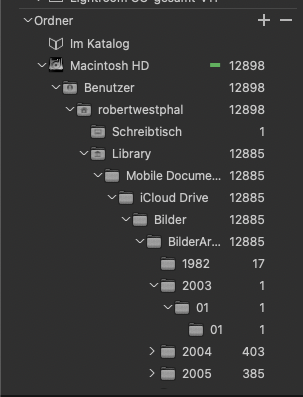
Is it possible to make C1 show only the last part of the path starting with /BilderArchiv/... ?
BR Robert
-
I have no idea if you can define some kind of alias on the Mac operating system and/or iCloud level for the "BilderArchiv" folder.
But what you could do is to hide the folder structure in C1:
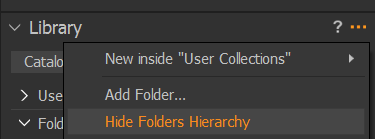
The result is that only the highest level folders which are having images will be shown, and the image folders beneath.
In other words, if you only see "01", 02, 03 etc. as folders (which is not very meaningful) then put an image in the folder above (e.g. 2003) to see 2003 as a parent folder and 01 below it. It can be any dummy image I suppose, which you would have to import.
Alternatively yoiu could rename your 01 folders to e.g. 2003-01.
This is for Windows, version 20. v21/Mac/iCloud I don't know.
0

Post is closed for comments.
Comments
1 comment