Catalog Folder Structure

I recently purchased a new laptop, installed Capture One V21 for FujiFilm and noticed that my catalog isn't broken down by folders i.e. it just displays all the photo's like they were in one root folder. The photo's reside on my laptop and are broken down by a volume folder and within that the folders for the occasion e.g. c:\Pictures\Volume05\Scotland Trip (May 2021)
I can't recall doing anything fancy or obscure when setting up my original catalog. What am I doing wrong?
-
What am I doing wrong?
Maybe we can answer this if we knew what you exactly did, your description is not very detailed.
0 -
Apologies. It was pretty much default settings.
I created a Catalog and saved that to my local drive.
Then clicked Import Images.
Import From was Include Subfolders and Exclude Duplicates.
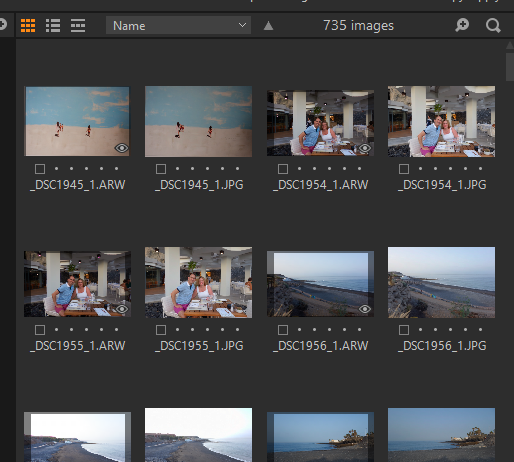
All other settings were left as standard. After the cogs turned whilst the catalog was being created, I was left with all the pictures visible in the Collection Pane i.e. no folder structure:
 0
0 -
I assume you either you click on "All images" collection (which would not have a folder breakdown) or you imported the images into/inside the catalog, which would copy all images flat in a standard C1 folder.
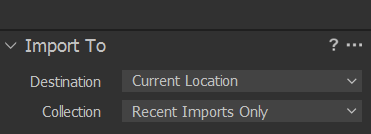
You should have chosen the option to keep the images in their current location:
 0
0 -
I appear to have slightly different options to you:
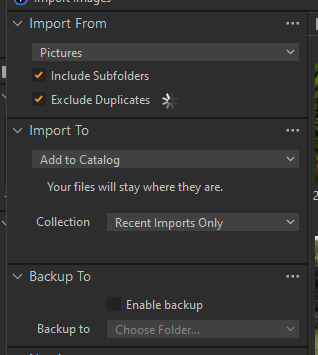
I have tried several variations on the dropdowns, but still end up with the same result as the screenshot above.
0 -
I am still on v20, but Add to Catalog looks like the equivalent.
Can you show the library tool with all its collections and explain where you see which images?
0 -
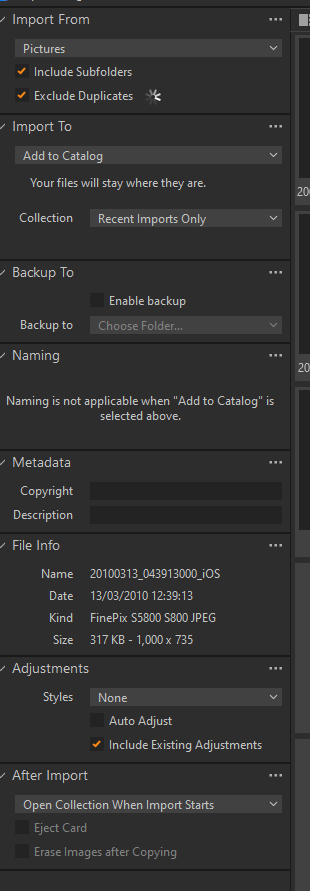
Do you mean this?
 0
0 -
Hi Raymond,
No, I mean the library tool in the library tool tab.
https://support.captureone.com/hc/en-us/articles/360002477117-Tool-Tabs-Library
So the question is, on which item in the library tool do you click on to see the images and miss your folder structure.
1 -
Firstly apologies for the delay in responding.
You suggestion with reviewing the Library tab and adjusting there worked.
Many thanks :)
0 -
So you see, in the Library tool, your folder structure on disk where you store the raw files? Good.
0

Post is closed for comments.
Comments
9 comments