Image not showing in C21

I am having a problem that I can't see certain images in C1 (vs 21) that I haven't had before. I add the image to C1 (leaving it in the folder that it is sitting in), but I can't then see the image. If I search on the image name, C1 "locates" it (showing 1 image shown) but I do not see the image (not even an outline of where it should be). I try re-adding the image, but C1 says it's already there. Only solution is to shut down C1 and restart it.
Any ideas on what's going on?
-
A little bit confusing, your description. Maybe support your description with small screenshots pasted here?
I am having a problem that I can't see certain images in C1 (vs 21)
v22 vs. v21?
that I haven't had before.
you didn't have the problem before, that means in v21 with this exact image, or image file type?
I add the image to C1 (leaving it in the folder that it is sitting in)
Catalog or session? What does "add" mean, import? Import via the import dialog with "import to" set to "Add to Catalog" or "Current location"?
, but I can't then see the image. If I search on the image name, C1 "locates" it (showing 1 image shown)
you mean the number show "1 image (filtered)"?
but I do not see the image (not even an outline of where it should be).
so the brower is empty and doesn't show any image thumbnail?
I try re-adding the image, but C1 says it's already there.
re-adding = Import again?
Only solution is to shut down C1 and restart it.
You mean the image thumbnail is shown in the browser after a restart, but the next import has the same problem?
what file type ?
in the library tool, what collection do you click at?
0 -
You haven't had the problem before, so you know C1, and know the difference between the Viewer and the Browser, right?
0 -
Hi, yes I do know difference between viewer and browser, thanks.
Here are some answers to your thoughtful questions:
A little bit confusing, your description. Maybe support your description with small screenshots pasted here?
I am having a problem that I can't see certain images in C1 (vs 21)
v22 vs. v21?
I've attached screenshot -- here there were 3 files that were found on Search that are not showing any images. I have no other filters in place.
Sorry, Version 21.
that I haven't had before.
you didn't have the problem before, that means in v21 with this exact image, or image file type?
No, this is happening only with new images, all TIFs.
I add the image to C1 (leaving it in the folder that it is sitting in)
Catalog or session? What does "add" mean, import? Import via the import dialog with "import to" set to "Add to Catalog" or "Current location"?
Imported into Catalog using the Add to Catalogue in current location.
, but I can't then see the image. If I search on the image name, C1 "locates" it (showing 1 image shown)
you mean the number show "1 image (filtered)"?
Yes. In the attached, there are 3 images filtered.
but I do not see the image (not even an outline of where it should be).
so the brower is empty and doesn't show any image thumbnail?
Correct.
I try re-adding the image, but C1 says it's already there.
re-adding = Import again?
Yes.
Only solution is to shut down C1 and restart it.
You mean the image thumbnail is shown in the browser after a restart, but the next import has the same problem?
Correct.
what file type ?
TIF.
in the library tool, what collection do you click at?
Not sure what you mean. I'm looking at the folder were the file exits. If I go to "recent imports" the file also doesn't show.
Thanks.
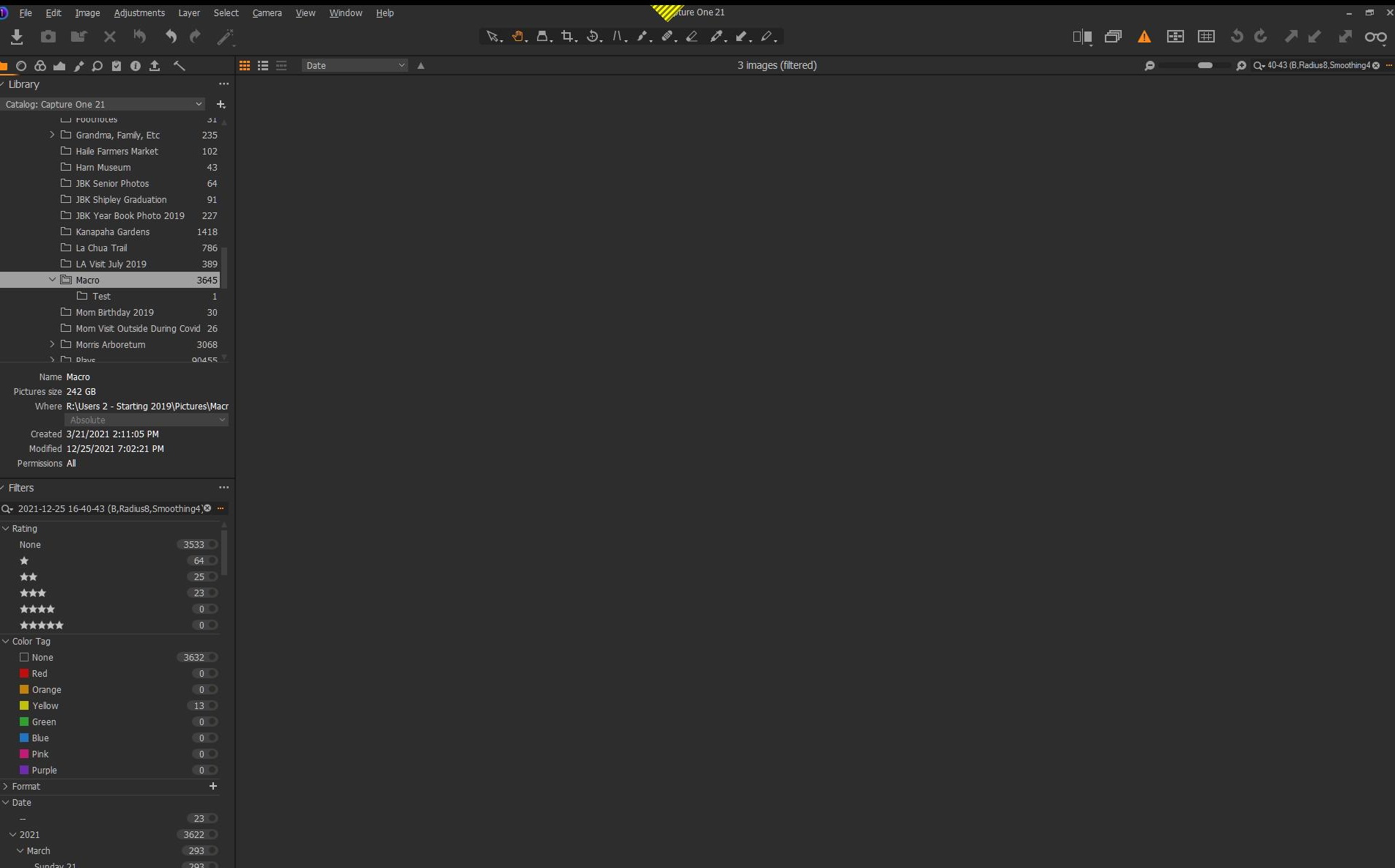 0
0 -
This filter looks strange to me, can you delete what's in the box and just use the file name to search for the tif files?
 0
0 -
Or is this the file name? Then the anser is probably that the search/filter box cannot deal with such complex file names.
EDIT: Or the browser, when respecting the filter with such file names. At least in v22.
0 -
I actually tried with shorter files and had the same problem. I restarted C1 and the problem resolved, but it keeps happening.
0

Post is closed for comments.
Comments
6 comments