Previous JPEG files history??? Edit?

The command required to move raw files to my F: drive upon entry into Capture One 21 PRo
-
Pardon?
0 -
can I put previous JPEGs into Capture One 21 Pro and Edit them? Name Tom Spencer.
0 -
Hi Tom, you can put any JPG into Capture One 21 Pro, edit them (define your adjustments) and export again as JPG.
0 -
Thank You. I did B/W courses in the 70s now trying to catch up with technology in my 70s. What command will install my RAW images on my F: drive.
0 -
But I would recommend this only in an emergency case, e.g. if you don't have your raw file and or your catalog edits for the raw anymore, or need a very quick edit urgently. For image quality and workflow reasons (catalog or session clean state)
0 -
I only shot in JPEG until recently. the exposures aren't too bad but nothing like capture one. I had 2 Pentax systems till I had cancer in 1999 and had a bunch of surgeries. The anesthetic changed my eyesight so that matte Fresnel focus was no longer possible. So I upgraded and am still learning.
0 -
What command will install my RAW images on my F: drive.
Where are your raw files now? If you have them already in a location on your computer where you think it is good you can leave them there.
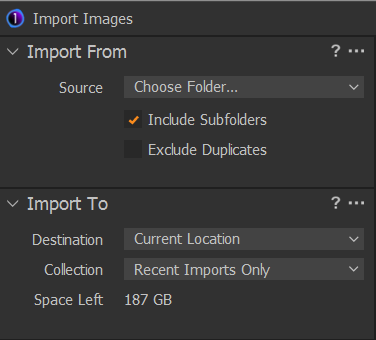
Create a new C1 (Capture One) catalog (if you haven't done so yet) via the menu File>New Catalog. Then open this catalog, goto menu File>Import Images.
In the Import Images dialog window, Import From: select the topmost folder of your raw images, Import TO: select Current location (maybe called "Add to catalog" in version 21):
 0
0 -
RAW files currently in camera. My wife recently died and I have been watching your videos to try and learn the many processes. I bought your program and will soon start editing.
0 -
I only shot in JPEG until recently.
You can also import JPEG files and manage and edit them with C1. You will not have the same latitude with JPEGs as you have with raw files, but you still can improve them in C1, add keywords, put them in albums if you like etc.
Note that C1 is non-destructive to your image files, that is true for raw files as well as jpegs, which means C1 will never change them. Instead, all adjustments you do will only be applied to new files during the export. You can preview the adjusted images in the viewer component (that is the window in which you see your image big)
I suggest to watch learning videos / recorded webinars, for example:
https://learn.captureone.com/webinars/new-to-capture-one-21-hit-the-ground-running/
https://learn.captureone.com/#category=109
0 -
My sincere condolences.
I copy the images from the card to the final location (Windows folders) manually via Windows Explorer, and then import them to C1. Others import from card directly. My folder structure is something like
Original Images\2021\December
Original Images\2021\Novemberand raw files can go into the same folder as jpegs.
On a side note, this is a user to user forum, so you are not talking with an C1 employee right now.
Have fun with the videos and C1.
Regards
BeO0

Post is closed for comments.
Comments
10 comments