Nikon Z9 RAW

How can I see, import and edit my RAW files in Capture One?
-
I'm sorry. I have updated to the latest version of CO.
But it does not open the Z9 files.
-1 -
By the latest version, do you mean version 22? And what file format are you using? On this page
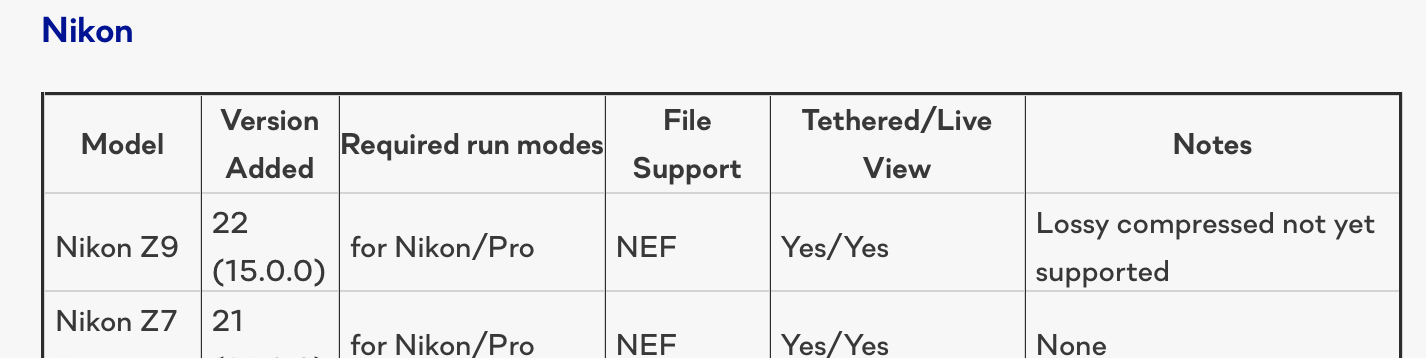
it states that lossy compressed files are not yet supported. Could that be the problem?
Ian
0 -

I just inserted my CFexpress type B card into the reader. My Mac loads the card, and it appears on my desktop. But Capture One does NOT recognize the cards existence, let alone initiate the import process. When I try to manually import, the card still does not appear within Capt One file listings. Images (RAW - High efficiency*) were shot with a Z9, but I don't even know if any of that is relevant. My Mac recognizes the card and its contents, but Capt One does not recognize the card, let alone the images.
0 -
A few things.
(1) See the screenshot above. Lossy compressed files from the Z9 are not yet supported - is that the same thing as "high efficiency"?
(2) Z9 is only supported in any case from Capture 22 - again see above. Are you on that version (this being the Capture One 21 forum)?
(3) My Mac does not recognise CFExpress cards (from my Z6ii) as a card - it mounts them as if they were a drive. (That is not a Capture One thing - it is a MacOS thing, and Lightroom users find the same issue. You can still import the files into a supported version of Capture One, but it won't automatically open the importer.)
Ian
0 -
Thank you Ian. You are right. I had 2 issues:
(1) The card is being recognized by Mac as a drive, so it was appearing in the list of drives instead of a card's typical isting amongst folders & files.
(2) I am using Capt One 22, but did not yet know that High Efficiency* is one yet supported (concerning). I have been assured that Capt One is working on this issue.
Thank you!
0 -

The Z9 has been out for months, yet Capture One has not added tethered capture for Lossy Com. For many, this is a real problem. I sincerely hope that Capture One has this fix as a priority, as it is severely affecting those of us who primarily shoot in RAW formats.
1 -

Why only CaptureOne 22 support Nikon Z9 RAW files? Is the 21 will get this feature also? I hope I do not have to spend 214 Euro just because of this feature? Can I ask when CO 21 will support this kind of RAW file?
Thanks
Karoly
0 -
Permanently deleted user
Is the 21 will get this feature also?
Well of course not - nor will any other obsoleted version of Capture One.
Or old versions of Lightroom.
Or Photolab.
And so on.
Once a version is superseded, it's dead as far as camera updates are concerned - it has been this way, everywhere, forever.
0 -
Permanently deleted user
I sincerely hope that Capture One has this fix as a priority, as it is severely affecting those of us who primarily shoot in RAW formats.
The problem is with Nikon and its choice of weird proprietary format, not with Capture One - DxO PhotoLab is equally stuck because of this problem, for example.
0 -
Permanently deleted user
I don't even know if any of that is relevant.
The answer to that is literally in the post directly above yours.
0 -
Permanently deleted user
did not yet know that High Efficiency* is not yet supported
Despite Capture One making this information public and readily available to anyone who cares to find out...
0 -
Horst Eberhöfer
Ich habe heute eine neue Version Capture One 22 herunter geladen und gekauft.
In der Hoffnung, dass die Raw Dateien gelesen werden können.Leider funktioniert das nicht.Meine Z 9 wird nicht gelesen, lediglich die jpg.
Das kann esdoch nict sein? Kann mir jemand sagen ob das wirklich nicht geht ?
Danke im Voraus
Horst Eberhöfer
0 -
The latest release of Capture One 22 can use regular raw files from the Z9, but it can't yet use the lossy compressed "high efficiency" files. Are you using those?
Ian
0

Post is closed for comments.
Comments
14 comments