Captureone 22 Pro: Always use this app to open .psd files not working

HI,
I'm using Capture One 22 Pro with Windows 11 Home. The problem that I have been experiencing ever since I upgraded to 22 is that when I choose to edit with photoshop 22, I get a new window pop asking me to choose how I want to open it. PSD file and I picked Adobe Photoshop 2022 and at the bottom, there is a radio button where you can click to say that you want .PSD files to open using PHotoshop 2022 all the time, however, this is not working for me. I get the same window all the time asking me to choose the application how I want to edit this file.
I didn't have this problem with the previous version. Can someone please help me?
i created a ticket for this issue about 3 weeks ago and till now no one from Capture one got back to me. Please help
-

Does your Windows 11 installation have PS2022 as a known file association for the .PSD file type?
0 -
Yes, for .psd, i have Adobe Photoshop 2022 set as default apps
0 -
I'm having the same issue but on windows 10.
0 -

I'm having the same problem. Went through every default app setting from Windows 11 settings and they should be right, but still C1 asks every time about default app. It's especially annoying when I would like to open multiple files simultaneously to photoshop. I didn't have this problem with Windows 10.
0 -
I think it’s CaptureOne bug and hopefully someone get back to us from the c1 team
0 -

I have the same problem as well, very annoying. has anyone heard back from C1?
0 -
yes after a month some one from C1 got back to me and this is her response.
The Open With plugin list is populated based on the file type associations of the operating system. In your Windows system settings, check what the default applications per file type, are set as.
Read more about this here: https://support.microsoft.com/en-us/windows/change-default-programs-in-windows-10-e5d82cad-17d1-c53b-3505-f10a32e1894d
If the desired app is not set as default in Windows, Capture One cannot display it in the 'Open With' list.
After you set the default applications as desired, Windows will associate this file extension (e.g. PSD) with the desired third-party app, and you will then see this app in Capture One for this image type.Kind regards,
Julia - Capture One Customer SupportWe encourage you to browse our Help Center for detailed product documentation, helpful pro tips, and much more.
0 -
Well, that answers to nothing. Problem is with Windows 11 and default app has been set as Photoshop .psd many times.
0 -
exactly. I was very disappointed with C1 support. Well, I have been using C1 for more than 6 yrs. Not sure if I can go back to the Lightroom. Also, C1 22 is very slow and it got so many other problems too.
very disappointed with 22
0 -

Hi Nam,
I had the exact same issue after wiping my computer and doing a clean install of everything, and updating to the latest versions of C1. My machine is Win10 64bit, and I'm running C1 21, but the fix will be the same, and isn't difficult.
I got the help I needed from this article: https://www.partitionwizard.com/partitionmanager/remove-file-association-windows-10.html
After fighting with this issue for weeks, and coming across the article above, I simply created new string values in my registry to match the ones on my laptop, which wasn't having the same issue. I am also running Adobe Photoshop 2022, so you should be able to use the exact same values. Simply navigate to the correct registry folder, right click and select "new string value", and make your entry match the ones below. Next, re-boot your machine and the problem should be resolved.
The only changes made are highlighted in yellow. I did not make any changes to the other PSD folders. I did notice when viewing the registry on my laptop that it did not have the "user choice" folder, but I left this in tact on my desktop and everything is working fine again.
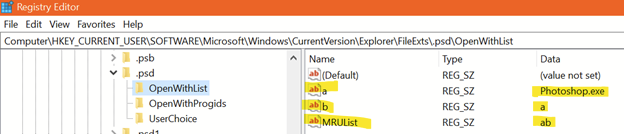 -1
-1 -
Sorry to say, but Williams fix doesn't work, at least not for me. Cheked registry and those values are already as suggested. Still asks default program every time I try to open to Photoshop from C1. Windows 11, Capture one 22, Photoshop 22. Really annoying when trying to open multiple files simulteaneously.
0 -
Sorry to hear that Sami. I'm not an expert here, so proceed with caution. It might be worth your time to compare the other folders under .psd with what I have. Again, I didn't need to make any changes to these.

 0
0 -

If anyone is still having this problem, I just solved it by going to windows settings>apps>default apps, scroll all the way down the bottom of the page and click on reset all default apps. This is in Windows !! BTW
2
Post is closed for comments.
Comments
13 comments