Capture One 22 - Watermarks not working anymore

I have a MacOS 12.0.1 and I upgraded from 21 to the last version (22) for the HDR feature. I very like it. But a BIG ISSUE happens with that version with the Output batch function. I can't see anymore my graphic watermark on the preview of my picture. So I can't place it where I should. I tried to render it, and the watermark is there. But it's a random position because I have to guess where it is on my picture.
And now, I tried to get back the previous version and my license is deactivated, so I have no choice. Please fix that shortly, cause I really like your software.
Thanks.
-

Is "proofing" turned on? You won't see a watermark unless you enable proofing.
0 -
I tried it. And it's working now with a new "Proofing" title over my picture. It was not there before. So now, I don't know if it was activated or not. But anyway, It's working now and it's the most important. Thanks again.
0 -
I have same issue. I see no watermark in Capture One 22. The watermark is shown only on the exported file.
In which menu, toolbar etc. do you enable this "proofing"?0 -
You will find it in the "View" menu and enable "Recipe Proofing".
1 -
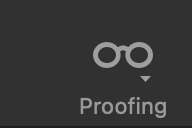
Also might be on your toolbar. The icon looks like this:
 0
0 -
I found it and it works. Thank you Pascal.
Marco I dont have the glasses on my toolbar, only a square icon that says "Proof Margin"
0 -
The toolbar is customizable which is why I said it might be there. I just checked and the default toolbar contains the proofing icon. Apparently you are not using the default which is not surprising to me. I don't use the default, either.
0
Post is closed for comments.
Comments
7 comments