Capture One Pro 20/21 slow slider response possible fix

I thought I'd leave this piece of info here after experiencing what I've seen seems to be a very ubiquitous issue, that is, the issue of CO 20/21 responding slowly to any slider manipulation or image adjustment. I found a blog post and started experimenting with what it said. This applies to macOS only.
One thing is not to use CO with the 'Scaled Display' option - something to do with the way macOS handles the scaled display vs using the native display resolution.
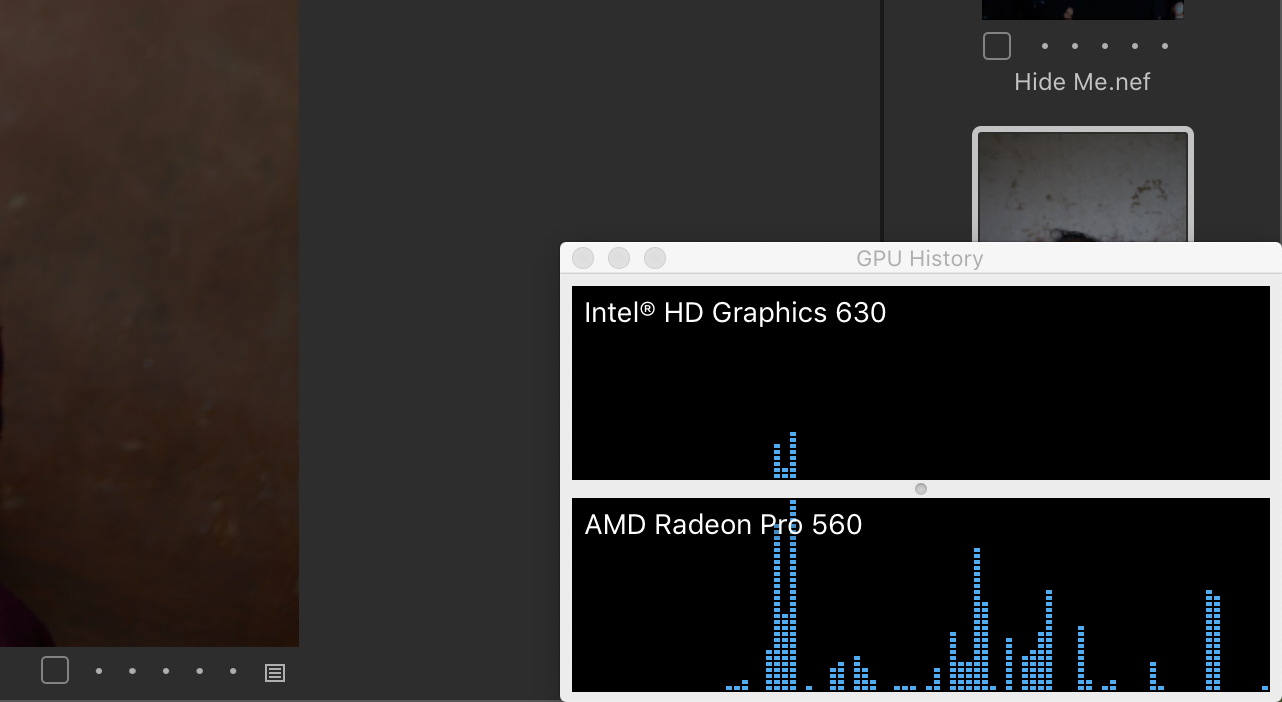
Secondly, I played around with the hardware acceleration options within CO while watching my Activity Monitor's GPU History window. I don't fully understand what's occurring but it seems that with hardware acceleration enabled, CO uses both internal and discrete GPUs as can be seen by the small spike in the Intel HD GPU. After disabling hardware acceleration within CO, I restarted the app and played around with some sliders, adjustments etc. As can be seen again from the attached image, with hardware acceleration disabled, CO now only uses the discrete GPU. When watching the GPU History, quitting and relaunching CO, it's also only the discrete GPU that shows activity.
Hope this helps in potentially solving some lag issues for some people.
-

C1 is badly optimized. Its very bad to use on 4k+ resolutions. On osx just click the option to use the app in low resolution.
0
Post is closed for comments.
Comments
1 comment