Bug: White Balance Problem in Panorama (green shift!)

I have 8 images stitched to a panorama.
At first the panorama looks fine, but the Hue-Value is set to 100!!
If you try to change the Hue, the panorama immediately gets a green shift.
Also when opening the dng file with another raw converter (e.g. Lightroom) the image has an incorrectable green shift.
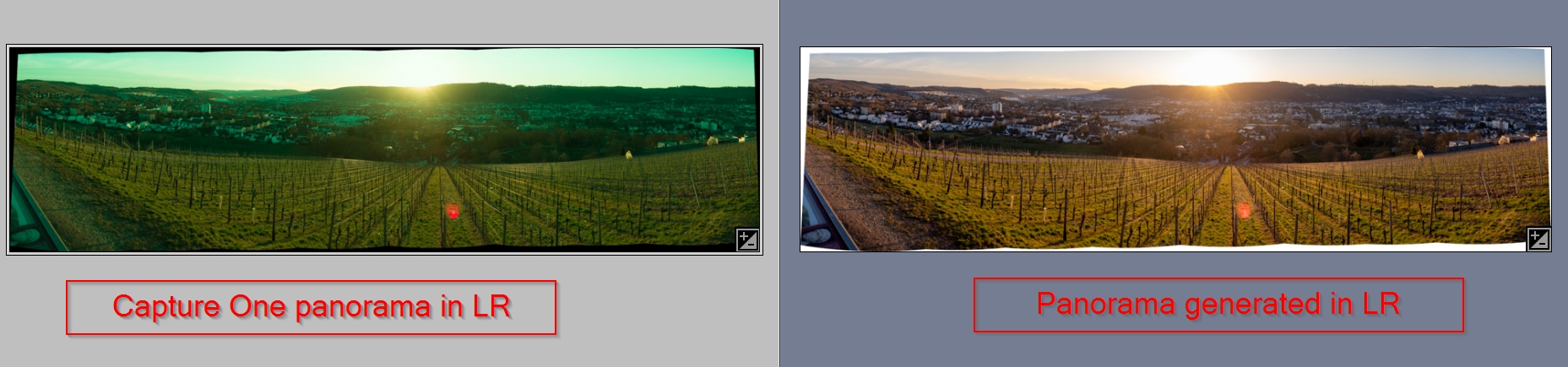
If the same images are stitched in LR they look fine and this LR generated file also looks fine in Capture One. The Hue setting in the LR panorama is also normal (value = 12)
Example to download: https://u.pcloud.link/publink/show?code=XZr2Q0VZGhMjvKtHh8B3shsyJjJd1zCPUyyX
This makes the panorama feature basically useless if the files cannot be realistically adjusted in WB in Capture One nor can the be edited in any other RAW converter.
Please fix this asap! Thank you!
-
 Permanently deleted user
Please fix this asap! Thank you!
Absolutely no point whatsoever reporting bugs here - you're talking to users.
0 -

Which camera is supplying the source images?
Which release of V22 are you using?
0 -
It's Version 15.1.2.3
The images are made with an OM-1 (Olympus/OMDS). Tried two panoramas (one golden hour before sunset, one after sunset) and both have the same issue.
I filed a bug now, hoping C1 can fix it with the sample files provided
0 -
It appears to be a problem with the OM-1 processing. I have just upgraded my camera to an OM-1 and stitched a panorama with it today - problem as you described. Setting the white balance on the resulting DNG to "shot" shows kelvin at 8091 and tint at 100 - the first image in the sequence shows kelvin at 5554 and tint at 0.2. I was using auto white balance and all the images show similar white balance. I'm using the latest version of Capture One - 15.3.1. I've just tried doing a panorama with my EM1 Mark III and this works fine. I'll report it as a bug.
0
Post is closed for comments.
Comments
4 comments