Translate url capture one into google don't work anymore

-
can anyone give me an advice about that
0 -
I am not sure what you are asking, to be honest. Can you explain in detail what you are trying to do?
Ian
0 -
Hi Ian,
thanks for your response.
My Capture one 21 was reset after an error caused by me. The program was not functioning properly, so I turned off my pc. After reboot a reset had taken place. Output Tab has been removed, but I can live with that . The online manual is no longer available. In the editing tools, the option "learn more and tutorials" is still present. The Tutorials option works as usual, but "learn more" is not available.
Sometimes I translated text from the C1 helpdesk, by pasting the URL, into GoogleTranslate. That also no longer works. Another URL works well.
0 -
If I use Google Translate, I copy the text then past it into Google translate. Works well for me.
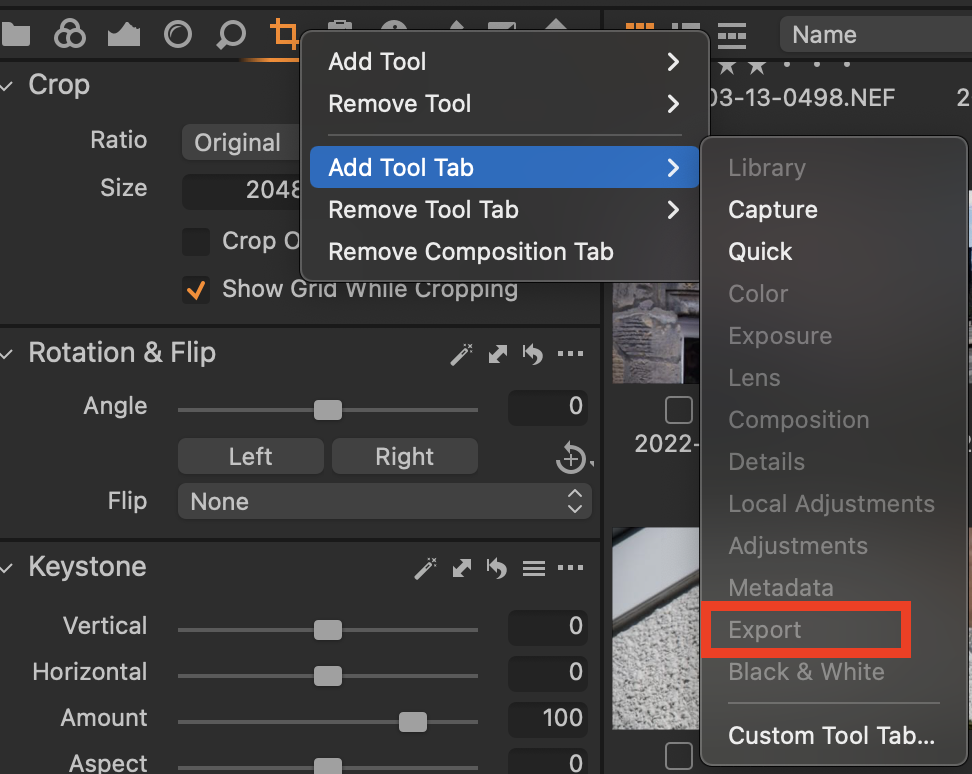
You can put the Output tab back if you want to. Right click on the tool tabs and choose Add Tool tab - select the Export tab, which is what it is called now. (It's greyed out in my screen shot because I have already added it.)
Ian
0 -
So I also work, without problems, with translate when it comes to short text, but pasting URL works a bit faster for me, then I immediately have everything on one sheet. The missing link in general with the helpfunction remains. I hope to get in touch with someone from capture one for a solution about that. If you can tell me i will be very grateful.
0 -
Permanently deleted user
I hope to get in touch with someone from capture one for a solution about that
0 -
let me know if you've received a workable response. thanks in advance
0 -
Permanently deleted user
YOU need to contact them, B - I'm just showing you how.
0

Post is closed for comments.
Comments
8 comments