Copying Layers

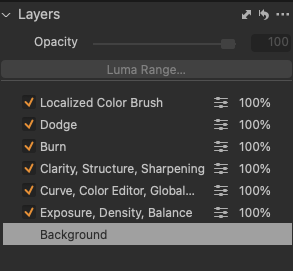
I feel as though many people have asked this, but here it goes... I would like to apply filled, labeled layers to a batch of images.You can see my layers below... I am trying to do this for my own efficiency, but also to easily relay instructions to studio assistants to maximize their efficacy as well. I have saved a preset but that doesn't seem to work. And when I copy and apply, things like lens correction and base characteristics are applied, but the layers are not.
Any suggestions? I can't be alone in this need. I know old versions definitely did not have this capacity, but perhaps the new version does? Thanks in advance.
-
You should be able to copy the layers using the copy/apply icon in the Layers tool. (It's the double headed arrow near the top right of your screenshot.)
(1) Select the image with the layers.
(2) Add to your selection all the other images you want to copy to. Make sure that the original one remains the main selection (with the wide border.)
(3) Press that double headed arrow and you will get a dialog box where you can choose which layers you want, or hold shift while you press it if you are happy to bypass the dialog box.
Ian
0

Post is closed for comments.
Comments
1 comment