Upgraded to Pro Version 15.2 but still have OLD keystone tool?

I have upgraded as requested by Capture One to the Pro version 15.2 I should have the new keystone tool but I only have the old one. Anyone else got this problem?
-
Try removing the keystone tool from the tool tab and then add it in again and see of you get the new one?
Ian
0 -
Thanks Ian, I assumed that access to the new keystone tool would be from the shortcut 'cursor tools' at the top middle of the display, but this just displays the old options and clicking it doesn't bring up the new tool? I can add the new Keystone to any of the tool tabs. Is this the way it is supposed to be?
0 -
Yes, it is. Are you sure that the new Keystone tool isn't there already on one of your tool tabs? (Of course you can have it on any tab you want, and even on more than one tab if that suits you.)
Ian
0 -
Thanks again Ian. I have added the new keystone tool to one of my tabs, but I am just surprised that the old tool remains in the cursor tools - what is the point?. Having said that, I'm not really surprised because after the debacle of the HDR function and panorama stitching I have seriously lost faith in Capture One as their upgrades need serious improvement.
0 -
With the cursor icon on the toolbar, you can choose between the three modes for the keystone tool - vertical, horizontal, or both combined. If, for example, it is on Vertical and you click it, you immediately get the guidelines, and if you right click on the image, the whole new tool appears in floating form, like this.
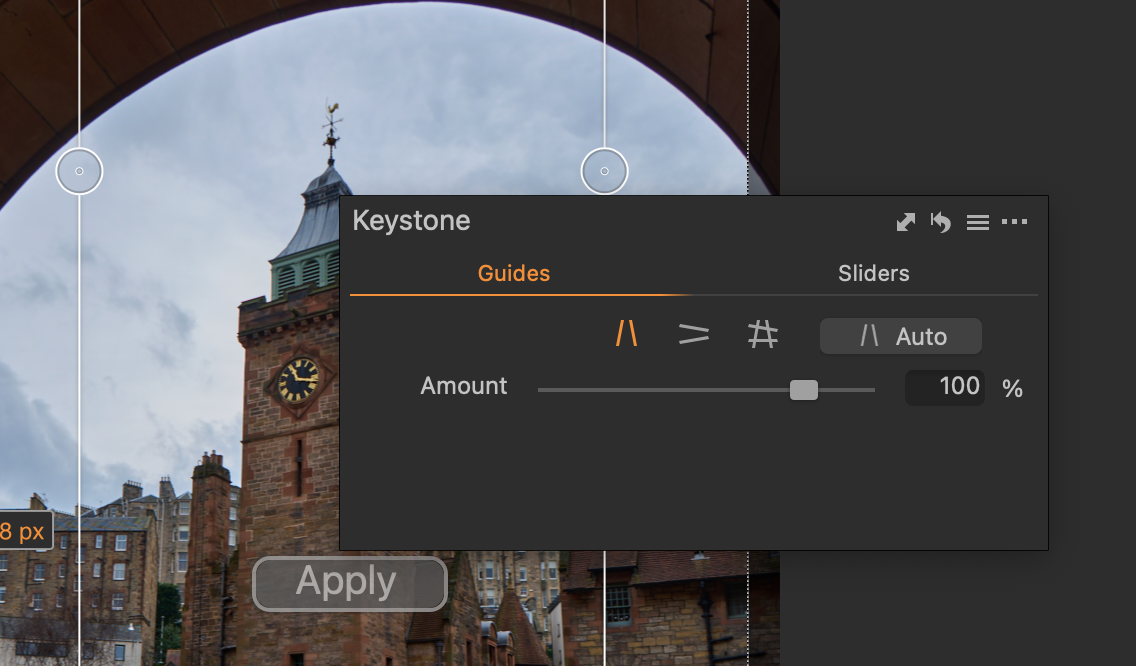
That is quicker than finding your way to the tool tab that has it on. (And if you remember that K is the shortcut key for it, it can be even quicker than clicking the icon.)
Ian
0

Post is closed for comments.
Comments
5 comments