RAW + JPEG pairs

Can you please add RAW+JPEG pairs in a future release?
I think CaptureOne is the only major image editor that doesn't have this feature and I don't understand why. The existing workarounds are really clunky by comparison, and you are 14 versions in!
Thank you!
-
Permanently deleted user
Playing Devil's Advocate here - what is wrong with Capture One's way of doing things?
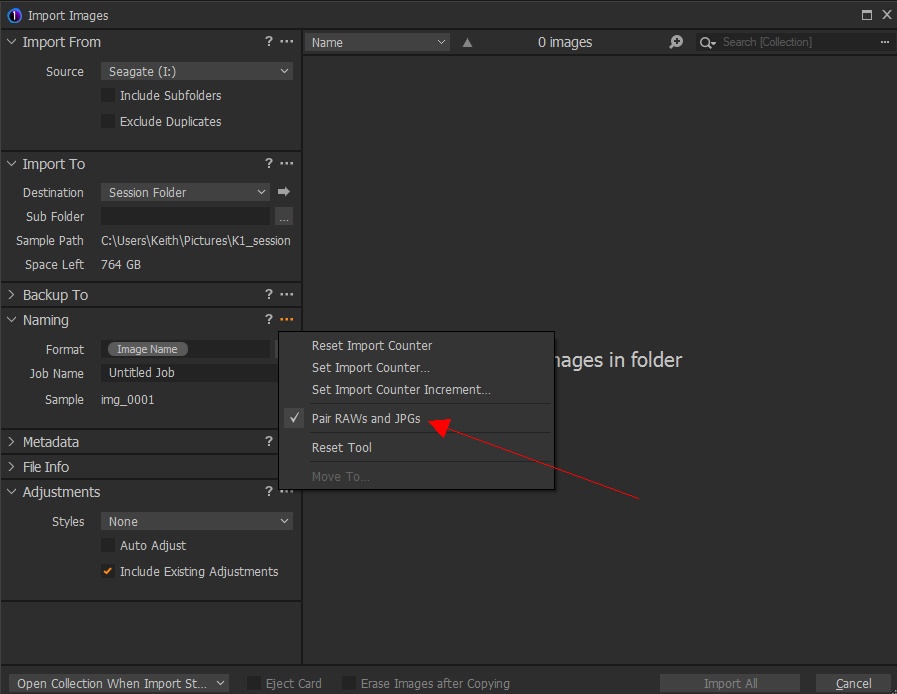
(This is Capture One 20, incidentally - it's not a new feature.)
What do you want that's different? Do you mean "stacking"?
0 -
Well, now I'm just confused! After seeing your post I thought: "oh have I just not checked that box on import?!!"
But I do have in fact have it checked...
But they don't behave as a paired images behave in other apps (Photo Mechanic and Aperture). In those apps the pair is stacked so you only see one of them. If you change the rating, or add them to an album, they always move jointly. In CaptureOne (unless I am missing some other check box) they behave exactly like two separate images. You can rate them differently, if you move one, they don't move together, edits applied to one don't apply to the other, etc. What am I missing?
0 -
After doing some more research it seems that option ONLY applies to renaming files on import (hence it's location). So unless I, and many people online, are missing something CaptureOne still does NOT have RAW+JPEG pair handling, and my request stands.
0 -
Permanently deleted user
OK, so you want stacking, not pairing.
Capture One would need to know this...
0
Post is closed for comments.
Comments
4 comments