Keystone adjustments WILL NOT copy across from one image to another

Hi there,
I've tried and tried to get Capture 21 on a Mac to copy and paste keystone (typically verticals) from one image to another (typically multiple exposures). I'm still having to use Capture One version 10, because it's the only version that does this. Capture 21 has been absolutely useless in this regard.
This lack of functionality is so exasperating - I'm a professional photographer and require this basic function in my editing - that after 8 years of using Capture One, I'm considering going back to Lightroom. Will someone from the Capture One team please help me to solve this and restore my faith back in this company and justify why I spent 300 dollars I paid for Capture 21.
Many thanks
Jamie
-

> James Baker: Will someone from the Capture One team please help me to solve this...
Ask them. This is a user (to user) forum, "team members" hardly read anything here let alone respond.
0 -
Thank you OddS for replying to this.
All I can find for them is an address. Do you know where or how I can speak to their team members please?0 -
> James Baker: ...how I can speak to their team members
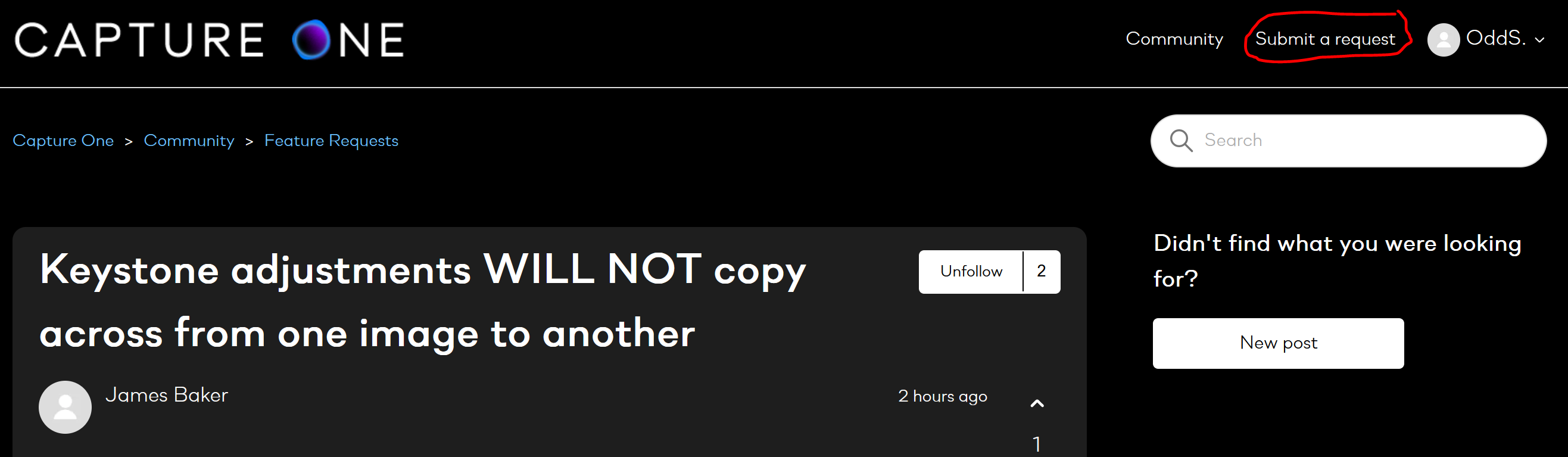
Try the "Submit a request" link in the upper right corner of this page
0 -
I'm afraid I'm not seeing it....there's no Submit a request. Thank you though for getting back to me.
Best wishes0 -
> James Baker: ...there's no Submit a request
Any blocker active in your web browser? A screen dump from my web browser.
 0
0 -
Adblocker.....that would be it. Thank you very much OddS.
0
Post is closed for comments.
Comments
6 comments