Exposure Warning Not Accurate?

Mac: Big Sure 11.6
CaptuerOne 22 15.1.2.1
Nikon Z7ii
This has been something that's bugged me since moving from LR. My exposure warning never seems to be accurate. For instance, in this photo, my highlights exposure warning is telling me that most of the blue is clipping. But even when I hover my cursor over those "over-exposured" areas, you can see the bar is in the middle of the histogram. For kicks, I opened photoshop and used the eyedropper to double-check if I was missing something. It's not over-exposed there either.
I've already adjusted the settings in C1 preferences to show red when items are pure white 255.
What am I missing?
Photo Exposure Warning turned on: https://www.dropbox.com/s/up9r4kalo1wfxr0/EW%20On.png?dl=0
Photo Exposure Warning turned off: https://www.dropbox.com/s/z8kdamf6esgdhab/EW%20Off.png?dl=0
-
I've already adjusted the settings in C1 preferences to show red when items are pure white 255
Where can you say "pure white"?
The warning shows up when one channel is about to clip, blue in your case.
0 -

 0
0 -
I know this preference setting, is says 255, not (255,255,255).
Pure white (255,255,255) should show the red warning but (255,255,254) should not? I think one wants to know if any color channel is clipping, not pure white.
0 -

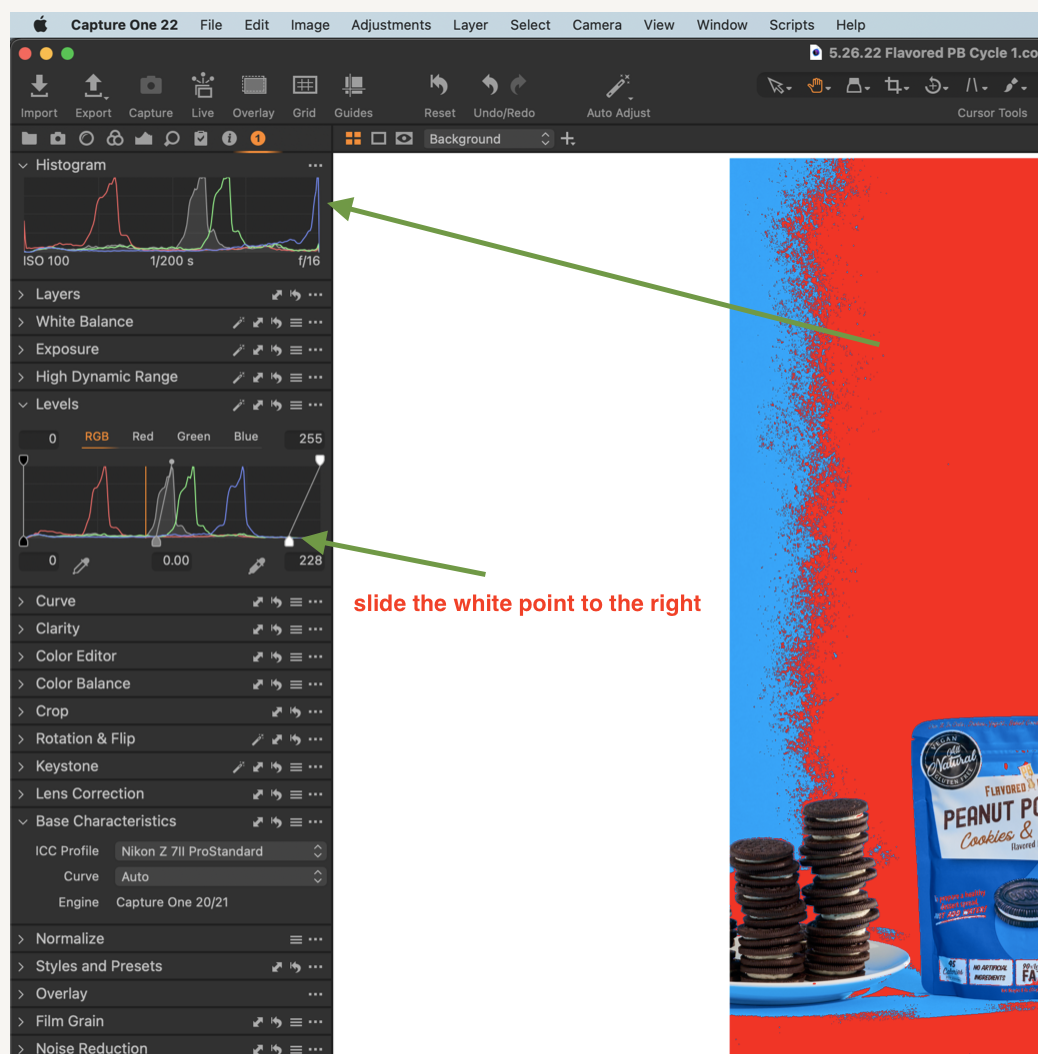
I think you have the blue channel clipped (upper arrow) because your white point is to much to the left (lower arrow). Try to slide it a llitle to the right.
 0
0 -

I set my clipping points at 250, that way I have a little headroom. When I see the exposure warning in highlights on an image I leave it on and hover the cursor over it to see what's going on. almost never are all 3 at 250 they might be 245 237 219 with the warning showing, I don't worry about that since there is color there and it's not pure white, I photograph flowers a lot and there are a lot of places on a flower that really don't have much detail just color so I can have the exposure warning flagging without having to worry about it much. I hope this helps.
0


Post is closed for comments.
Comments
5 comments