Renaming a varient

I wish to export and rename images individually as titles for upload to my website. When I make a variant of the original there appears to be no way to give that variant a unique name.
Being new to COP I've yet to find a way to do this at the export stage. Any suggestions would be appreciated.
-
There is no way of renaming a variant in Capture One. But you can name an exported file in whatever way you like.
When you click the Export button you should see something like this.
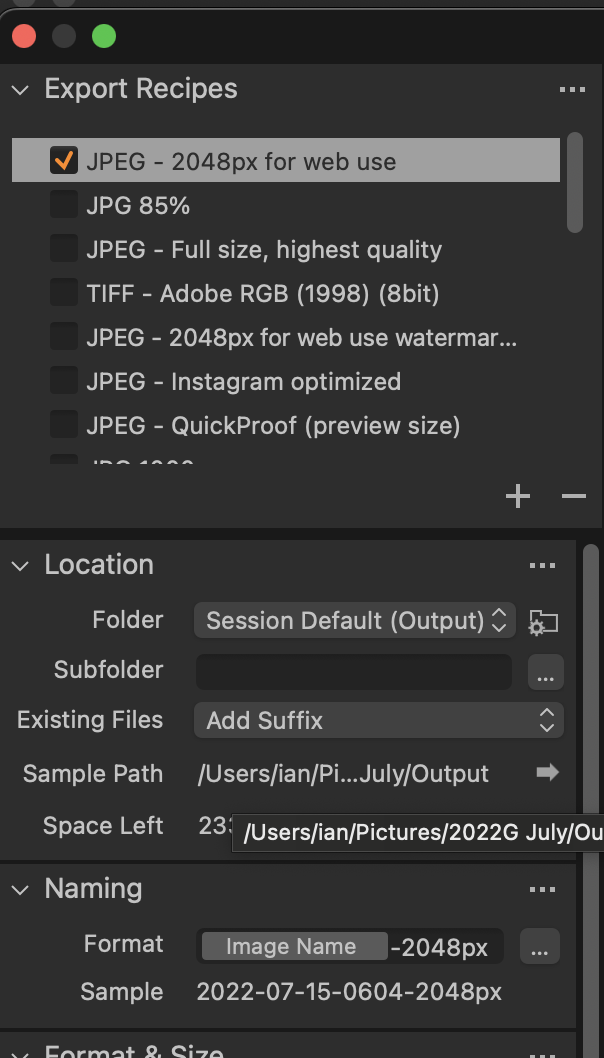
Note the Naming section. In this example, my Recipe is set to use the original file name and add -2048px to the end of it, so the raw file name was 2022-07-15-0604.NEF and the output file was called 2022-07-15-0604-2048px.JPG. But there is no reason why you should not type anything you like in the Format box - for instance the image in question here happens to be of a butterfly. I could have typed Marbled White Butterfly in the Format box and then my output file would have come out as Marbled White Butterfly.jpg.
Ian
0 -
Thanks Ian for the suggestion. I will give it a try
David
0 -
Ian,
I tried your suggestion and found it worked OK for a single image export.
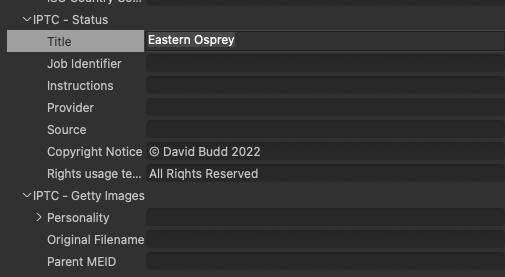
My website uses IPTC token's similar to those in Capture One.
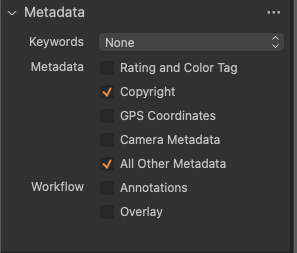
By using the (Title) token in my website and the same IPTC token in COP I found I can title multiple images individually and upload them at the same time. I changed the default Metadata section in the Export Recipe panel to All other Data.
David.
 0
0

Post is closed for comments.
Comments
3 comments