Capture One is not reading High Efficiency files from Z9

Capture One is not reading High Efficiency files from Z9, only normal raw. Is there something else I can do?
-
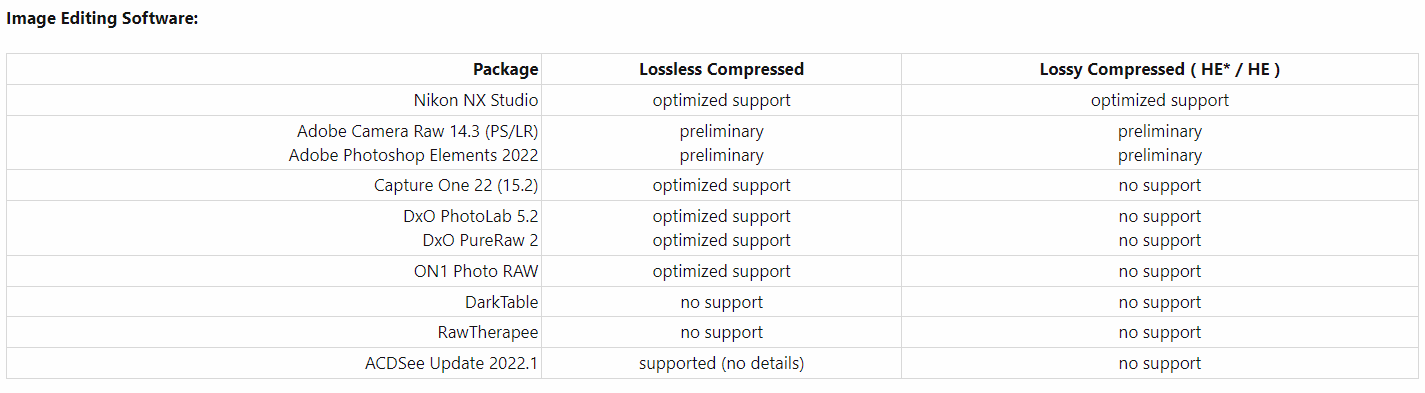
Yes - don't use the high efficiency files for now. They have said that they are not yet supported.
See details here.
There are a lot of threads about it here and on the Capture One Facebook groups. It's something to do with not yet being given access to some third party technology used the high efficiency files, or something like that.
Ian
0 -
 Permanently deleted user
Is there something else I can do?
Yes: get in Nikon's face about using a closed, proprietary compression format that its owner - Intopix - refuses to help 3rd parties (like Capture One) with:
https://www.nikoncafe.com/threads/nikon-z9-raw-photo-nraw-video-support.331229/#post-4211259
0 -
Permanently deleted user
It's something to do with not yet being given access to some third party technology used the high efficiency files, or something like that.
It's something to do with the SDK apparently, Ian:
Capture One and DxO do not support the HE file format because they are waiting for an ARM-native SDK.
(From the same source as the above.)
Glad I shoot Canon: their "CRAW" format delivers everything promised of "HE" - and its easy to support.
0

Post is closed for comments.
Comments
3 comments