Resizing the image instead of cropping

-

Don't know if there's a better way, but one way is:
In the Export dialog Tools under Format & Size adjust the Quality and/or Scale.I don't know what settings to recommend, so you can either search for some specific info or just trial & error.
0 -
I don’t see that option. I’m using the Capture One 22 (Sony Edition)
0 -

Assuming you have the paid/pro "Capture One (for Sony)" version and not the free "Capture One Express (for Sony)" version.
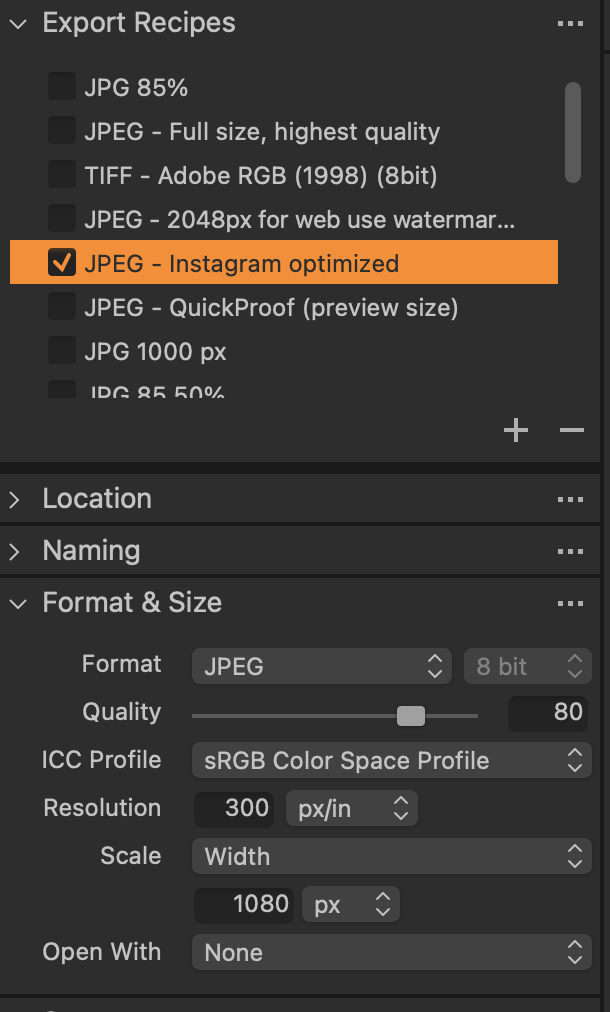
In the export dialogue, there's export recipes including one called "JPEG - Instagram Optimized".
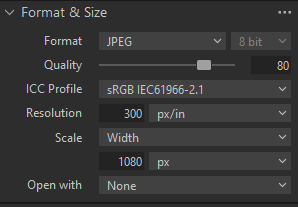
If there isn't, the resize option is Format & Size > Scale like Boris said. This lets you choose how you want to constrain height and/or width and set a pixel value.
For the Insta recipe, this is the setting:
 0
0 -
There is a page about file dimensions on Instagram's website.
https://help.instagram.com/1631821640426723
It looks as though you are not required to make it 4x5.
My understanding, then, is that the way to get photos correctly sized for Instagram is to use an Export recipe that scales the output to 1080 pixels wide. One of the recipes that comes with Capture One says Instagram optimised, and does just that.
Ian
0 -
Sorry @Propheticus, I think your reply was posted after I began typing.
Ian
0 -
Not sure what you're sorry for. Guessing you posted something very similar to my post? Anyway, no foul in hearing the same advise validated by multiple sources :)
0 -
Yes, I just didn't want to leave the impression that I thought your advice wasn't sufficient!
Ian
0

Post is closed for comments.
Comments
7 comments