Naming templates not working

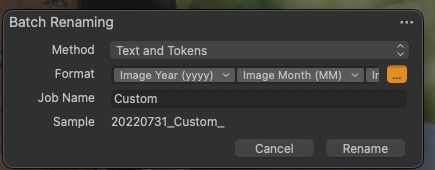
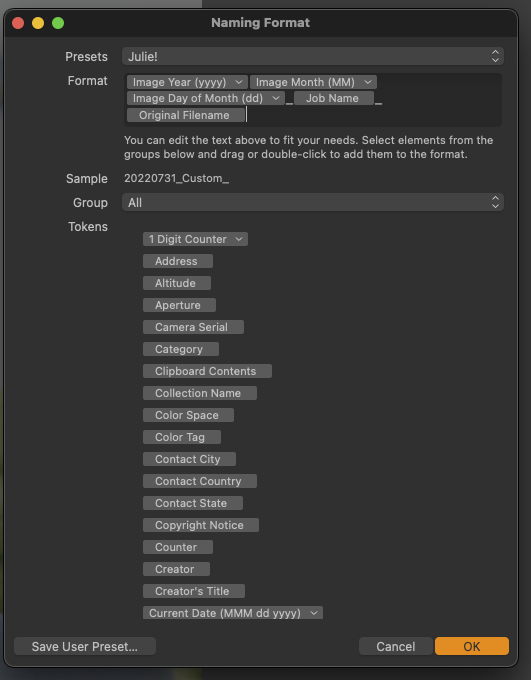
I recently upgraded to CaptureOne 22 - my naming templates no longer work. I tried creating new ones, but they don't work either. Specifically the original file name is not populating (this is the file name the camera assigns). I also tried to do a 'find/replace" and it inserted the words "batch rename" instead of what I typed into the rename section. I'm having crazy issues with this... anyone else??
-
 0
0 -
 0
0 -
So the date is working, as is the Job Name, but the original file name is not.
0 -

Original Filename refers to the "IPTC - Getty meta data field"... nothing to do with the original file name of the file.
It seems CO12 allows you to save a batch rename preset with this token, and then load the same preset for naming - however it is not a supported token for Next Capture Naming. This is clearly an old bug. It does not allow it in 22...
0 -

> Julie Tremblay: ...but the original file name is not
With reference to the answer from shootmachine did you try token Image Name ?
1 -
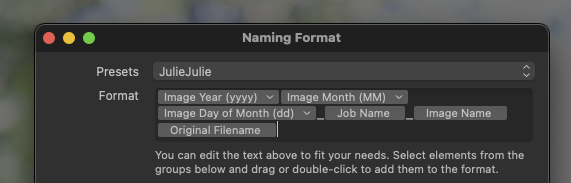
I finally figured this out: this is what tokens are needed to get the naming format I used in the past. I took a screen shot and saved it for future use should this setting get blown away in the future.
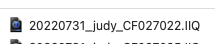
This is what the results are:
 0
0 -
> Julie Tremblay: ...this is what tokens are needed to get the naming format I used in the past
Are you sure? Why do you still include the token Original Filename ?
If that token is ever filled in the future, it will ruin your file name. The "CF027022.IIQ" part is from the Image Name token. If Original Filename had been set to "GettyIsMyTarget" rather than being empty, the result would have been "20220731_judy_CF027022.IIQGettyIsMyTarget".
0
Post is closed for comments.
Comments
7 comments