Capture One 22 unable to open/upgrade sessions created in previous version

After upgrading recently , I have been unable to open sessions created in the previous version (12.1.x), which are there on my external drive. The following are screenshots of the error messages I see.
When I try to open an old session file from my external hard drive, this is what I see

I click on "Upgrade", and I immediately see the following

After clicking on "Ok" , I see the following

After I click on "Verify and Repair...", I see the following

I've confirmed that Capture one has access to my external drive

This has been disappointing to say the least :-(. Please suggest , how I can fix this.
The following are my system details
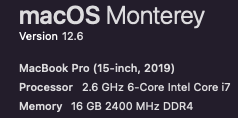
Thank you so much for your help!
-
You could try this.
- Create a new session - perhaps call it AdnanUS_2022_new
- In that session use the System Folders section of the Library tool and find the Capture folder of the old AdnanUS_2022 session.
- Drag the images there to the Capture folder of the new session.
- Do the same for the other folders (Selects, Output, and any others there may be).
The new session should be OK.
This should work because even if the old session database is corrupt in some way, the edits you have made to the images are not stored in the session database - in a session they are stored in subfolders of the folders the images are in, and Capture One will see to moving those for you to the new session's folder.
Ian
0 -
Thanks a lot Ian Wilson . That worked! I am glad to see my edits are intact.
However, does this mean that I have to do this for every past session that is there in my External Hard drive ? That's crazy that Phase One hasn't come with an easier way to resolve this, or is there another way to do this in bulk?
0 -
This is odd. It's not happening anymore with my other folders :-). I guess we're good :D
0

Post is closed for comments.
Comments
3 comments