Apply keywords to all selected photos?

When selecting a number of images and clicking on a keyword in the Keyword Library, Capture One used to apply this keyword to all selected images, but now it appears to only apply the keyword to the primary selected image rather than to all of them.
Is there something – a setting? – I've overlooked or accidentally changed, or is this a change in Capture One?
(I'm aware that I can apply the keywords of the primary selected photo to all other selected photos, but that solution isn't much help if I only want to apply one of the keywords applied to this photo.)
-

I'm running 15.3.3.8 and applying keywords works as always. What version are you using? (I didn't upgrade to 15.4 because it didn't seem to offer me anything, and lately I'm very very late to update unless something I need is broken in my current version).
0 -
Thanks for your reply. I currently use 15.4.0.22. Perhaps something's changed then.
0 -
Could well be the case. This is the main reason I no longer install "minor" updates—for the past couple of years, updates have broken functionality I rely on, and it's taken several weeks for C1 to issue a patch update to fix the problems. Now the v16 release should be so close that any bugs introduced in 15.4 probably won't be fixed till 16.something (and may never be fixed).
Lately, though, I've taken to manually Copy/Paste my keywords if I want them across multiple images. Not a big deal, and totally consistent behavior.
0 -
One of the problems with using copy and paste is that you can't copy and paste a single keyword from an image that has multiple keywords. At least not as far as I'm aware.
Perhaps it's a bad idea to do so, but I always install new updates right away, hoping that they will solve some of the existing issues.
0 -

did you remember to leave this selected?
I'm using 15.4 and it works perfectly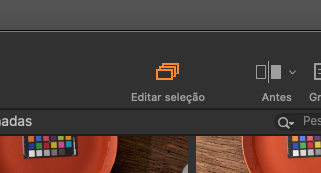 1
1 -
Thanks, Ricardo! Of course!
For some reason that option had disappeared from the toolbar. I had a vague sense that there was something I had overlooked.
0 -

thanks, i was confused. suddenly the "edit selected" icon was gone after I've changed the workspace. also i couldn't find anything about it in the menus…
0
Post is closed for comments.
Comments
7 comments