Session: Folder accidantely defined as paper basket - how to fix it?

Hello, somehow and not itended: i changed one folder with my fotos into the session's paper basket.
a) How can i fix this?
b) how could that have happened?
by the way i am working with the german version of C1
Thanks for your quick answer as i cannot work with the files anymore as they supposed to be in a paper basket.
-
Hello, i found a workaround: I created a new folder, called it new paperbasket and defined this as the paperbasket of the session. NOT keeping the falsly as paperbasket declared folder in favorites. So i can edit my pictures in the old folder.
However: this was very shocking and annoying.
c) Where do i change the folders of a session - i assume there is a special menu for this - but where do i find it?
d) how did the first definition of a folder into the paper basket happen by accident? Any ideas?
thanks for your help!!
0 -
The trash folder (which you are calling the paper basket) should show up in the System Folders part of the Library tool, like this.
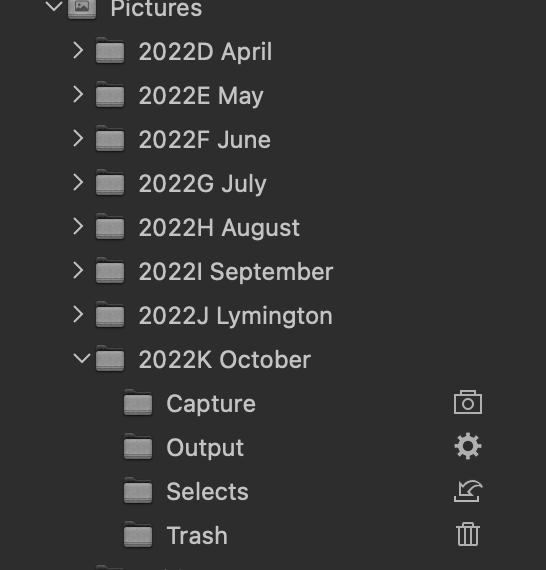
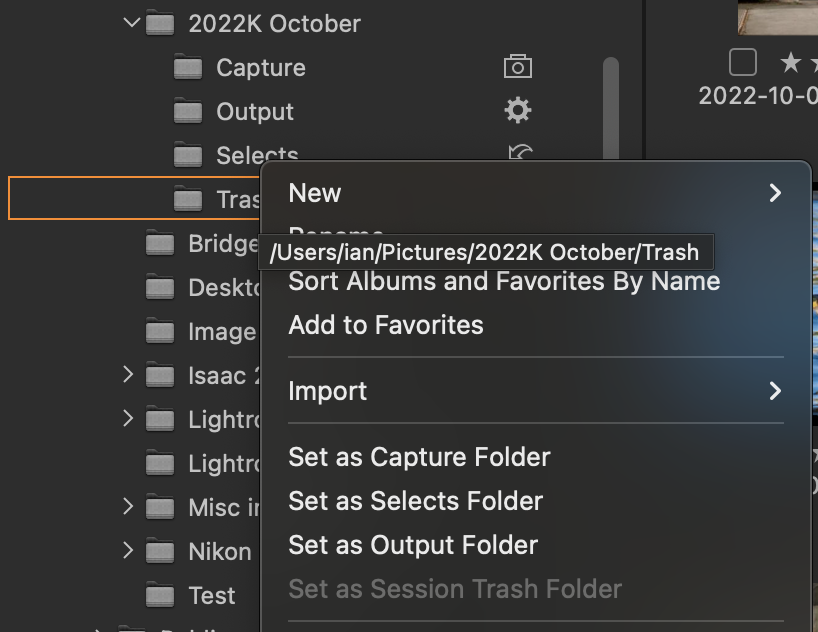
The Trash folder is a physical folder created by Capture One on your hard disk when you create the session. If all is as it should be, you should see the Trash can icon next to the folder, as shown. If that does not show you can right click the folder and choose Set as Session Trash folder. (It's greeted out in my screen shot because mine is already set. And as you can see, you can also assign folders as the Capture, Selects, and Output folders, if needed.)
Ian
0

Post is closed for comments.
Comments
2 comments