Prolblem

I am not able to exit the program, the exit option is off and it locks my Mac when I want to shut it down, what should I do to exit Capture one 22
-

Try Command Q. To exit the program, you should go to Capture One -> Quit Capture One.
-1 -
I already did that but Command Q and Capture One > Quit Capture One is not active
0 -

"not active"? Like "Quit Capture One" in the menu is grayed out?
I may be experiencing the same thing. When I quit C1 it takes minimum 1 min to actually quit. It's running, but can't do anything with it (Quit is grayed out). Sometimes it doesn't fully quit so I force it. Works perfectly otherwise, so it's just an annoyance.
After waiting a couple minutes, if it's still running, command-option-esc to bring up the Force-Quit Applications menu and kill it.
Mine is in that state right now which is what brought me here.
C1: 15.4.0.22
New MacBook Air M2
0 -
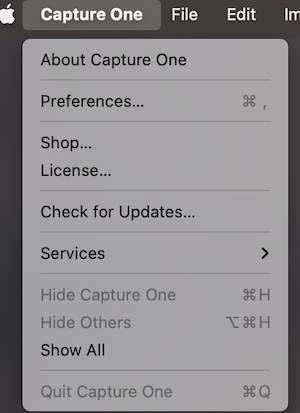 0
0 -

the same is my problem. Foece Quit is Not working. Even restarting is not working. When I reboot, Capture One is still on but not responding. So I have to fully turn off the computer and re start again, which is annoying.
0 -
I could only solve the problem by deleting the contents of the Content folder and downloading the trial version of captureone 22, then I copied the folder to the old one and then I was able to get out of the program.
0
Post is closed for comments.
Comments
6 comments