Session import problem

I just did a 16.0.1 update. I have switch to using Sessions instead of Catalog. I used the new grouping and selection features. I created a folder where I want my images to go, I see the number of images I have selected and when I click on import the import screen disappears. I don't see the typical spinning icon I usually see in the upper edge of the screen indicating the software at work. When I go into my folder in my library I have no images present. When I checked my Windows File Explorer I don't see the images there either.
Any help is greatly appreciated.
-

"I created a folder where I want my images to go..."
The usual intent of Sessions is to confine images
to session folder sub-folders, at least before export.
That way you have a single folder containing all images and their adjustments.
The default image location for session imports is the C1 created Capture folder
which is within the session folder.Are you expecting the images to be in another location?
0 -
I selected Import to Folder, then navigated to my usual area I keep my photos and created a New Folder. I am importing from an SD card.
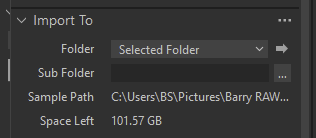
I can see my folder in File Explorer
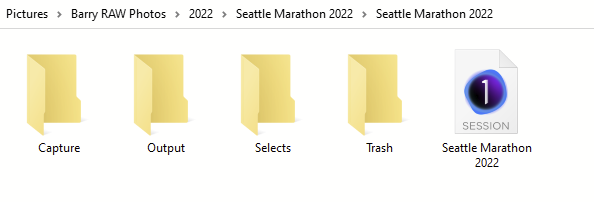 0
0 -
You need to change the destination folder to Capture Folder via the dropdown list.
At the moment you have Selected Folder as destination which will put the photos in whatever folder you have currently selected back in the C1 Library tool.
0 -
I see you have doubled up on the Seattle Marathon 2022 folder.
When you name a new session, C1 also creates the folder of that name, so set the session location one folder back up the tree ie ... / ../2022.
0 -

Did you have any luck yet? Because I was hit with the same issue and find none of the responses so far helpful.
Neither copying into the catalogue nor copying into a destination folder work in C1. After selecting images and hitting import nothing happens.
0 -
No luck yet. I tried the suggestion above but that made no difference. I was pressed for time to get the images edited so I just imported them into my Catalog as per my usual process. I like the idea of Sessions now but yet to be successful in that transition. I also had my C1 crash a couple of times so there has been that frustration too. Good luck and hopefully one of us can share the secret for success.
1 -
SFA - The import ceases to work immediately after I click on Import, rather than not being able to find where the images went.
1 -

I have the same problem 16.01.20 this seems to be a bug. The only way I could get it to import was to copy all photos to C drive from the memory card and import again. After clicking import it pauses for several seconds then nothing.
2 -

I have the same problem, too. Importing a selection from my CFExpress Card in an existing folder doesn't work. If I try to import all of them it will work.
-1 -
Importing a selection from my CFExpress Card in an existing folder doesn't work. If I try to import all of them it will work. If I want to import one, it will work, too
-1 -
I can not get any photos to import now. I ran into this problem a few times and I had to restart the computer and that seemed to work now nothing . Any Help????
0
Post is closed for comments.
Comments
11 comments