What profile does C1 use to show a ProPhoto image if that profile isn't installed

So, I've upgraded to Ventura and either due to that, or lack of Adobe products, I now longer have the ProPhoto profile installed. I believe for exporting to ProPhoto, I should now use the equivalent ROMM RGB, so have updated my export recipes accordingly.
However, the .tiff files in my master catalogue which were baked in ProPhoto... Will C1 be displaying these correct if that profile isn't installed? It seems happy to display them without warnings of the profile? 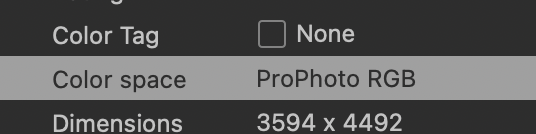
-

Maybe the profile is embedded?
0 -

Printer profiles may be in a folder in the Printer folder of the Library. Upgrades of the OS sometimes remove the path to ICC profiles from Capture One. Often reinstalling the driver will restore the listing of the profile in Capture One. If this doesn't work, dragging a copy of the profile to the ColorSync/Profiles folder in the Library should resort the profile(s) to the list.
However, for ProPhoto, the ICC profiles are likely elsewhere and the process different, but if you find the profile and copy it to ColorSync/Profiles, it might work. Unfortunately, I am not a user of ProPhoto, so my suggestion is at best a hint.
0 -

Mac OS ships with some ColorSync scripts for various purposes: one is extracting a profile embedded in an image.
You can find them in Macintosh HD/Library/Scripts/ColorSync
Once extracted you can drop the resulting .icc profile into your ColorSync library and it should show in C1 when rebooted.
0 -
Cheers all for the replies. It looks like you were right @C-M-B, it looks like the profile was embedded into the tiff files and this should be sufficient for me. I verified this by looking at the Base Characteristics in C1 of the tiffs which revealed:

I've set my archive export recipe to ROMM RGB, and provided C1 embed that into my archive files, I should be future proof.
Cheers Jerry C and www.shootmachine.co for your recommendations, especially those extract scripts which would allow me to extract the profiles from a given file if needed.
Paul
0
Post is closed for comments.
Comments
4 comments