Urgently need to turn this off? Keystoning?


All my images are rotated, or perspective/keystone corrected as I'm shooting. I can't figure out how to turn this off?!
First, what is this, and how do I turn it off?
Second, Is it possible to undo whatever this is from the images we have already captured?
I've spent 2 hours online looking for a way fix this. Please help!
Thank you!
-
I'd look at the Next Capture Adjustments tool (second from the end in the right hand panel in your screen shot.) Make sure that an adjustment to one photo is not now being automatically carried over to each subsequent capture.
Also it does look like keystoning or rotation or both. You could select any one of the affected images and use the reset button on both the keystone tool and the rotation tool. If that restores it to how it should be, select all the remaining affected images and you should be able to do the same to all of them at once.
Ian
0 -
Ian, thank you so much. Your suggestion to use the "reset button" was enough for me to follow that thread and make a fix - to all my images quickly. I knew it had to be somewhat obvious, except I had no idea where to begin looking.
Also, I'm not back in the studio yet, but the Next Capture Adjustments tab (I didn't know about this either!) was set to "Copy from last," so I'm hopeful the images are now fixed and that future images will be OK.
Thank you, thank you!
0 -
Yes, Copy From Last was probably the problem, then.
Ian
0 -
How do you DISABLE keystone? Using RESET per photo or group of photos is not suitable. I do NOT want Keystone to do anything to any image.
0 -
It won't do anything automatically, unless you ask it to. The only thing you may need to do is disable Keystone as one of the options in the Auto adjust tool, if you ever use that. Long press on the Auto adjust button on the toolbar, and make sure Keystone is not checked.
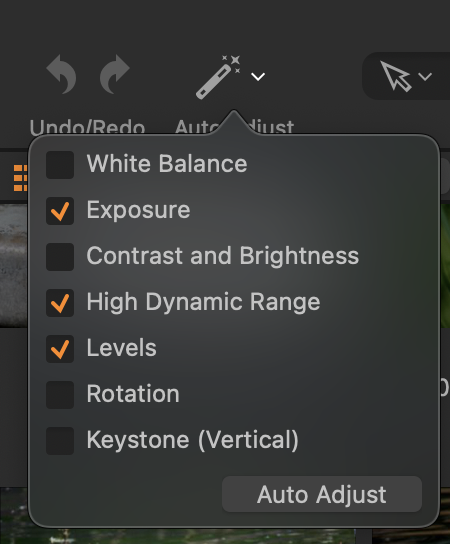
Apart from that, if you don't want Keystone, don't use it.
Ian
0 -

I have tried all of the above, it doesn't switch off or go away. It forces all my images into a keystone and rotation correction. It's really upsetting my clients sitting behind the screen and I cant seem to prevent it from showing up. Please help.
0 -
Is it caused by one of these settings in the Next Capture Adjustment section of the Tether tool tab?
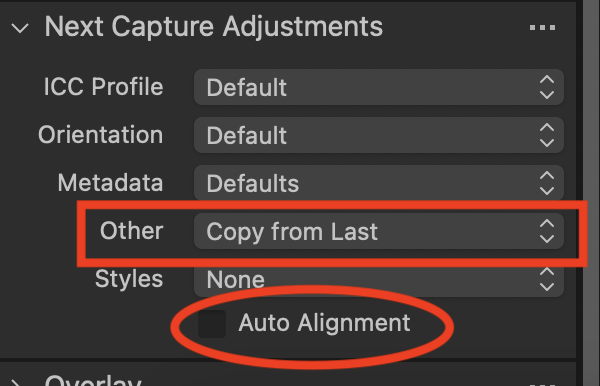
Ian
0

Post is closed for comments.
Comments
7 comments