watermark impossible

Hello everyone :)
I am on Capture One Pro 23 and I have a problem with the export watermark function: when I choose my watermark pattern (text or image the problem is the same) it does not appear on the image. Even when I want to move the watermark with the mouse by clicking on the handle (see screenshot) the watermark does not appear.
Is this an inherent problem with Capture One version 23 or have I misunderstood something?
Thanks in advance for your help ;)
-

To display the watermark you have to enable proofing:
 0
0 -
Hello Okular, thank you for helping me. I have no "proofing icon" on my C1 23 (see screenshot)
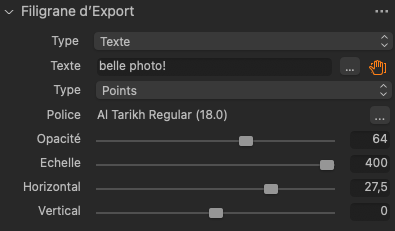 0
0 -
You either find the proofing in the menu View / Vue (not sure if this is the correct name, I'm on a German version) or you add it to the toolbar by right clicking in that bar and customize it: Simply drag the icon to the bar.
0 -
OK, it works now. Thank you
0
Post is closed for comments.
Comments
4 comments