Sessions, Catalogs, Synchronize Files --open questions

I'm essentially new to Capture One (new years resolution is to clean up how I am using C1 so that I have a consistent workflow and organization).
The session structure makes most sense to me, so have been and plan to continue doing so. However, I have seen a couple of videos regarding use both sessions and catalogs. Use the catalog as a session archive (when I am done with photos in a session) for easier searching, etc of my photos. One of the videos also showed synchronizing my photo file folders with the catalog. What is the purpose of this? Is this different than the session archive? I'm a bit confused on this.
Also, with my plan to archive sessions, I understand that if I were to want to go back and work on an old session, I want to do that at the source/session and then re-sync it to the catalog, correct? Also, as my primary hard drive fills up, I will need to move some sessions to my archive drive...do I do that moving in the catalog to keep track of the source file location? Is that related to the folder sync?
Appreciate the help!
-
I add my session keepers (essentially the Selects and Output folders) to my catalog once I have mostly finished work on the session. (I am just a hobbyist and usually start a new session per month plus a few extras for things like holidays.) Once I have added a folder to the catalog, I may want to do some more work on images but I ALWAYS do it in the catalog not in the session. The session won't be updated with the new adjustments I have made, but there is really no need for it to be. I can just as readily use the images in the catalog.
The reason I put them in the catalog is that I want to be able to find images taken over a wide timescale - I take a lot of bird images and may want to find all my images of Red Kites, or of Brent Geese, for example, whenever they were taken. (Keywords are the other important factor in this, of course.)
Ian
0 -
Yes, starting with sessions and ending in a catalog is the only easy way to work with both, catalog and sessions.
Having a catalog over all sessions (or all (or select) images of all sessions incl. adjustments) is a good way to find images across the years, edit /correct / reorganize metadata, but this is only stored in the catalog, no sync back to the sessions.
Hence, most advantages of sessions are no longer existent once you work in the catalog.
There is no sync function for catalog vs. session adjustments.
I have requested one, please comment and vote for it if you think it deserves it :
0 -
So what it is the need for syncing changes back to the session? You have an image you took maybe 5 years ago, and now you would like to edit it a bit differently and use it for some new purpose or other. Why not just do that in the catalog?
For the way I work, at least, the advantage of a session is that it is a self-contained and transferrable unit for initially working on images. I often start on a MacBook, and transfer the session to an iMac later. It isn't convenient to carry my whole catalog around with me, but in the end there are no disadvantages to the images I want to keep ending up in my catalog, and to working on them from there 5 years down the line if I need to.
(And I have read your post that you linked to, though I am not convinced of the need for it.)
Ian
0 -
Yes Ian, I think if you don't see the need then I cannot make you see it.
I can only tell you that the self-contained property of sessions is something I want to keep even years from the capture time, not only in the beginning of the workflow (also Tim mentioned a primary and an archival harddrive),
but my main point is that I don't trust the catalog. Once in a while I find folders which definitely were in the catalog but have vanished from there.
And synchronized .cos files (and .comask files) are a "live" backup when a full sync function would be available. If you don't need all this, fine, but nevertheless these advantages do exist.
0 -
Another one: You could swap out the C1 catalog with another one, e.g Photo Mechanic Plus or alike, if all your edits were stored as C1 side car files (session files., cos.comask)
0 -
You could swap out the C1 catalog with another one, e.g Photo Mechanic Plus or alike, if all your edits were stored as C1 side car files (session files., cos.comask)
... presumably only if the other app stored the same kinds of edits in the same kind of way. So obviously an exposure boost of +0.5 EV is the same in any app, for example, but a .comask file stores information in a way that as far as I know no other app does. It's not likely that a radial mask from C1 with a Luma range applied would translate well to another app.
Whether some kind of synchronisation between catalog and session is technically easy, I am not qualified to say. What happens, for example, if you work on an image that is off-line, You can do that in a C1 catalog, but would it have to queue up the adjustments to sync them back to the session when it was able to access the drive where the session was stored again? Just musing and wondering...
Ian
0 -
You could swap out the C1 catalog with another one, e.g Photo Mechanic Plus or alike, if all your edits were stored as C1 side car files (session files., cos.comask)
... presumably only if the other app stored the same kinds of edits in the same kind of way.
No what I mean here is to use the external catalog ONLY for searching then drag&drop the selected images to a session and (re-)edit them there. For this, you want to have each images latest edits in the each images' .cos file.
but would it have to queue up the adjustments to sync them back to the session
There is no need for a queue of adjustments, all adjustments are in the catalog, there is only the need to manually sync them (think like the XMP sync) or to remember the variants to be synced with a flag. There could be a timestamp for each image of the last edit in both the catalog and in the cos file to easily allow for a sync mode which takes the highest timestamp. But yeah, C1 is not even capable or willing to introduce a "last modified" timestamp in the C1 browser, so it might be technically too challenging for them or not important. (ok, they even destroyed the "Date Modified" timestamp of the .cos files' in the file system, just looking at the folder in the browser updates this timestamp (in the Windows version 15.4, at least).
0 -
Cheers, Ian.
0 -
This is helpful, thank you. I still am unclear on the option of "synchronizing folders" when in a catalog. I have all of my photos (including sessions which I have only been using 2 years) in a folder structure by year.
2022
--2020-01-05 - description of the shoot/session
--2020-01-22 - description of the shoot/sessionIf I do the sync of the folder structure, does it pull in all variants, edits, etc? If I want the original file source/session to be my source of truth, I should go back and do edits in the session and then resync the folder. So, if I create a catalog by syncing these folders (for ease of searching, etc.), what would be the benefit or value of importing sessions into the catalog (instead or in addition to the folder sync)?
0 -
According to my testing, the major difference between doing a folder sync (or importing the images via the importer dialog) vs. importing the sessions is that importing sessions does create a structure of former session folders in the library tool and most relevant: It asks you what to do for the already existing images (refrenced by the catalog).
Ie. you can choose to keep the existing edits or overwrite with the changes done in the session (below button "Imported")
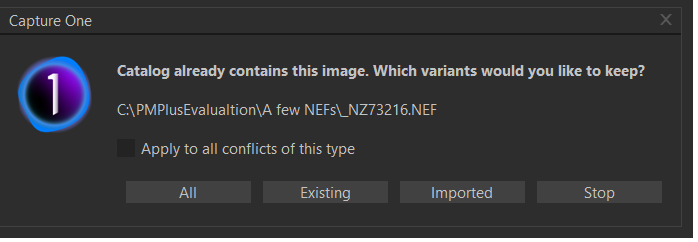
It will double the structure in the library tool though, for each time you import it:
see ("Untitled Session")
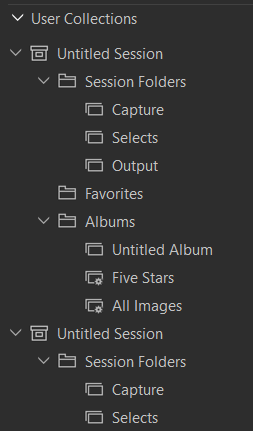
On the other hand, a folder sync (or importing the images via the importer dialog) is only importing new image files or can delete missing one, but not update images with edits done a session (exisiting images will be skipped in the import).
A way to cope with it is to create an album in the catalog for each image you want to edit in the sessions. Then drag&drop them from the album browser in the catalog to a session album (could be any C1 session running), edit them in the session so that the edits are stored in the .cos and .comask files, then remove them from the catalog (I remember them in the catalog album for this purpose) and then import (synchronize) them into the catalog again from the images parent folder. The drag&drop to a session has the big advantage that you can pass images to this session regardless where the images are stored, i.e. across several sessions or somewhere in your folder hierarchy.
I suggest creating a catalog and a session(s) and do your own tests, this is very much needed for all the details which are not documented or may be missed by others (e.g. by me) but are maybe important for you, or are different on Mac vs. Windows. Share you findings and conclusion please.
0 -
It partly depends on what you want to see in the catalog. I always start work with sessions, but I don't import the session to my catalog afterwards - as BeO points out, that adds the whole Session structure to the catalog. I don't want that - I only want to add the keepers to my catalog. So I add the Selects folder to the catalog, not the whole session.
Ian
0 -
I did a little testing and I think it will be more useful to me to 1) start with sessions and then, 2) sync the session folder to my catalog when I'm done with it.
It looks like the catalog which is based on folders does support resyncing those folders. So, for example, if I added an image to the session folder, or moved images between folders at the session level, I can sync the folder within the catalog to pull in the changes. The only problem I'm seeing is if I created a new variant. It doesn't see to add the new variant created in the session to the catalog. Is this expected behavior?
The reason I have used the folder structure is that it aligns with how my brain works. Additionally, if I move off of C1...my images are still organized in some logical way. Syncing with a catalog has the added benefits that come with the catalog (improved searching etc.).
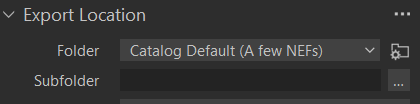
It may be that once I move a session to the catalog, I should just work there. However, I edited an image in the catalog and then exported. I map the location to the session output folder. It doesn't show up in that folder in the catalog until I resync. Is there a different way to do this? I would hope that when doing this export from within a catalog...it would immediately be in the output folder of the catalog without further intervention
0 -
Resyncing the referenced folders only detects new and removed image files, no added or removed variants or any other edits to an original image file (a variant is also only a specific type of an edit, also stored in the .cos file).
Going forward with your favorite folder structure is how i do it too. New: I maintain the .cos files and .comask files in the folder structure by editing images in a session only, no catalog edits, and remove the images from the catalog to re-import (resync) them again to pass the new edits and variants to the catalog.
Export image from catalog into the catalog output folder:
 0
0 -
So, it sounds like once an image is in the catalog, the cos files (or the edits) are not stored back in the folder structure but somewhere in the catalog db. Is there an advantage at this point in the workflow to keep the edits in the session vs. now editing in the catalog? Even if one leaves C1, the .cos and .comask files won't do you any good (these are specific file types for C1, right?)
0 -
Yes, the .cos etc files are stored inside the catalog database - one of the main differences between catalogs and sessions.
In my approach I edit in the catalog once images have been added to the catalog, but as you can see from the discussion above, not everyone is happy with that approach.
I think you are right that if one leaves C1, the .cos and .comask files won't be any use with another app.
Ian
0 -
Yes, the .cos etc files are stored inside the catalog database - one of the main differences between catalogs and sessions.
Technically nitpicking, it is not the files stored in the database, the adjustments are stored in database tables.
In my approach I edit in the catalog once images have been added to the catalog, but as you can see from the discussion above, not everyone is happy with that approach.
That's how I did it earlier, and I would LOVE to edit them in the catalog still, provided the edits could be syncronized to the .cos files (which is the subject matter of my feature request, linked in my above post, feel free to (up-)vote and comment this request).
With my new approach (drag&drop the to be re-edited images to a dummy session) I can use other catalog apps. But yes, the .cos and .comask files won't be of any use with another raw developer.
(though the.cos files also store the metadata incl. keywords for every variant, unlike the xmp files, and could serve as a plain text last resort metadata backup accessible by a scripting language, if everything else fails).0


Post is closed for comments.
Comments
16 comments