Unresponsiveness (Capture One 23)

Capture One still becomes unresponsive when I apply keywords, rate images, change colour tags, switch between tool tabs, etc. The severity of the issue varies, seemingly at random, but the issue doesn't go away.
I've had this issue for more than six months now, since version 22 (cf. this post in the version 22 section of the forum).
I currently use a catalogue containing about 56,000 images, or rather variants, on a MacBook Pro M1 Max 64GB running macOS 13.2.
According to the support department, the issue is caused by the size of the catalogue. And, also according to the support department, they have no plans of improving Capture One's performance in this regard.
This does not explain, though, why the degree of unresponsiveness varies so much, and why some users with larger catalogues don't have this issue.
Currently, Capture One becomes unresponsive for about 80 seconds when I apply a keyword to a single image. Judging from the Capture One log file, com.captureone.captureone16.log, what is going on during this time is that the catalogue is being saved:
[Data & time] Autosaving [file path to catalogue]
[Data & time] Waiting for background saving to complete...
[Data & time] Background saving done.
These three lines appear about once a minute.
While all image files in the catalogue are stored on an external hard drive (non-SSD), the catalogue itself is stored on the internal (SSD) hard drive, so saving the catalogue should be reasonably fast. And as it makes no difference whether or not the image files are online or offline, presumably it isn't a question of the speed of the external hard drive.
Neither does it appear to be related to the size of the preview files as I've tried making a copy of the catalogue and deleting all previews and thumbnails. This made no difference either.
Deleting all albums and all but a few keywords made virtually no difference either.
I've tried making new catalogues and importing the content of the old catalogue, and I've tried reinstalling everything on the computer from scratch. None of this made any difference either.
-

Thomas Kyhn : "According to the support department, the issue is caused by the size of the catalogue. And, also according to the support department, they have no plans of improving Capture One's performance in this regard."
I do not think it is related to the size of the catalog. Mine is 65,000 and stored on my iMac Pro's internal SSD with the referenced images on an external hard drive, running running OS 13.2, just like you describe for your system. I am using previews of 5K or one step below. However, my Mac is an Intel version and yours uses an M1.
I have no unresponsiveness when I apply keywords, rate images, change color tags, switch between tool tabs. None.
Saving my catalog takes about 20 seconds and Capture One is unresponsive, then, but it could take longer on your system. Why your system becomes unresponsive could relate to the triggering of a backup, which is not the same as "autosave." Any change you make is saved when you make it in the background. This process should not slow down anything, whereas a backup can take quite a bit of time during which Capture One is unresponsive.
The message in the log file indicates a background task is being run. It is normal for this to run frequently so as to save all changes made to the catalog. You did not post the date and time for the autosave sequence. In checking my log files, this entry indicates autosaving take a fraction of a second, 3 milliseconds in my case. I suspect the key to what is happening lies in the meaning of this log entry, what is being autosaved and how long it should take compared to how long it is taking. Support should be able to explain what is waiting and what has to wait and why this has caused a delay for you when the process should be almost instantaneous.
Last, to be sure the data in the three lines you relate to the long delays you observe, you will need to correlate the slowdowns to the exact times of what causes them and the times in the log entries.
1 -
Hi Jerry,
Thanks for your reply.
One thing that appears to indicate that it isn't the size of the catalogue that causes this unresponsiveness is that it doesn't always happen, sometimes Capture One becomes unresponsive for 80 seconds when I rate an image (etc.), but next time I open it there's no unresponsiveness at all when rating images.
I have backup reminders set to once a week, but as backup takes place just before Capture One is closed, I don't think it has any relation to this issue.
I should, of course, have checked how long autosaving takes. As far as I can gather, it's consistently less than a second here too, so I assume that can be ruled out also.
I'll have to write down exactly when Capture One is unresponsive and then take a closer look at all the log files generated by Capture One.
0 -
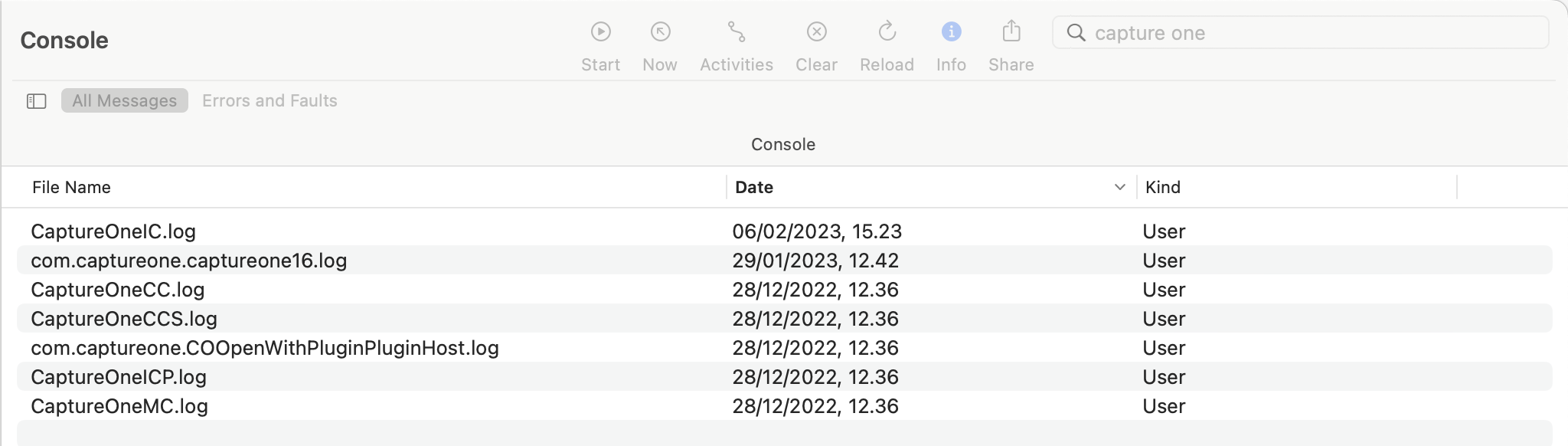
So far, I've checked one instance of unresponsiveness (for more than a minute), but no activity was recoded in any of the Capture One log files during this time. And there are no diagnostic reports either for this period.
These are the log files I've checked:
 0
0 -
In the Windows version (until 22) there is a file called application.log, is captureone16.log the equivalent file on Mac or with version 23?
0 -
I would assume that it's the same file.
I ran Capture One's 'Get Logs' script to see what files it includes, this is it:
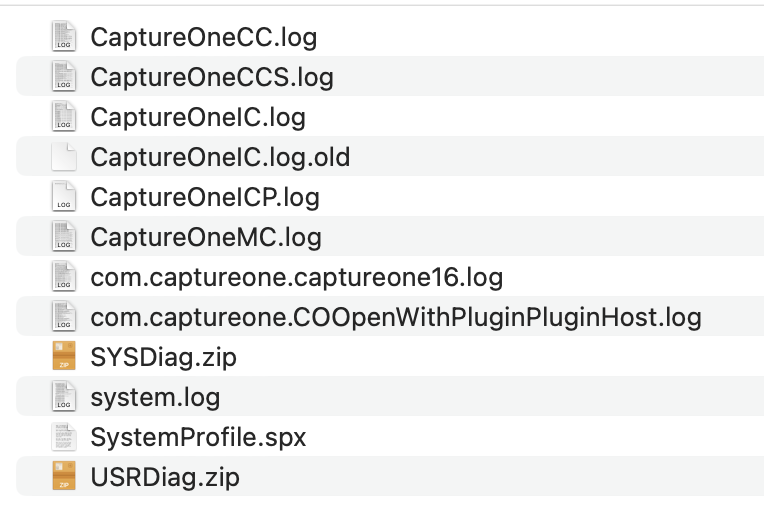
The com.captureone.COOpenWithPluginPluginHost.log and system.log files, which I hadn't looked at before, have no entries for the period in question.
The two zipped folders contain diagnostic reports, which I had already looked at.
So no luck yet. Perhaps next time.
0 -
I've now looked through a log file for the whole system, and found a few Capture One related entries that keep occurring during unresponsiveness, only I have no idea what they mean:
default    17:37:12.923748+0100    runningboardd    [app<application.com.captureone.captureone16.12043748.12050564(501)>:9486] Ignoring jetsam update because this process is not memory-managed
default    17:37:12.923788+0100    runningboardd    [app<application.com.captureone.captureone16.12043748.12050564(501)>:9486] Ignoring suspend because this process is not lifecycle managed
default    17:37:12.923819+0100    runningboardd    [app<application.com.captureone.captureone16.12043748.12050564(501)>:9486] Ignoring GPU update because this process is not GPU managed
default    17:37:12.924124+0100    runningboardd    [app<application.com.captureone.captureone16.12043748.12050564(501)>:9486] Ignoring memory limit update because this process is not memory-managed
These four messages come up again and again:
Ignoring jetsam update because this process is not memory-managed
Ignoring suspend because this process is not lifecycle managed
Ignoring GPU update because this process is not GPU managed
Ignoring memory limit update because this process is not memory-managed
0 -
So, no succeed. I still recommend to try my two proposals.
0 -
I've bought an SSD hard drive for storing image files, and I still this issue with unresponsiveness.
0

Post is closed for comments.
Comments
8 comments