My Capture One is not working any mir

Hallo,
I have a licence for Capture one, but since yesterday the program do not work correctly any more...
Please help me to run it correctly.
Kind regards,
Eduard
-
You will have to tell us more than that if you want us to help. In what way is it not working? What happens, and what doesn't happen? What exact version of Capture One are you using, and what version of MacOS?
Ian
0 -
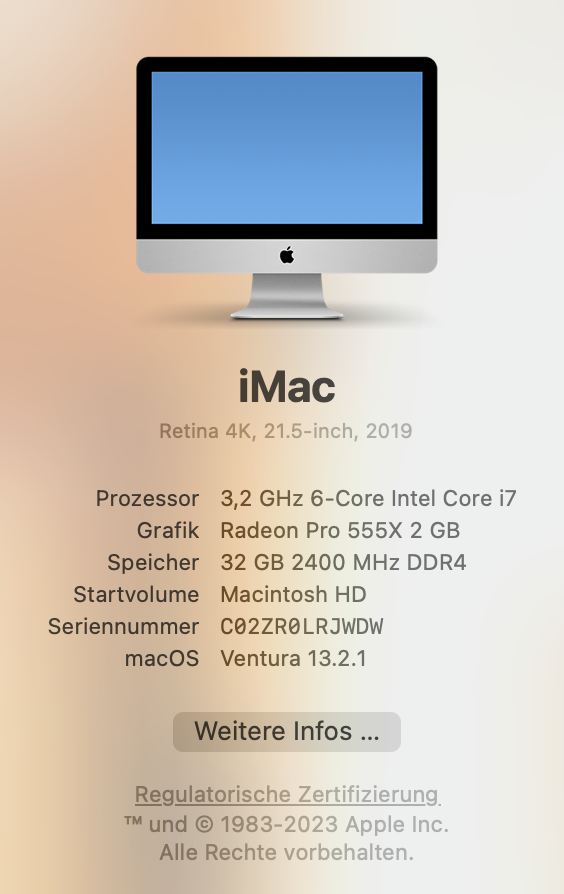
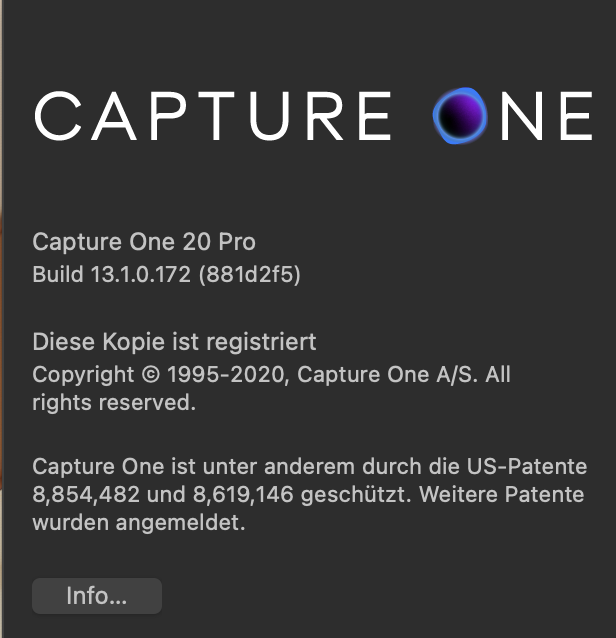 0
0 -

I can not navigate and use other tools...
0 -
The trouble is that Capture One 20 only supports MacOS as far as MacOS 11.1 Big Sur. See the chart here.
Ventura 13.2.1 is only supported by the latest release of Capture One 23 (release 16.1).
Ian
0 -
. . . I bought a program that is now 2 or 3 years old and it doesn't work on a 4 year old Mac???
really???
I can not believe it . . .?0 -
It's not the age of the Mac that is the issue, but the age of the version of Capture One that doesn't support Ventura.
I always check for compatibility with the apps I use (Capture One in particular) before I upgrade to a new version of MacOS.
I am not enough of a techy to know what the differences are in the coding between different versions of MacOS or different versions of Capture One. But When Apple brought out MacOS Ventura, Capture One had to bring out a new version of Capture One (23) that would run on it. I don't know whether they could (or should) be expected to re-engineer versions 20, 21 and 22 to use it as well. (As I say, I don't have enough technical knowledge to understand what that would involve.)
Ian
0

Post is closed for comments.
Comments
6 comments