Capture one lost connection to images on USB Device

When I Moved to a new Computer Capture One does not discover the Images of my files again. Is shows up the device and all the Previews, but they appear to be offline. Even though the Images exist under the same name and location.
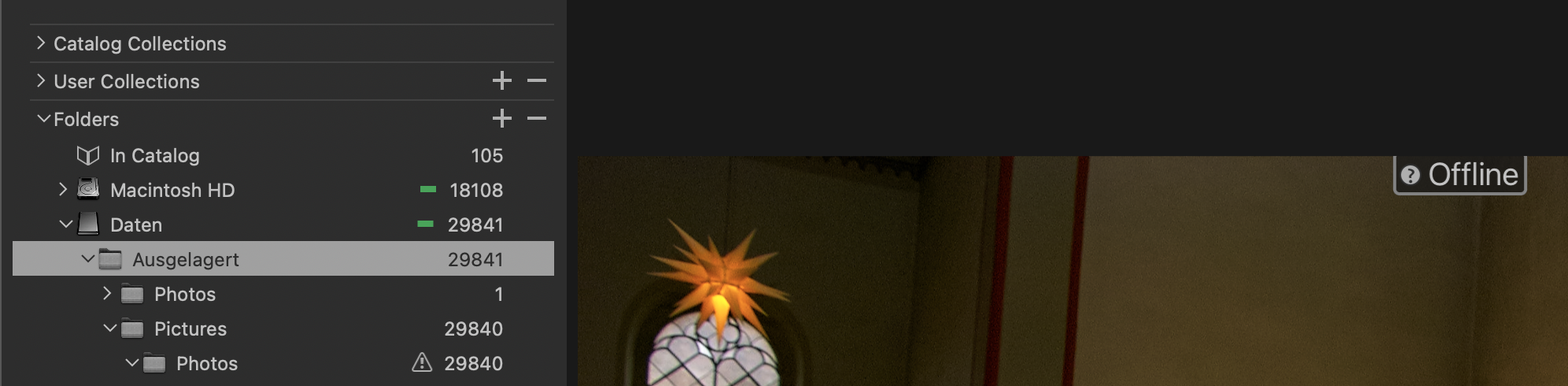
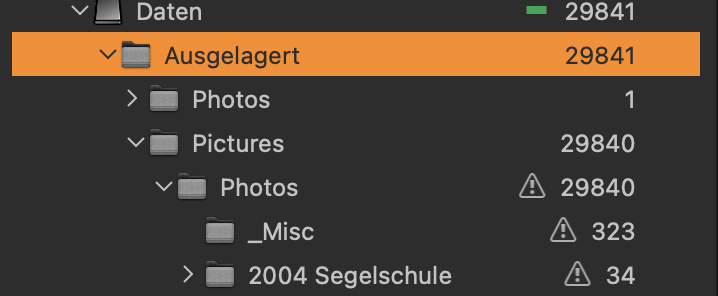
My only Option is to click on every Image right and click locate there and relocate the Image under the same path. Of course this is no Option for more than 20.000 Images. So how to deal with that?
-
This triangle exclamation mark appears when the whole folder is offline (or c1 thinks so), not individual images. Right-click on the folder in the library tool and select "Locate", the FInder should open, then locate the folder.
Edit: And pray it works...
0 -
Thanks die Your answer. That's A Fotos point, unfortunately the locate option on folder level, let's CO (23) crash after some seconds. You know that problem?
1 -
Capture One often crashes here too when relocating folders; often it takes a few attempts before it works.
Also, have you tried verifying the catalogue?
0 -
often it takes a few attempts before it works.
and then results in duplicate offline images. Had this a few years ago.
0 -
and then results in duplicate offline images. Had this a few years ago.
Yes, I've had this issue too. Perhaps it's a good idea to make a backup before each attempt.
0 -

unfortunately the locate option on folder level, let's CO (23) crash after some seconds
This happens to me as well. Any idea if this is getting fixed soon? Can't edit any images...
0 -
The solution for me was to not locate the drive itself, but locating a subfolder... Hope this helps!
0


Post is closed for comments.
Comments
7 comments