Capture One 22 for M1 Mac, old style vignetting tool

I have Capture One 22, version15.2 installed on an M1 Mac, but the Vignetting tool looks the same as before. There's no Auto feature. How do I find the auto feature?
-

I have Capture One 22, version15.2 installed on an M1 Mac, but the Vignetting tool looks the same as before. There's no Auto feature. How do I find the auto feature?
As far as I'm aware, there is no auto vignetting tool. What would it do?
15.2 has an auto Keystone feature. Is that what you're thinking of?
See: https://support.captureone.com/hc/en-us/articles/4732266654877-Capture-One-22-15-2-0-release-notes
0 -
Sorry, yes I meant keystoning tool.
.0 -
Does your keystoning tool not look like this now?
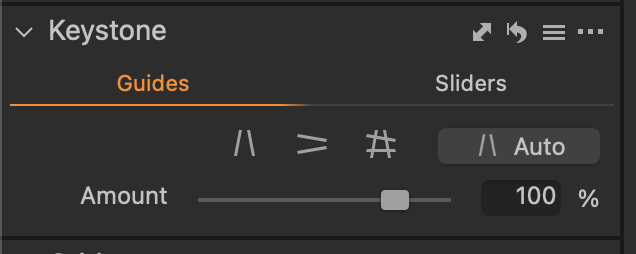
Ian
0 -
Thank you for the help! I had an older version installed, along with the newer one, and once I caught that error I deleted the old one. I see the auto Keystone now, and it's cool! Thanks again.
0

La publicación no admite más comentarios.
Comentarios
4 comentarios