No Camera Tab?

Hello. Brand new to using C 1. I don't have a Camera or Lens tab in the toolbar....and can't figure out how to add them. Am I missing something obvious? Thanks.
-
I don't have a Camera or Lens tab in the toolbar
I don't follow. Do you in the toolbar (at the top of the screen) or in the tool tabs down the side?
Also, what do you expect to find in these tabs?
One of the features of C1 is that you can set up your workspace any way you like.
https://support.captureone.com/hc/en-us/articles/360002468797-User-interface-overview
0 -
Thanks for the response Shane. I was seeing in older versions of C 1 a Camera tab and Lens tab.....where you could see/add profiles for your camera/lenses. I'm not seeing that info now. Where do i find all the profiles for cameras and lenses? Thanks.
0 -
I was seeing in older versions of C 1 a Camera tab and Lens tab.....where you could see/add profiles for your camera/lenses. I'm not seeing that info now. Where do i find all the profiles for cameras and lenses?
As far as I'm aware, you could never add profiles for lenses, but you can select an appropriate profile under Lens Correction.
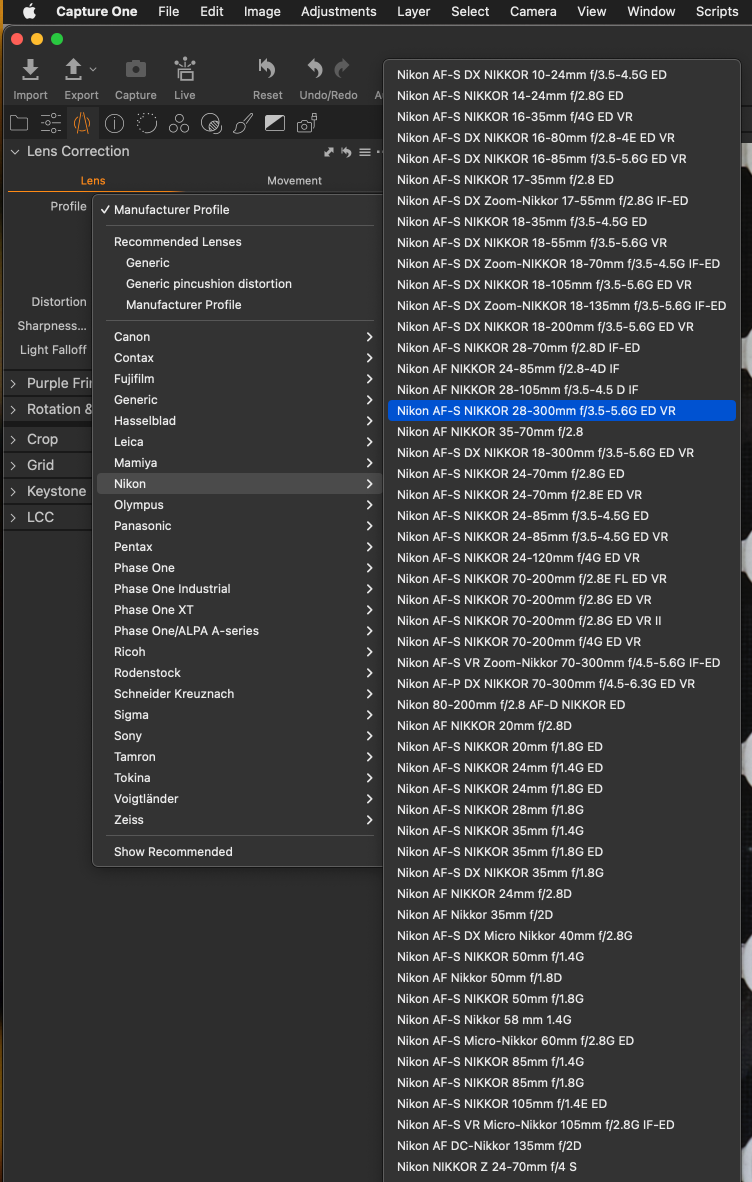
As to where to find them, you can add the Lens Correction tool to any or as many tabs as you like.
The Camera tab has always been related to tethering - as a far as I'm aware.
0 -
Thanks Shane. I was expecting to see what you showed here....but I don't have any drop down lists.
0 -
I have a grayed-out Profile box that's says "None".
0 -
I have a grayed-out Profile box that's says "None".
You have a file selected, but nothing in the lens profile - not even "generic"?
Unless someone else has a suggestion, I think it's time to go to C1: Submit a request
0 -
Right...just says "None". And none of the adjustment sliders work of course.
I am using the Mac Trial version I just downloaded 2 days ago. Could that be the reason? I have this question out to C 1 Cust. Support....but haven't heard back yet.
0 -
When I view file info in the Meta tab....all the camera/lens info is there and accurate.
0 -
Problem solved....just heard back from C1 customer support. I need to look at a RAW file, not JPEG...which was what I was originally doing. Didn't think of that but it makes sense.
Thanks.
0
La publicación no admite más comentarios.
Comentarios
9 comentarios