Option to rasterize the Luminance Mask immediatly after creating
Implemented
If I use the Lumicance Mask tool im the layers panel, I would like to have the option while creating it, to rasterize it immediatly.
When I´m using it to clip (more or less darken or brighten the bg) people from e.g. a black or white background, I will have refine the mask anyway most of the time. So this would save me some clicks.
-
Does it save many clicks? After you have added the luma range to the layer, and adjusted the parameters to suit, then as soon as you have closed the luma range dialog box you can right click the layer and choose rasterise if you want to. You can even assign a keyboard short-cut to rasterise the mask, in which case it is exactly the same number of clicks (or key presses).
Ian
0 -
Hi Daniel,
Thank you for the post.
It is possible to assign the keyboard shortcut to rasterize a mask. Then it would be possible to use it when necessary at any time.
To create and edit the keyboard shortcuts, create a custom keyboard shortcut set first.
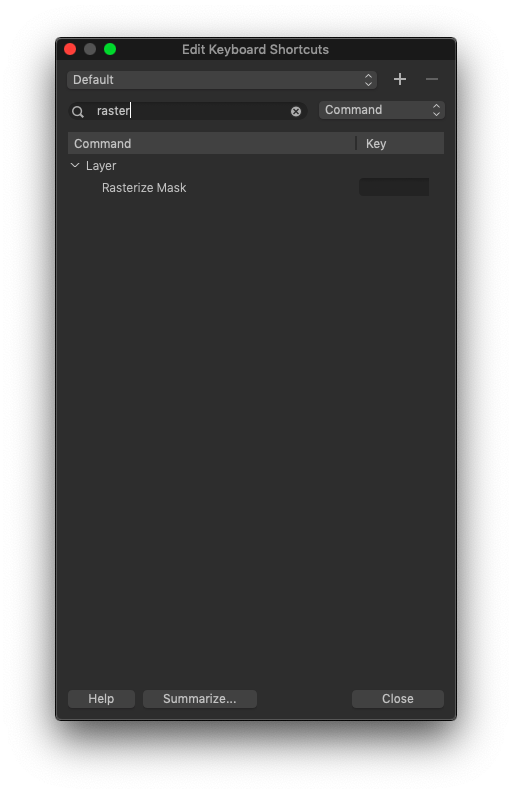 0
0 -
Well, thanks. That is one way to save some mileage with the mouse and faster as leaving the picture or tool for right clicking on a layer. and I knew this already.
My post is in the wrong category, I wanted to propose a feature - can you move it there please?
0 -
Done
0 -
Hi Daniel,
Thank you for the suggestion for this new functionality.
I have forwarded your comments to the Product Management team for further consideration.
0

Cette publication n’accepte pas de commentaire.
Commentaires
5 commentaires