Moving a huge catalog

I have a very big (Capture One 21) catalog (100k+ images) on an iMac where all images are just referenced (not inside the catalog) all images are in the same folder or one of many subfolders as the actual .catalog file.
Now I copied that whole folder with all its images and the .cocatalog file to a new macBook Pro (Capture One 23) only to discover that files stayed the same relative to each other, the catalog is still broken because it seems that Capture One stores the absolute file path.
So I looked up on how to move a catalog with referenced images and found the instructions here: How do I move a Catalog? – Capture One
There it says I have to do this manual step
6. In case you moved the source images, you will see the "?" sign on the thumbnails, which indicates that those are offline. To fix this, select the thumbnails with the question mark, then right-click and choose Locate from the menu.
I my case this seems to be rather tedious and error prone because I have organized my images inside the catalog folder into many subdirectories.
It seems that I now have to go though each of those folders by hand an relocate the images.
So my questions are:
- Is there a better way to move my catalog or to bulk relocate all images?
- How can I really make sure that I haven't forgot to relocate any of the 100k+ images.
-

I think you’ve already chosen the best way, one modification required.
There are two ways of locating images, one way in the catalog, which is one image at a time, and another in the library, where you can locate an entire folder and all its subfolders.
You obviously want to use the second method.
I would be a little cautious of moving the catalog, locating images and upgrading CO version in one operation.
i would probably also install CO22 on the second Mac, use CO22 to accomplish the catalog move and image relocation, stop and delete CO22, start CO23 and perform the upgrade.
1 -
i would probably also install CO22 on the second Mac, use CO22 to accomplish the catalog move and image relocation, stop and delete CO22, start CO23 and perform the upgrade.
But my old catalog is Capture One 21. I am not sure whether I can still install Capture One 21 on my new M2 Ventura MacBook Pro. I can try.
If that doesn't work, how about I do it this way:
- Copy the old catalog with all its images to an external drive.
- Rename the folder that contains the original catalog and the image files, so they can't be located anymore.
- Open the copied catalog on the external drive using my old Mac with Capture One 21.
- Relocate all images that now can't be found anymore by choosing the new location on the external drive.
- Open the copied catalog on the external drive using my new MacBook with Capture One 23 and upgrade to Capture One.
- Copy the converted Capture One 23 catalog form the external drive to the MacBook.
- Open the copied catalog on the new MacBook and relocate all images again.
0 -
I still haven't found an answer to my second question.
Is there a way to find out, whether my catalog contains images that can't be located? I really want to make sure everything has been relocated correctly.
0 -
Is there a way to find out, whether my catalog contains images that can't be located?
Very often requested by quite a few users but not implemented by C1.
0 -
I think I have written an Applescript for this, a few years ago.
If you anyone is interested, I will find it and publish it.1 -
I think I have written an Applescript for this, a few years ago.
If you anyone is interested, I will find it and publish it.I would be very interested in that.
0 -
I have now sucesfully moved the huge catalog to my new MacBook. And I used an unsuspected clever "hack":
I just made sure that the path on the new machine is exactly the same as on the old machine.
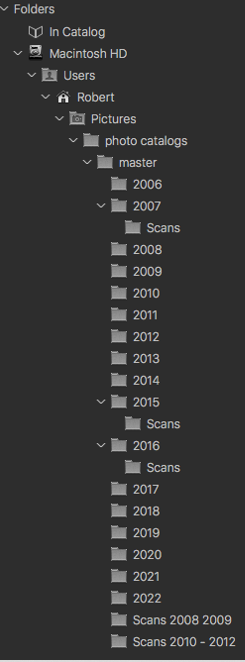
In the below screenshot you see the folder structure of my root folder called "master" that contains the catalog file and all images.
On my new machine I set my default account to the name Robert and copied the folder "master" to the exact same location (Macintosh HD/Users/robert/Pictures/photo catalogs/master).It worked.
 0
0 -
Here is a link to the script I have published for finding images with broken links to files.
It has been some time since I used it, and not with CO23 (yet), if there are any questions or problems, please reply. I don’t recommend that you try to fix a problem yourself, I can do it much faster.
if you try it and it works for you, please also give me a brief reply, just so I know that it is working.
1

投稿コメントは受け付けていません。
コメント
8件のコメント