Spot and Dust removal tool problem

The article (removing spots and sensor dust) on this subject says to use it, go to the Details tool tab and go to the Spot Removal Tool.
I cannot find the Details tool tab (orange icon, below as seen in the article) and it is not available for me to add from the existing list of tool tabs. The tools shown below are shown under my Refine tool tab.
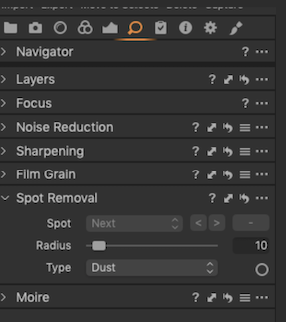
This is how my Refine tool tab looks.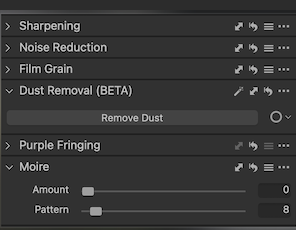
The Dust Removal Beta tool does not have the drop down window shown in the article.
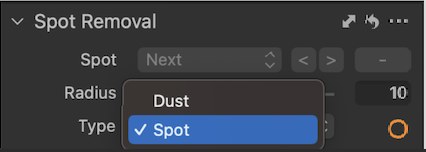
The article says, "With the Spot Removal cursor selected, Ctrl/right-click (MacOS/Windows) in the Viewer. The Spot Removal Settings dialog window opens beneath the cursor in the Viewer. This does not happen.
I have tried selecting the Default workspace, but it shows the same problem.
The functionality of the dust and spot removal tools is not affected. I can select the tool from the menu bar and I can adjust the radius by dragging it and it appears to work, but it would be convenient if the instructions referenced in the article could be accessed as described in the article.
In searching the Capture One articles for "Details tab," there are no references to it after 2019. Is it possible the article was based on the old article and not edited to apply to version 23?
So, is there a way to display the Details tab and the accompanying Spot Removal tool? If so, how. How can I display the Spot Removal dialog window?
-
The release notes here for version 23 release 16.2
https://support.captureone.com/hc/en-us/articles/10915314545565-Capture-One-23-16-2-0-release-notes
say
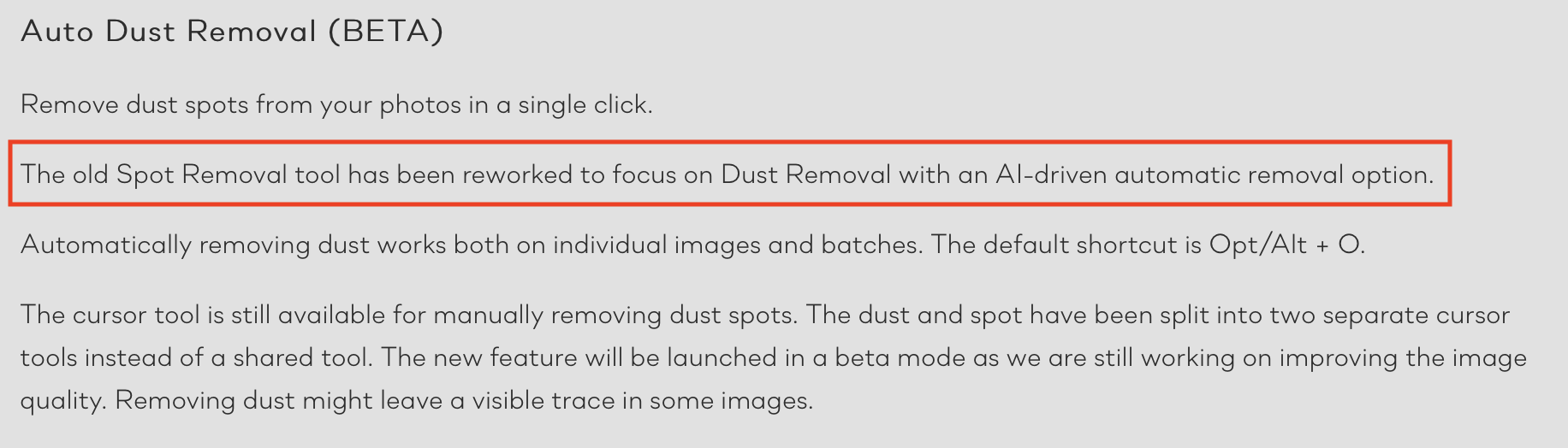
I think that means that the dust removal tool is no longer available in its old form, which is what you show in your final screen shot.
In any case, even before the new Auto Dust Removal feature, the old Dust Removal tool was not the best thing for the job. Some versions ago when they brought in the heal and clone brushes, they became a much better way of dealing with this kind of problem anyway. (One of the advantages of using them is that you are not limited to 100 spots on an image, which was the case with the old Dust Removal tool. Not that I ever needed as many as that, but some users found it a limitation, apparently.)
Maybe the article you are looking at is a rather old one.
Ian
1 -
... actually reading the release notes again, the old Spot and Dust removal tools are still available too, but from the cursor tools only, I think.
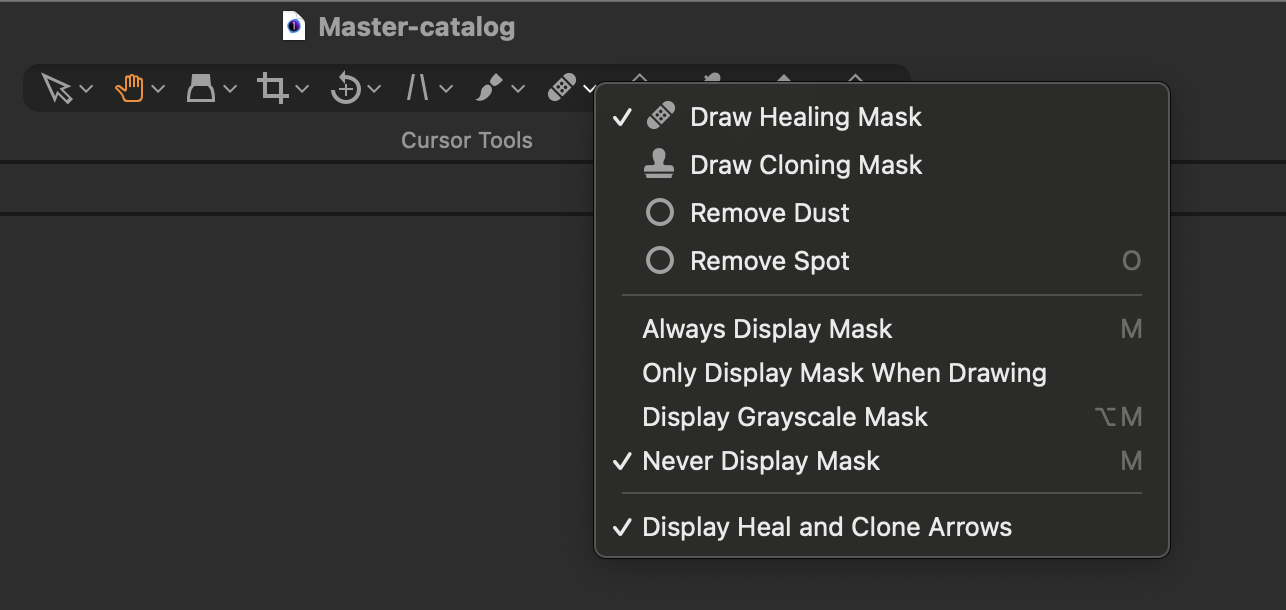
And, as it says, these are now split between Dust and Spot instead of the options in the drop down list you show in the screen shot. I still think the Heal brush often does a better job, though.
Ian
0 -
That is how I thought it currently worked in version 16.2, and is well described by Jack Williams in https://support.captureone.com/hc/en-us/articles/10913734650653-Auto-Dust-Removal-BETA-.
However, I did not see this at first and relied on the one by Lilly that says it was updated 6 days ago, https://support.captureone.com/hc/en-us/articles/360002616618-Removing-spots-and-sensor-dust. It says it refers to versions 16.1.3 and older, but this is not entirely correct and is confusing because the Details tab is not available in 16.1.3 and has been replaced by the Refine tab. The spot removal tool is available in 16.1.3, as described as is the drop down tool. CTRL-right click no longer displays the drop down spot tool in version 16.2 because that tool has been replaced.
Bottom line, Jack's article should be relied on for version 16.2. Lilly's article appears to have been modified from the original in 2019 and needs additional editing to apply to other version 16 editions, specifically with reference to the Details tool.
0 -

That is how I thought it currently worked in version 16.2, and is well described by Jack Williams in https://support.captureone.com/hc/en-us/articles/10913734650653-Auto-Dust-Removal-BETA-.
However, I did not see this at first and relied on the one by Lilly that says it was updated 6 days ago, https://support.captureone.com/hc/en-us/articles/360002616618-Removing-spots-geometry dash subzero-and-sensor-dust. It says it refers to versions 16.1.3 and older, but this is not entirely correct and is confusing because the Details tab is not available in 16.1.3 and has been replaced by the Refine tab. The spot removal tool is available in 16.1.3, as described as is the drop down tool. CTRL-right click no longer displays the drop down spot tool in version 16.2 because that tool has been replaced.
Bottom line, Jack's article should be relied on for version 16.2. Lilly's article appears to have been modified from the original in 2019 and needs additional editing to apply to other version 16 editions, specifically with reference to the Details tool.
I use version 16.1.3 and it doesn't seem to have changed much to me. Have a good day.
0 -

That is how I thought it currently worked in version 16.2, and is well described by Jack Williams in https://support.captureone.com/hc/en-us/articles/10913734650653-Auto-Dust-Removal-BETA-.
However, I did not see this at first and relied on the one by Lilly that says it was updated 6 days ago, https://support.captureone.com/hc/en-us/articles/360002616618-Removing-spots-and-sensor-dust.Drift Hunters It says it refers to versions 16.1.3 and older, but this is not entirely correct and is confusing because the Details tab is not available in 16.1.3 and has been replaced by the Refine tab. The spot removal tool is available in 16.1.3, as described as is the drop down tool. CTRL-right click no longer displays the drop down spot tool in version 16.2 because that tool has been replaced.
Bottom line, Jack's article should be relied on for version 16.2. Lilly's article appears to have been modified from the original in 2019 and needs additional editing to apply to other version 16 editions, specifically with reference to the Details tool.
I see a lot of changes, as well as new settings. Try using it for a while, then you will know. I will update it when there is something special.
0 -
There was what looked like a spurious link in Software Engineer's post
And the approach of "I have been through your Query and it seems like you're experiencing difficulty accessing the Details tab and the Spot Removal Tool in Capture One version 23." reads like the non-helpful answers that are often generated by a bot rather than an actual human on various forums. Plus he has only been a member of the forum since earlier today. All in all it looked suspicious to me, and the Admins can decide if they think it's OK or not.
0 -
The additions to the links in my original post speak for themselves.
0 -
The "pending approval" is set automatically, afaik, it happened to me many times until the AI behind this learned.
I agree with Ian, but you are welcome to the forum, and I think the forum members and you will likely learn to understand each other better over time. Tip: avoid external links for some time until you are not a new member anymore.
0 -
Hi BeO - pending approval is set by moderators.
Ian
0 -
Hi Ian Wilson,
strange, when the forum was new it was said it is set automatically by an AI, and moderators then can approve it.
Last week it occurred to one of my posts again (the first one since quite a long time ), in the second I submitted it. This cannot be done in real time by a mod. Another post in another thread was accepted normally, no pending approval, so it can also not be a restriction on the forum member. What's the secret here?
Cheers,
BeO0 -

BeO I think posts under a certain word count are auto-modded. Some of my shorter missives have been sent immediately to the mod queue. :)
I'll try to confirm this and post back.
0 -

Comments containing links (that are not related to Capture One) and certain keywords are auto-modded.
We manually check the queue every morning and approve/reject posts.0 -
Thank you.
0


投稿コメントは受け付けていません。
コメント
13件のコメント