Unlocked keystone correction adjustment points
Implemented
Since there's no way of seeing what has been requested/reported by other users (or by yourself, for that matter), I'll share this request here.
Feature request: keystone correction – individual horizontal and vertical adjustments (#19298).
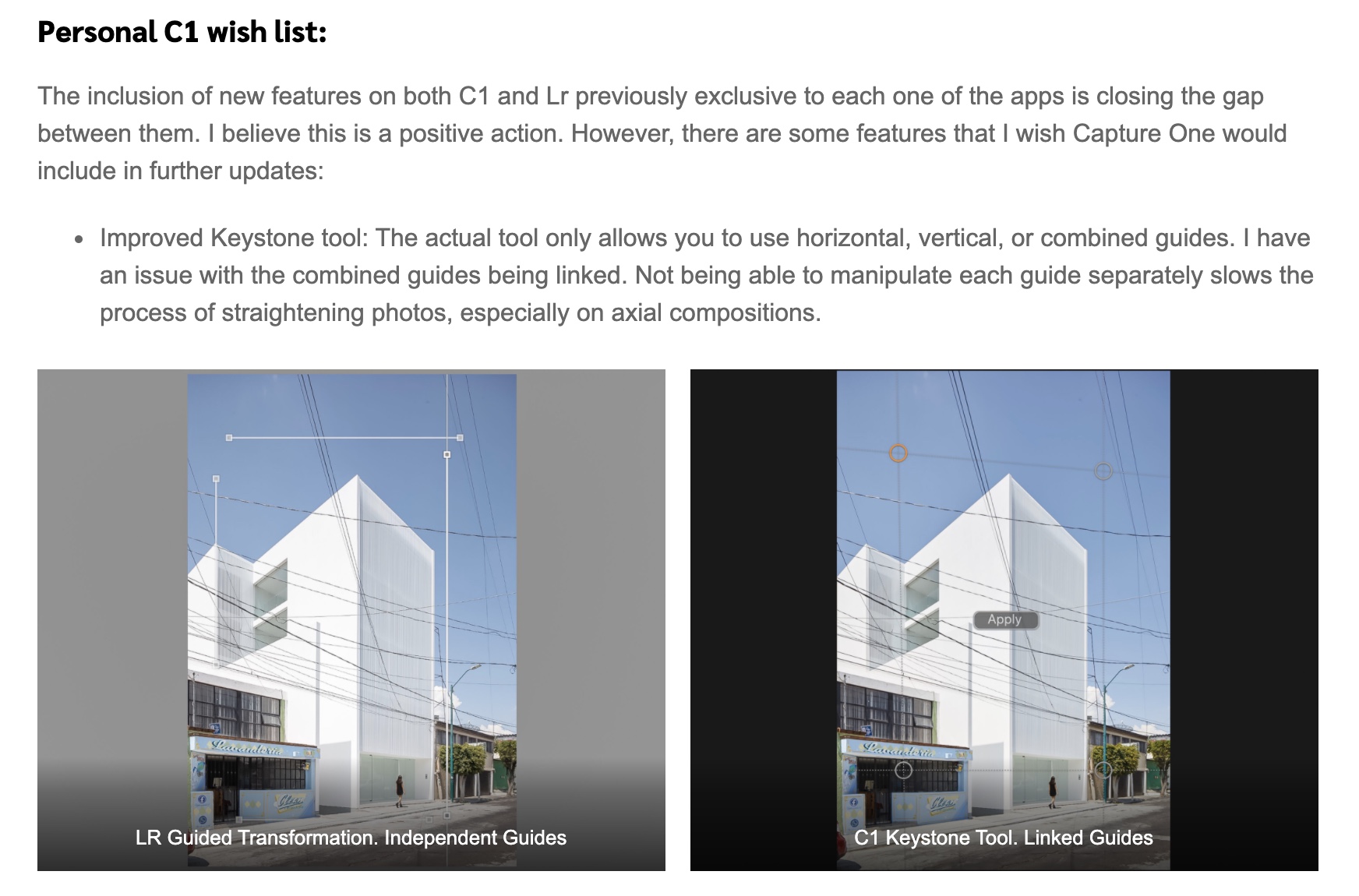
Capture One's keystone correction tool uses four adjustment points in all three modes, Keystone Vertical, Keystone Horizontal and Keystone; in the latter, horizontal and vertical adjustments are locked together, as opposed to independent of each other, which would require eight adjustment points, four for the two vertical lines and another four for the two horizontal lines. With some corrections this isn't a problem, but in many cases this makes it difficult to make precise adjustments as it prevents you from making full use of the lines available in the photo you're adjusting.
It would be very useful if you could unlock the vertical and horizontal adjustment points so that you would have four vertical and four horizontal adjustment points, that is, four lines that you could place independently of each other. As you probably know, this is how it works in Lightroom, and it's much more flexible and easy to use than the four interlocked adjustment points available in Capture One.
I'll attach a screenshot of adjustment points placed in the same photo in Capture One and Lightroom, respectively. As you can see, in Lightroom it is possible to make use of the full extent of the available lines to place the adjustment points at the greatest distance from each other, whereas in Capture One it's only possible to make use of a small part of the image, which, of course, results in limited precision.
I hope you'll consider such an improvement in a future update.
. . .
Capture One:
Lightroom:
-
Thomas
This post (with images) is easier to relate to than the other post you have just made on the same subject. It's a bit confusing to have multiple posts about the same thing. Consider deleting the other one? (It has no responses yet, so I think you can.)
Ian0 -
Ian3 wrote:
Thomas
This post (with images) is easier to relate to than the other post you have just made on the same subject. It's a bit confusing to have multiple posts about the same thing. Consider deleting the other one? (It has no responses yet, so I think you can.)
Ian
If you're referring to the post about the keystone malfunction ([The Capture One forum has migrated to a new platform, as a result all links to Capture One related postsstopped working and have been removed]), they're about two separate issues. Though they both relate to keystone adjustment, one is a feature request and the other is a report about the the current keystone tool not working as it should, which is something that needs to be fixed regardless of whether new features are added or not.2 -
thomaskyhn wrote:
Ian3 wrote:
Thomas
This post (with images) is easier to relate to than the other post you have just made on the same subject. It's a bit confusing to have multiple posts about the same thing. Consider deleting the other one? (It has no responses yet, so I think you can.)
Ian
If you're referring to the post about the keystone malfunction ([The Capture One forum has migrated to a new platform, as a result all links to Capture One related postsstopped working and have been removed]), they're about two separate issues. Though they both relate to keystone adjustment, one is a feature request and the other is a report about the the current keystone tool not working as it should, which is something that needs to be fixed regardless of whether new features are added or not.
OK - understood.
Ian0 -

Thank you for your feedback on Capture One.
Your comments and suggestions were forwarded to the Product Management team from Request #19298.
0 -

As an architectural photographer, I cannot stress how useful such a tool would be. For complex keystone corrections I sometimes completely bypass Capture One now and deal with it in Photoshop directly (with Adobe Camera Raw plugin, transform functions, DXO Viewpoint or adaptive wide angle filter, all of which do a better job than Capture One).
For years, Capture One has been an industry leader for many of its features, but regarding keystone correction, it is severely lacking behind the competition, and its features have not seen any major improvements since, IIRC, about version 6 (which is when I started using the software - can't comment on earlier versions).
By the way, both ACR/Lightroom and DXO Viewpoint have some sort of very useful automatic keystone correction button, which works quite well for quick corrections or as a starting point for more precise work; adding such a feature would also be very welcome.
3 -
I agree with Charles O'Hara. Though as long as simultaneous vertical and horizontal keystone correction doesn't work properly this improvement won't be of much use.
2 -
Oh, indeed, I see the "dreaded parallelogram" on that post. The 4 point correction almost always seem to produce wonky results, hence I almost never use it (which is a shame). The verticals tool works mostly OK (although I'd certainly like to turn off the default 80% correction and set it all the way to 100%), and when I need both horizontal and vertical corrections to get a clean one point perspective, I always get better results by first setting the horizontal correction, then manually setting the vertical correction and then tweaking the rotation.
So yeah, the 4 point keystone tool needs a complete rework IMO.
3 -
By the way. According to Lily, the default amount for vertical adjustments was changed to 100% in version 20.0.4. Here it's still at 80% though; not sure if they reverted to 80% or this is an error.
2 -
Hi Thomas, I just replied to that other thread. On my end, as far as I know, it's always been 80%, even with the recent updates.
-1 -
In some cases it would be an advantage if you could place six adjustment points (three lines) rather than eight (four lines). For instance in photos with lines like this:
 1
1 -
This is so much wanted. I've been waiting for the updated, corrected and really useful keystone tool In CaptureOne for years. Now it really lags behind the competition. As an architectural photographer I still amazed that it's not yet updated.
1 -

Totally agree! Please unlock four closed lines into four separate lines in the keystone tool. And shortcut for quick zoom into the circle would be also nice!
1 -
Also mentioned on the Architectural Photography Almanac site.
See the comments also.
0

投稿コメントは受け付けていません。
コメント
13件のコメント