Capture One Pro 20 - Adjustment Layers Cause Black Rectangles Across Image

I have been using Capture One Pro 20 for just a week and now I am having a major issue.
I notice that when I go back and look at some photos I edited previously, they are covered by big black rectangles which obviously weren't there in the original image:
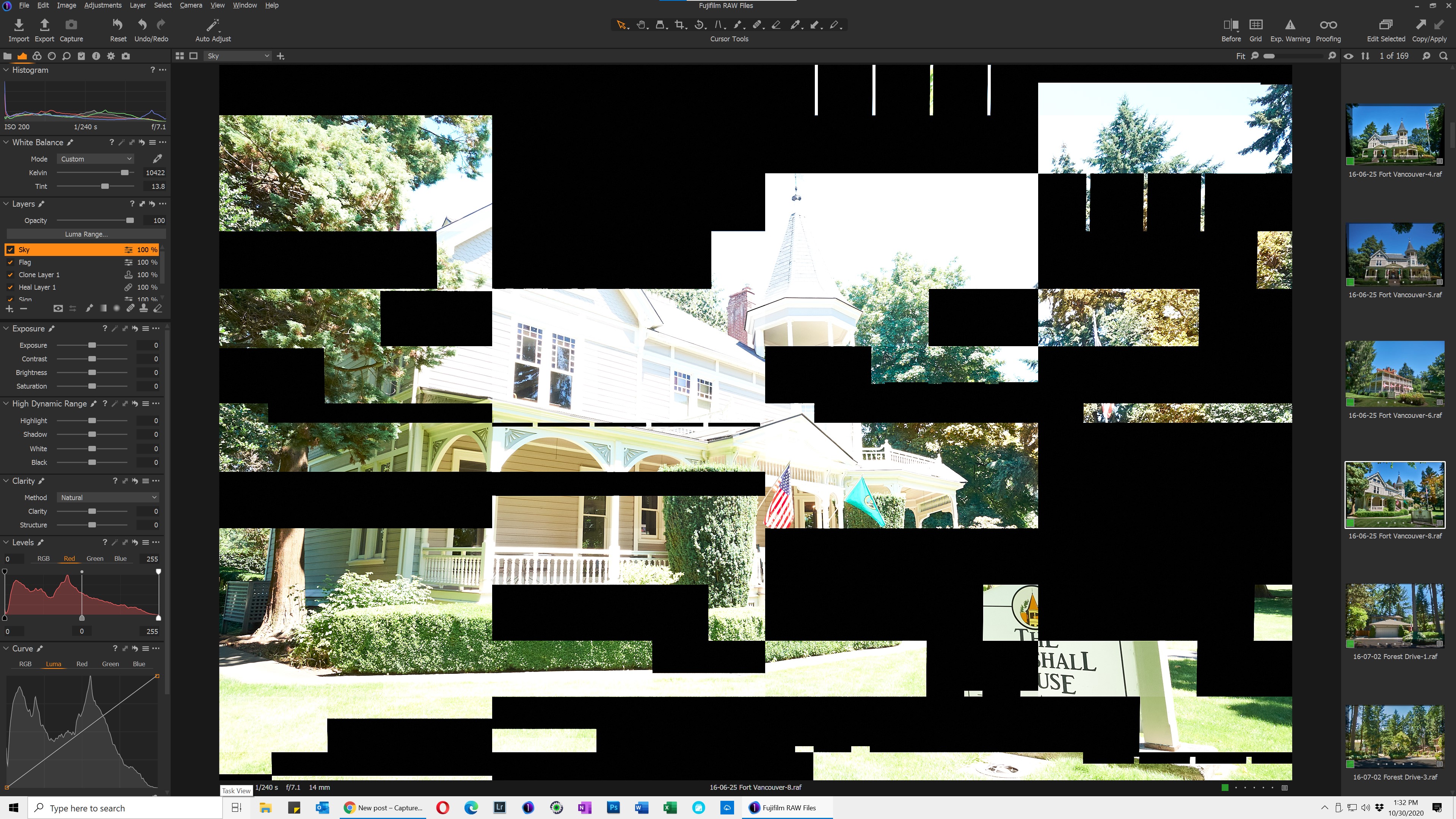
In addition, the exposure is pushed to the maximum value, even though the histogram on the left pane does not reflect this. Clearly, this is not the way I left my photo when I finished editing it.
If I turn off the adjustment layers, the black rectangles immediately disappear; the exposure remains blown out though. As soon as I turn on an adjustment layer, the black rectangles reappear. Sometimes they jump around on screen for a bit. Only Clone/Heal layers seem to cause this problem, not regular adjustments with a brush.
Images without adjustment layers never seem to have this problem. Most images WITH adjustment layers also don't seem to have the issue. It doesn't seem to matter whether there is one adjustment layer or several. Restarting Capture One and restarting the PC make no difference.
I am running a 1-year old custom Intel-based i7-9700 CPU PC with Windows 10 Version 10.0.19041 Build 19041, 32 GB of RAM and NVIDIA GeForce RTX 2060 graphics card.
I'm not having issues with any other programs that I run. This seems to be something wrong in Capture One 20.
Does anyone know how to fix this issue?
-
Thanks very much Reid for your prompt suggestion. Long story short, it fixed the problem after working through the article you referred a couple of times.
Even though I have a (single) fast NVIDIA graphics card which exceeds the recommended specifications Capture One states for Windows 10 (and which I installed specifically for use with Capture One Pro), Capture One 20 is having issues displaying the image with clone/heal adjustments on my high definition 43" monitor.
Disabling hardware acceleration under Preferences > General > Hardware Acceleration = "Never" (both boxes) and following the other multiple steps mentioned in the article linked to above eventually fixed the problems of black rectangular artifacts in image previews as well as fixed the apparent over-exposure issues.
Thanks for your help!
0 -

Shame to waste that graphics card.
Maybe try turning it back on for processing only or display only and see what happens.0 -
I agree, but setting either one to "Auto" individually in Capture One Pro 20 causes the problem - but only for clone/heal layers.
I may end up leaving the graphics card set to Auto except when a problem arises. Now I know the cause of the issue, I feel more comfortable changing these settings on the fly.
Thanks for your feedback.
1 -

I have reported this problem about one month ago on this forum and have since raised a issue request with C1 support, I also have a high quality GPU Pro WX7100, during conversations with support I tried all of the above, disabling hardware acceleration etc, but the problem always came back eventually, they have said that it is a bug and they are looking at sorting it out,so I have to just wait and see, I found that it always occurred when I applied an adjustment layer and then used the Clarity tool. Very annoying as I have used C1 for about five years and never had a single problem.....
0 -

Hello, I have the same problem.
If I turn off the adjustment layers, the black rectangles immediately disappear. As soon as I turn on an adjustment layer, the black rectangles reappear. Sometimes they jump around on screen for a bit. Only Clone/Heal layers seem to cause this problem,
I have CPU AMD RYZEN 9 3900X GPU NVIDIA GeForce RTX 2080 Super RAM 64 Gb.
I'm trying to disable hardware acceleration in Preferences> General> Hardware acceleration = "Never" (both boxes) but the problem still exists
It is impossible to work in these conditions. I have been working with the perpetual Pro license for a year and this has started to happen a month ago. I have updated the latest version 20.13.1.3 What I can do? Thank you
0 -
I'm the original poster of this thread. My experience with this issue in the past few days is:
• Yes, only heal & clone layers cause this problem - and then only on certain images
• Switching from Auto to Never in Hardware Acceleration Preferences doesn't always immediately fix the issue; sometimes I have to close Capture One and re-open. Occasionally a Windows 10 reboot seems to be the only solution
• Most of the time Capture One Pro 20 works fine for me with Hardware Acceleration Preferences set to Auto
• I'm beta testing Capture One Pro 21 (now on version BETA-3) and *so far* I have not encountered this problem on my PC, which is encouraging0 -
I would have to concur with the last contributor, my experience follows the same pattern and I have also tried several different scenarios but the problem has always cropped up again. I have purchased a copy of C1 Pro 21 in advance in the hope that they have sorted it out and if what you say is true then I am very pleased, I have a lot of images waiting to be processed so I keep my fingers crossed.
0

投稿コメントは受け付けていません。
コメント
8件のコメント