Converting a backup catalog to a regular catalog

So there was a problem with my C1 catalog and I had to delete it (importing another catalog into it caused it to import the managed files as well, growing its size to 2TB and filling my HD). I had backed it up and am now using that backup file. All is well, though the backup catalog is different. It is in a folder named with the date of the backup and the file ends with .cocatalogdb. There are folders called Adjustments, etc. This is similar to the package contents of a 'normal' C1 catalog - but they end with .cocatalog. Is there any way to convert it back? Or can I keep using the backup catalog?
-
If you locate a Capture One catalog in Finder, you will see a .cocatalog file. But actually it is a package. Right click it and choose "show package contents" and you will see something like this.
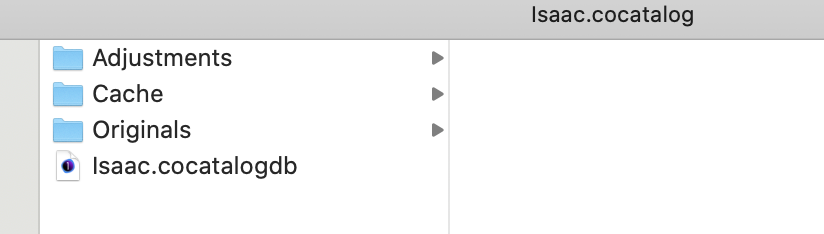
So this was a catalog called Isaac. (My grandson's photos.) It shows in Finder as Isaac.cocatalog. But the package contents includes stuff including the catalog database which is Isaac.cocatalogdb. That database is what gets backed up. You could replace that database file with the backed up version.
Ian
0 -
And there is an article about restoring a catalog from a backup here.
https://support.captureone.com/hc/en-us/articles/360002518657-Restoring-a-Catalog-from-a-backup
Ian
0 -
Thanks, Ian.
The structure for my backed up catalog looks like the one you showed above. In effect, instead of a package, my C1 catalog is a folder. I suppose I could use pkgbuild from terminal, but that sounds unpredictable
The restoring catalog article shows how to restore an existing catalog. I had to delete mine since it took up 2.3 TB on my HD, and I had no space left. So I can't replace the .cocatalogdb file since it doesn't exist (I think that's prob what happens when you restore a catalog)
0 -
I think what happens when you restore a catalog is that the .cocatlogdb file is replaced. There is no need to resort to pkgbuild or anything like that. What happens if you follow the process at the end of that article and double-click the backed up .cocatalogdb file?
Ian
0 -
On order to follow the process I need the original catalog file (restore catalog is grayed out otherwise). If I just double click the .cocatalogdb file, it opens as a regular catalog. I was just wondering if there is any drawback to doing this
0 -
I don't see it as a problem. Isn't that what the method at the end of the article tells you to do?
Ian
0

投稿コメントは受け付けていません。
コメント
6件のコメント