22 Only exports 1 file at a time??

Since upgrading to 22 from 21, I have multiple files selected but only exports 1 file at a time??
I don't remember toggling off anything and I noticed 22 doesn't ask "export variants" anymore
Mac Big Sur
-
does it work if you enable this?
 -2
-2 -
I use Mac Catalina and started using Capture One 22 about a week ago. Last week, I was able to export batches of RAF files to jpg that I then process in ZereneStacker. Today, while working on focus bracketing on only 3 flowers, the first batch of 111 files duplicated to 222 files. When I limited to smaller batches of 17, 38, and 49 files, I got duplicates and triplicates in one export folder, then it stopped sending batches, and I could export only 1 picture at a time. That was tedious! The Export Recipes have disappeared.
0 -
BeO - Where can I find "Edit selected" Thanks
0 -
Hi Leonardo,
You can customize the big icon tool bar of the main window with a right click, if this icon is noz there.
Or use menu item Image>Edit all selected to toggle it.
0 -
Hi Pio,
Regarding duplicates, what is your setting for existing files:
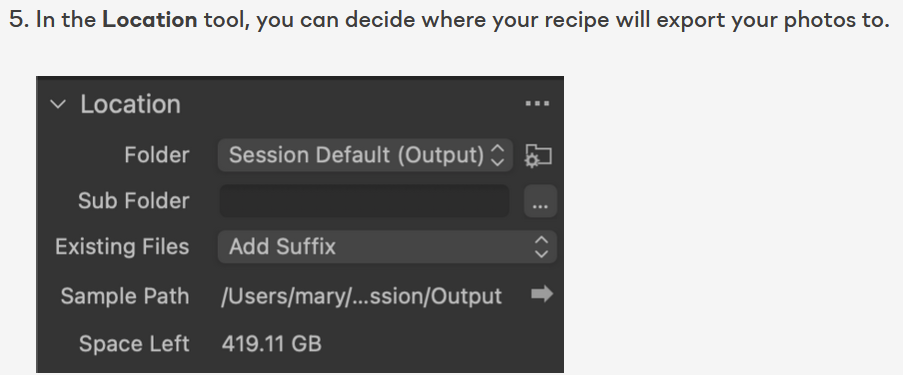
https://support.captureone.com/hc/en-us/articles/360021057158-Export-Recipes-
0 -
I followed this thread on why Capture One 22 exports only 1 file at a time.
As suggested, I looked for Edit Selected on my Mac:
I went to View>Customize Tool Bar> add Edit Selected to the Tool Bar.
I clicked to activate Edit Selected, then selected all files for Export.
Then I went to Export>Location>Export folder
The Dialog at the bottom right indicated "Exporting 117 Variants" and I clicked it.
The actual export took very long--granted my MacBook Pro 13" is old running OS Catalina with only 8GB of RAM, but exporting 117 files should not take that long. In 2022 I plan to buy a new iMac with 24" or 27" screen and Apple's new M1 chip, with 16 or 32 GB of RAM for photo work.
I found the exported files in my Export folder, but there were duplicates in a folder named "Daisy 2" that I created yesterday. This is another topic.
For now, I am just glad that I could export a range of files in one click.
Pio
0 -
Thanks BeO- switching subscriptions right now from fuji to pro will surely give that a try
Pio- glad it worked out
0 -
BeO
Followed the instructions as Pio did- however I still can only export 1 at a time?
0 -
Hey false alarm, I figured it out for some reason the window looking icon needs to be activated
this compiles all the selected into the main window, now it will export multiple files
0

投稿コメントは受け付けていません。
コメント
9件のコメント