Phase One secretly reduced number of activations for co 21

in the middle of this pandemic it seems an evil and rather aggressive move to reduce the number of activations which will especially affect professional photographers and small studios which are already under lot of economic pressure. it becomes even more clear why they saw the need to deploy this scam like sales tactics to push c21 before release. it is a challenging year for all and it is easy to assume that there hardware business crashed so they decided to make us software user pay more and keep the money stream to the investors which are in control of this company.
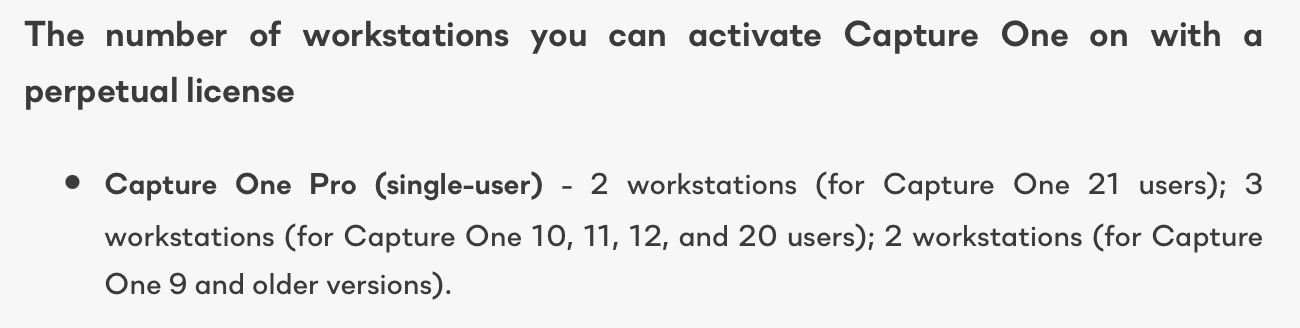
Capture One Pro perpetual license
Capture One 21 and later versions: 2 activation seats.
Capture One 10-20: 3 activation seats.
Capture One 6-9: 2 activation seats.
Capture One Pro subscription
Capture One Pro 21: 2 activation seats
Capture One Pro 20: 3 activation seats.
Capture One Pro 12 and previous versions- 2 activation seats.
Brand version perpetual license
Capture One 21: 1 activation seat.
Capture One 20 and previous versions: 2 activation seats.
Brand version subscription
Capture One Fujifilm / (for Sony) / for Nikon 21: 1 activation seat.
Capture One Fujifilm / (for Sony) 12, 20: 2 activation seats.
Capture One for Nikon 20: 2 activation seats.
https://support.captureone.com/hc/en-us/articles/360002406957-Activation-Limit-Exceeded
-

Are you making a point?
Could you actually make one?
0 -
@Keith ....made it easier for you to comprehand
-2 -

To my understanding, the list is for the single user licenses, i.e.:
- the licenses allow to install and activate CO on as many computers as seats are available.
- the licenses do not allow to use CO simultaneously on different computers [a 'single user' uses only one computer at a given time...]
https://support.captureone.com/hc/en-us/articles/360007791797-All-about-Capture-One-licenses
Thus, with two seats, it is still possible to install and activate (e.g.) on a desktop and a laptop computer, which might be even using different OS. I wouldn't consider this as a huge problem, provided that the license terms are followed.
Concerning the brand licenses, I could see that there could be a limitation. OTOH, even there I could imagine that many people don't even notice the change because they own only one computer. If really needed, the single user could find ways how to use CO for <brand> on different computers with a single seat license: Beside deactivation/activation, the free Express version might be sufficient on the secondary computer...
@CSP, if you want to change my view:
Could you describe in detail how this license change would affect people using CO according the license terms:
- how common is it that a professional photographer uses more than two computers
- why would the change affect a small studio because only one person may use CO at the time anyway. I.e. if two (or more) persons use CO at the same time, there was a requirement to have a sufficient amount of licenses
0 -
- how common is it that a professional photographer uses more than two computers
- why would the change affect a small studio because only one person may use CO at the time anyway. I.e. if two (or more) persons use CO at the same time, there was a requirement to have a sufficient amount of licenses
I think it is very common to use more than 2 computer for various reasons.the core issue is that they reduced the value of c1 dramatically but want more money this is called profiteering and it does not matter if you need or use the possible activations or not. did not read about this in their ads which persuaded user to upgrade in advance.1 -

I think EVERY photog I know uses 2 computers; a laptop and a desktop, typically a MacBook pro and an iMac or Mac Pro. (I actually use 3 as I have my old Mac Pro at home for editing there.)
After two trials I was going to buy C1 today and was looking here to see if there's a 30% off code I could use or if I need to wait until the monthly email that comes at the end of every month. Saw this and for me that pretty much kills C1 as I don't want to pay for two licenses.
In the end I prefer C1 to LR but not enough to pay twice.
1 -
I assume C1 must have data on how many of their customers use how many computers and determined that cutting everyone down to 1 computer (and risking loosing those that need 2) would increase revenue. This especially if doing so is costing them on the PR front.
0 -
@ photo tundra
sure they have this information ! could be they see no opportunity to expand their user base to increase revenue by offering an improved product so they decided to hurt those using all 2 or 3 activations which are more likely to be professionals and will more likely buy more licences to keep c1 running. i believe this is not how a leading company acts taking this risk resembles more a company in troubles.
0 -
@Photo Tundra:
"In the end I prefer C1 to LR but not enough to pay twice."
To my understanding the LR rules are similar to the CO21 rules:
"Your individual license lets you install your Adobe app on more than one computer, sign in (activate) on two, but use it on only one computer at a time."
0 -
Thanks. If it is the same as Adobe that'd be great.
The way C1 have written it, it indicates that you can only activate 1 seat (computer) at a time for perpetual brand version 21. So I'd have to activate it on my laptop for shooting and then de-activate it on my laptop and activate it on my iMac for editing. Lather rinse, repeat. There is no way that I can work like that. On some days I may go back and forth between my laptop and iMac 20 or 30 times but even just a couple of times per day would be enough of a PITA that I'd not want to do it.
If I was somewhere and needed to do some editing on my laptop would it allow me to activate it on my laptop if it is currently activated on the iMac in my studio that has nobody there to deactivate it because I'm in a café somewhere?
Adobe has a workable license. I've got it installed on 3 computers and activated on two (my laptop & iMac). If I'm at home and need to do some editing there then I can activate my Mac Pro and then the next day reactivate my laptop or iMac, whichever I took the activation from. I only do that maybe once per month which isn't too bad.
1 -
The way C1 have written it, it indicates that you can only activate 1 seat (computer) at a time for perpetual brand version 21.
Two activations. It says that on this capture one support page. https://support.captureone.com/hc/en-us/articles/360007791797-All-about-Capture-One-licenses#h_40bbdc8d-f587-4041-acc9-8fee54276a64
 0
0 -
On the line below that though you'll see that for a brand license (Nikon for me) it is only 1 seat, not 2. A blog post on here made it clear that this was not how a 'seat' is traditionally defined in the software industry which is concurrent users but that it is a single activation and that to go between computers you'd have to deactivate on one and then activate on the other. I can't do that 10 or 20 or 30 times in a day.
With C1 to get what I have with Adobe it will cost me twice as much (subscription or perpetual, take your pick). Worse, I'm not sure that I can drop Lightroom+Photoshop as C1 does not cover all of the capabilities of LR+PS and C1 is way behind on developing an API that allows plug-in folks to write for it.
I was willing to fork out for a Nikon brand license (w/ their standard 30% discount) that would allow me to work w/ C1 in a normal fashion. But I can't afford to pay twice as much for C1 (especially when I'll have to keep LR+PS for at least a little while if not a long while).
1 -
Just to clarify:
Adobe: $9.99/mo includes Lightroom + Photoshop for ALL cameras. May be installed on an unlimited number of computers, activated on 2 and used on 1 at a time.
C1: $9.99/mo includes C1 for a single brand camera. May be installed on an unlimited number of computers but activated on only 1 and used on that 1.
C1: $20/mo includes C1 for all cameras. May be installed on an unlimited number of computers, activated on 2 and used on 1 at a time.
Is C1 worth twice as much as Lightroom + Photoshop? Perhaps. But for those of use who will still need LR+PS for a while and thus that cost as well it's pretty tough to swallow paying 3x as much as I am currently.
If I (and others I've talked to the past day or so about this) are misunderstanding C1's definition of 1 seat then I hope someone from C1 (@Lily?) will clarify it.
0 -

I came to this page because I also was shocked to find that I only had two activations as opposed to the previous three. The license fo v21 said it would run both v20 and v21 when available. It did not say I would lose an activation on v20.
That is where I agree with the user who called it 'devious'. To get less with v 21 is disappointing but to be stripped of an activation you already had is . . .
The second point about whether a photographer 'needs' there activations is also important. Many photographers have a desktop and a laptop. In my case two powerful laptops one newer, one as backup that connect to full colour space external monitors.
From time to time I need to demonstrate or shoot on equipment that is not mine, this is where the third activation is great, I can setup for the project without deactivating one of my other machines, then finding I am out of internet coverage when I need to reactivate.I then deactivate that one once done. Yes some of us live and work in remote areas.
Usually my remote areas are parts of outback Australia but have also Antarctica where you need software that works without checking in to the internet. On my last trip all Adobe products stopped working except one old full license copy of CS6 that was still on one of my laptops. The more modern Affinity Photo kept working and Capture One worked although I would not have been able to activate or deactivate.
Redundancy is key to a photographer's workflow and in promoting C1 to other photographers I have often referred to the 'spare' license a big plus. Is C1 truly worrying that we are selling the spare on some mysterious black market?
2 -
It was pointed out to me that I still edit a number of photos from iPhones and DJI drones each week for social media posts and since C1 does not support those I'll need to keep a LR license just for that.
So, paying nearly 2x what I currently do to add C1 for a single camera was a go. But 3x with the new activation limitations can't be justified.
0
Post ist für Kommentare geschlossen.
Kommentare
14 Kommentare