What is a TASK file and how can I move/delete them?

Capture One has almost filled my C:\ drive with .TASK files. I want to delete them or move them to another drive with more space but worry that if I do, other files may be corrupted. Right now they are writing to C:\Users\A.paquette\AppData\Local\CaptureOne\Batch120\active\{FILENAME].task
Ideally, I want to set a new path for those files that writes to a different drive but see no option to do that. Secondly, I want to know what the files are. If they are temporary files, they should be safe to delete, which I would love to do. If they contain detailed masks that took hours to paint, I want them preserved.
AP
-

I'm interested in the answer too. On my system, I have over 3100 files and 350MB in the equivalent folder.
0 -

Batch 120 sounds like a C1 V12 Output Processing Batch file.
Usually the most recent 100 entries in the Output Batch file will be retained in case there is a need to repeat the process.
Does that seem to be a possible answer to you question?
0 -
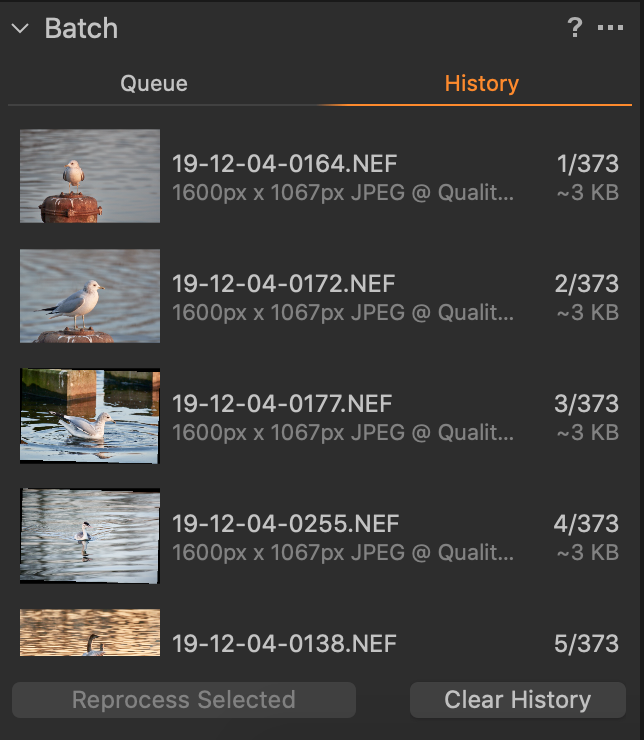 If what SFA suggests is the reason for it, you can clear the output batch history. In the Batch tool switch to the History tab, and click the Clear History button. There is nothing to lose by doing so apart from the convenience of repeating the processing of files in the batch history, which you can do without doing that way in nay case. (I've been using Capture One since version 4.1, and I have never once felt a need to use this!)
Ian
0 -
SFA's theory does not appear to be correct. I have over 3000 files on my system in that directory but the Process History is much shorter. When I "processed" a RAW file, no new .TASK files were created. However, when I "exported" a RAW file, a new .TASK file was created.
There is still the question of whether it is safe to delete these .TASK files.
0 -
I've had a chance to look into this in more detail and the .task files appear to be orphaned Process Queue Active output files.
My system had about 315Mb worth of such files from several years back (since V12 beta processing I think for the "120" folder) but I also found a very small number in the Batch 110 and Batch70 folders.
They are nominally files that should appear in the the Process Queue but do not. However clearing the Process Queue will remove them. Or at least it did on my case.
I think to clear the 110 and 70 folders I would need to start V11 and then probably V10 to run the clear so it's probably easier to simply delete those file using Windows.
I would surmise that the task files, as they do not appear in the queue and given that many or old projects, are simply either files that have been processed but for some reason failed to be cleared from the queue folder OR files that somehow became invisible and have never been processed - at least not in the process run that created them.
It's very likely safe to just delete them although I not that there is an Active.list file present as well.
When I cleared the 120 folder using V12 that file was left behind (as expected) but appears to have only a header line. As does the same file in the "70" version of the folder despite a few file being present.
Therefore my suspicion is that the .list file contains a list of tasks that are active and that also forms the basis of the list of tasks to be cleared from the queue once the queue process has been successfully completed.
If, for whatever reason and by whatever mechanism, the .list file does no contain a .task file found in the folder it would not be cleared - or indeed it might not be processed at all. Or something like that.
So as long as you do not have a whole batch of files in the queue awaiting processing next time you start the queue you should be safe to eliminate the files you have found. It might be interesting to first just display them in detail listing mode to see which dates apply to them.
HTH.
Grant
0 -
SFA,
That seems to be true for the directory ..\Batch120\history but not for the ..\Batch120\active directory. At least on my system, the number of files in the ..\Batch120\history directory matches the number of items in the Process Batch History display. It is the ..\Batch120\active directory that the OP and I are asking about.
0 -
Jeff,
Different files I would anticipate.
The History retain the last 100 files processed as a quick option for reprocessing them should one wish to. It's not something I can ever recall using. If I need to reprocess the chances are that I need to change something else first.
In theory the Active folder should only contain the task field waiting to be processed. That would be the case if the process queue was currently stopped or there was an active output process in process.
What I have found on my system are files from the past that are orphaned and do not appear if I list the files that the Active process thinks it has in its queue (if I may phrase things like that.) They do not appear if one chooses the option to clear the active queue.
My comment above, unlike my earlier suggestion, was mostly about the Active folder not the History folder. The earlier idea mentioned, mainly, the process rather than the specific part of the process since at that time I had not had an opportunity to dig into the details and look at the folders in question.
HTH.
Grant
0 -
Thanks for the answers. I'll need a little more info to understand them though. The reason is that I have never used a tool called "process" and am not sure what it means. I have on occasion seen a message that reads something like, "there are files to be processed. Process them now?" or something like that. I've seen the "process recipe" panel but am unsure what it does or why I would want to use it. I use "export variant" to get my edited images out of Capture One. My impression is that the process recipe would generically process everything, thus leaving out things like unique metadata and filenames.
Bottom line on the main question, and I do appreciate the answers so far, is whether the .task files may be safely deleted.
Best regards,
AP
0 -
You have much more control using an output process recipe rather than Export variant.
That said I suspect that the Export Variant is probably using much the same process behind the scenes and would explain the existence of the .task files as an instruction set for the Export/Output process - just not why they are not removed once the process has ended successfully.
So on that basis I just ran a test using Export and the .task file appears in the "active" folder (Nothing in the history) and remains where once the file export is complete and after exiting C1.
I cannot image what purpose it might have or what subsequent action from within C1 would clear it so I think it might be time to "Submit a request" to Support to see what activity is intended.
I tested this running V20.0.3 so it may be worth checking when running 20.0.4 as well.
However as I can see folder and files on my system orphaned back across several versions I think think may not be something likely fixed in the most recent release.
I see no reason that you cannot just delete the files (using Windows) so long as you are not in the middle of exporting.
HTH.
Grant
0 -
AP
There's a quick intro to process recipes in this tutorial from Capture One's YouTube channel.
Or there's this one, from Capture One staff member David Grover.
And the longer version with more detail in this webinar
The second and third of those are based on older versions of Capture One but this is stuff that hasn't changed, so they are just as useful now as they were.
All of them are also available on the Learning Hub.
Ian
1 -
AP, SFA,
I just opened a case (#35815) regarding these .TASK files being left on the system. Let's see what Tech Support replies.
0 -
BTW, I see from some of the responses here that the number and age of files on my system is unusual. On my system, the task files go back several years, there are well over 100 of them, and they take up more than 10 GB of space.
0 -
Andrew,
Yes, interesting isn't it.
Is your system 10 years old or have you replicated the whole structure to new machines when upgrading?
Grant
0 -
For what it's worth, I did a little sleuthing with a binary editor on one of the .TASK files. I found that there was a header section and then a PNG section. Deleting the header bits with the binary editor and saving the file with a .PNG extension, I found that the Windows "Photos" program would display it and it was a very small version (450 x 300 pixels) of the image that was exported using CaptureOne.
0 -
Jeff, in my case, there are a lot of files that are 70 MB each, implying they are more than the tiny thumbnails you found.
0 -
SFA, my system is about eight years old.
0 -
Andrew,
I don't have any that are over 757KB with most be much less. I checked a few more at random. Not all of them have the embedded PNG image. The ones that do are of varying sizes though.
I use Capture One to process Sony compressed RAW files. What camera format are you processing?
0 -
Jeff,
Phase One IQ3-100. Sometimes, stitches of as many as 48x 100 mb images, so the main files are huge to start with. The raw .iiq files for my 100 MP back are about 120 MB, but if I've done work on them in Photoshop and brought them back as TIFFs, the same file is about 567 MB. If it's a stitch, they go as high as 3.99 GB. I've only had one file go over 4 GB (it was 6 GB) in a single layer Photoshop TIFF, but had to derez it so that I could save it and bring it in to Capture One.
0 -
Andrew,
Your answer to my question and your response to Jeff's question is very interesting.
In effect you have managed to continuously work with the same computing device, despite significant increases in file resolution and file size, for 8 years. Presumably without feeling that performance has been seriously compromised in that period.
I'm in for 7 years although the technology comes from 8 years ago.
I find that quite remarkable compared with previous experiences of technology creep.
I keep thinking that I should be upgrading but have yet to find an absolutely undeniable reason to do so.
I must be missing something, right?
Can you tell me what it might be?
0 -
I just had a fantastic computer built for me. It was awesome in 2010, still pretty good now. I used to be a CG artist and needed a lot of horsepower for CG renders, so I maxed out on everything. I had an i7-6800 3.4GHz CPU with 6 cores and 12 processors, 64GB RAM, solid state main drives + 3 data drives, 2 high end graphics cards for four monitor support, among other bells and whistles. Over the last eight years, or maybe it has been ten, I've replaced the mother board twice, replaced both graphics cards, and added memory (it started with 32 GB RAM).
0 -
Andrew,
Sounds like a good decision in terms of cost effectiveness.
I bought a Dell Precision Notebook in early 2013.
I needed to move to 32bit Windows for both C1 and some business application software I work with on Windows.
I bought a decent but not over specified notebook with i7-3820 and a bit of a GPU which was very low end even then.
I added 16GB RAM (bought it with 8Gb) and a 1Tb mSata SSD (came with 512Gb) running in a spare Sata spot to only half speed and, much to my surprise, this has worked well for me through many application software upgrades.
I keep thinking it's time to upgrade again ... but it's difficult to justify.
I may make the change simply to get Win 10 without risking the potential to trash a system that works very nicely running Win 7. Not a really convincing reason to spend the significant amount required.
0 -
All,
I got the following response this morning to my problem report to tech support about this:
Thank you for contacting us and sharing your inquiry.
It is OK to remove the files from Batch120 folder - these files represent batch queue that was used when processed/exported your images.
I will also let our product team know about this issue. Thank you for your input!Best regards,
Victor
Capture One Support1

Post is closed for comments.
Comments
22 comments