Tool tab scroll not working

OS Name Microsoft Windows 8.1 Pro
The mouse wheel does not reliably scroll through either the tools in the scrollable area or the folders in the Library. Usually it does not work at all, sometimes it will scroll down a bit but not back up, and very rarely it will suddenly work as it's supposed to—but the next time C1 is opened it's back to the previous erratic behavior. The wheel works fine for every other purpose.
Anyone else seeing this?
-

I had the same problem in 20.0.3 and now in 20.1.0. It works for a while and the stops. Some times I can make it work again by a left click on an image in the viewer and the go back to Tool. I don't think it is a mouse problem I have tried several , even cabled. And like you , all other applications work just fine. btw. I am seeing the problem in my own workspace , it appears to work better/OK in the default workspace.
0 -

If the current personalised workspace was created in an older version of C1 it may be worth taking a little time to regenerate the settings from a new Workspace.
It is possible that some part of the older file is calling in settings that have a conflict with the latest settings for some of the features and functions = especially likely, I would suggest, for some of the Layer functions.
It maybe time to revisit the Keyboard shortcuts as well and compare any personalisation with the latest defaults just in case something happening internally to some part of the system finds some non-obvious conflicts somewhere.
0 -
If the current personalised workspace was created in an older version of C1 it may be worth taking a little time to regenerate the settings from a new Workspace.
I've tried loading the Default workspace with no modifications and I see the same behavior. Is there something else I should be trying?
EDIT: Version 13.0.0.x running on Windows 10 works normally.
EDIT 2: I just updated my W10 install and scrolling still functions normally... for now.
0 -
Let's just take stock for a moment.
The library tab has always had scrolling available in its tools for both the Library Section and the Filters section.
Taking the filters as an example, scrolling will always be active if enough filters are to be displayed AND the active/open filter tools fill the vertical space available.With filters it is mostly likely that the available vertical space will be used up.
For other tabs both fixed and scrolling areas are available.
Again the scrolling area does not scroll UNLESS the tools are already expanded far enough to fill the space available.
The C1 Preferences file offer 2 options for the way the scroll wheel (or equivalent) works in the scrolling regions.
The scroll wheel can either activate scroll tool sliders and the be used with the Alt-key modifier to scroll tools up and down, OR vice versa.
Scroll is disabled in a scroll area where the limits of the available display are not being exceeded.
Does that description match your understanding?
I'm running WIn 7. Mostly this works as expected.
I can appear to stutter once in a while but usually only if I have 2 sessions open or the system is doing something else somewhat demanding in the background.
Using a trackpad I use its scroll wheel emulation to scroll the tools not the sliders.
Grant
0 -
OK, after a morning of testing I've found that this glitch is OS dependent, at least in my case. I stepped back my Win8 C1 20 installs from current to the first release of v20 and I found the scrolling issue was present from the beginning. I'm not sure why I didn't notice it before, but I didn't. V20 shows no issues in Win10 and I should point out that it's the exact same config running on the exact same hardware (dual boot), so the issue seems to lie with Windows 8.1 or maybe a driver specific to that OS. It's also worth noting that while some are having issues only with custom tool tabs, my issues are present in the default configurations as well.
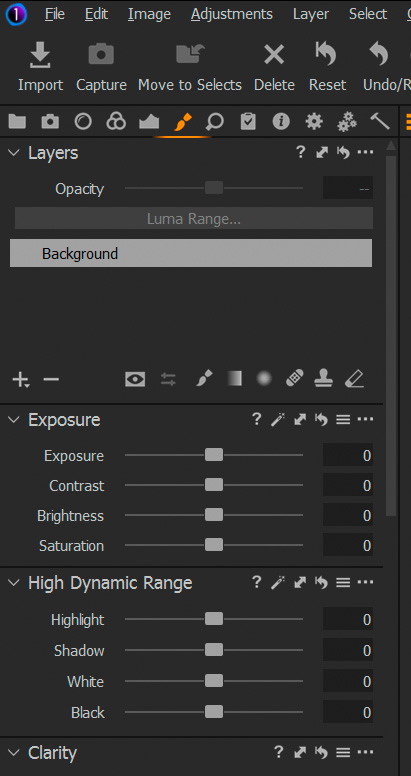
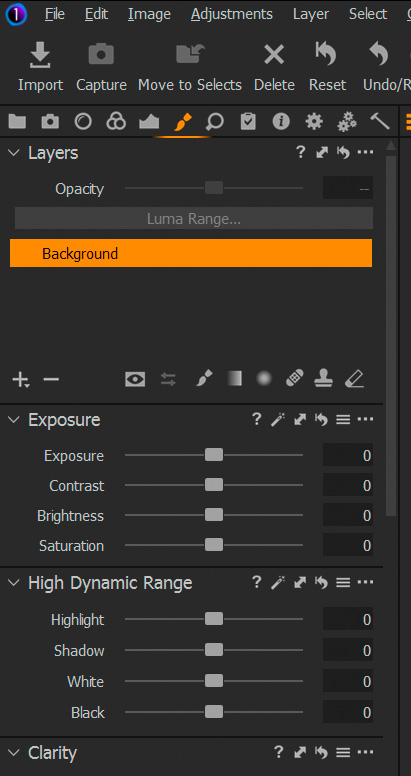
I have found a partial work-around. If I go to my layers tab and select/highlight either the background or a layer if there happens to be one, then scrolling works for both tools and folders until I select another image in the browser and then it's dysfunctional once again.
Support has been contacted.
 0
0 -
Thanks both of you for taking the time to help.
In my case when I first expierenced the problem in 20.0.3 , my own workspace was created in 20.0.3
I gave up on this workspace/scroll feature (lets call it WS1) and created a new workspace (ws2) with tabs for each part
of my workflow - library import , filtes , keywords etc . no scrooling area.
But ws1 is still available and can try your suggestions , or I can create a new workspace in 20.1
Keyboard shortcuts changed from MY to default now , lets see if it changes anything.I am aware of the following statements:
>The library tab has always had scrolling available in its tools for both the Library Section and the Filters section.
>Taking the filters as an example, scrolling will always be active if enough filters are to be displayed AND the active/open filter tools fill the vertical space available.With filters it is mostly likely that the available vertical space will be used up.
>For other tabs both fixed and scrolling areas are available.
>Again the scrolling area does not scroll UNLESS the tools are already expanded far enough to fill the space available.
>The C1 Preferences file offer 2 options for the way the scroll wheel (or equivalent) works in the scrolling regions.
>The scroll wheel can either activate scroll tool sliders and the be used with the Alt-key modifier to scroll tools up and down, OR vice versa.
>Scroll is disabled in a scroll area where the limits of the available display are not being exceeded.Normally nothing is running in the background (not even windows updates/AV etc) , this is a system dedicated for Photo and Video work.
Your work-around seems similar to mine.
Windows 7 Ultimate in my case0 -
I received a response from support:
Hello,
Thank you for bringing this bug to our attention, we appreciate the time you’ve taken to contribute towards the development and maintenance of Capture One.
I would consider this a bug and have already filed a report with all the details for the R&D team.
Unfortunately, we cannot comment when this bug will be fixed, but rest assured that it has been reported and will be looked into.
We also cannot guarantee that this will be in the next service release, but we will do our best to roll out a fix as soon as possible
0 -

I've been having this issue as well. My capture one installation is only about a month old. Sometimes it works, and then it won't. Not disrupting, but annoying sometimes.
0
Post is closed for comments.
Comments
8 comments