All adjustments greyed out

I'm new here and new to Capture One (moving from Aperture). All my adjustments are greyed out and I've not found any helpful info on Google or searches on this forum. I have reinstalled the software, reactivated the software and tried test catalogs with photos that shouldn't be a problem. They all are editable with Preview.
I'm tearing my hair out (and I don't have much left) trying to get this to work. I'm certain there is some simple thing that I have done wrong but I sure can't find it.
Any advice would be appreciated!
I'm tearing my hair out (and I don't have much left) trying to get this to work. I'm certain there is some simple thing that I have done wrong but I sure can't find it.
Any advice would be appreciated!
0
-

Hello,
This is one of two things going on. Either:
1) The images are not raw files, or Capture One cannot properly read the file due to improper permissions. This can occur when reading or capturing images on an external hard drive.
2) Capture One is running in DB mode (for digital backs). This is only a problem when working with DSLR files. Solution is to activate with a Pro key. Images will display with an eye icon on them.
If neither of these are the reasoning, please create a support case via http://www.phaseone.com under the support tab, and clicking on Contact Technical Support, and attach some files you are having issues with. Thanks.0 -

So how do we check permissions? Or make it so that Capture One can properly read the file?
0 -
Did you really mean to post this in the forum for versions 8 and 7?
If you are on a Mac, with a recent version of MacOS, Macs these days need permissions to be given to apps to access files and folders. You can check whether this has been done in your case in the computer's System Preferences., in the Security and Privacy section.
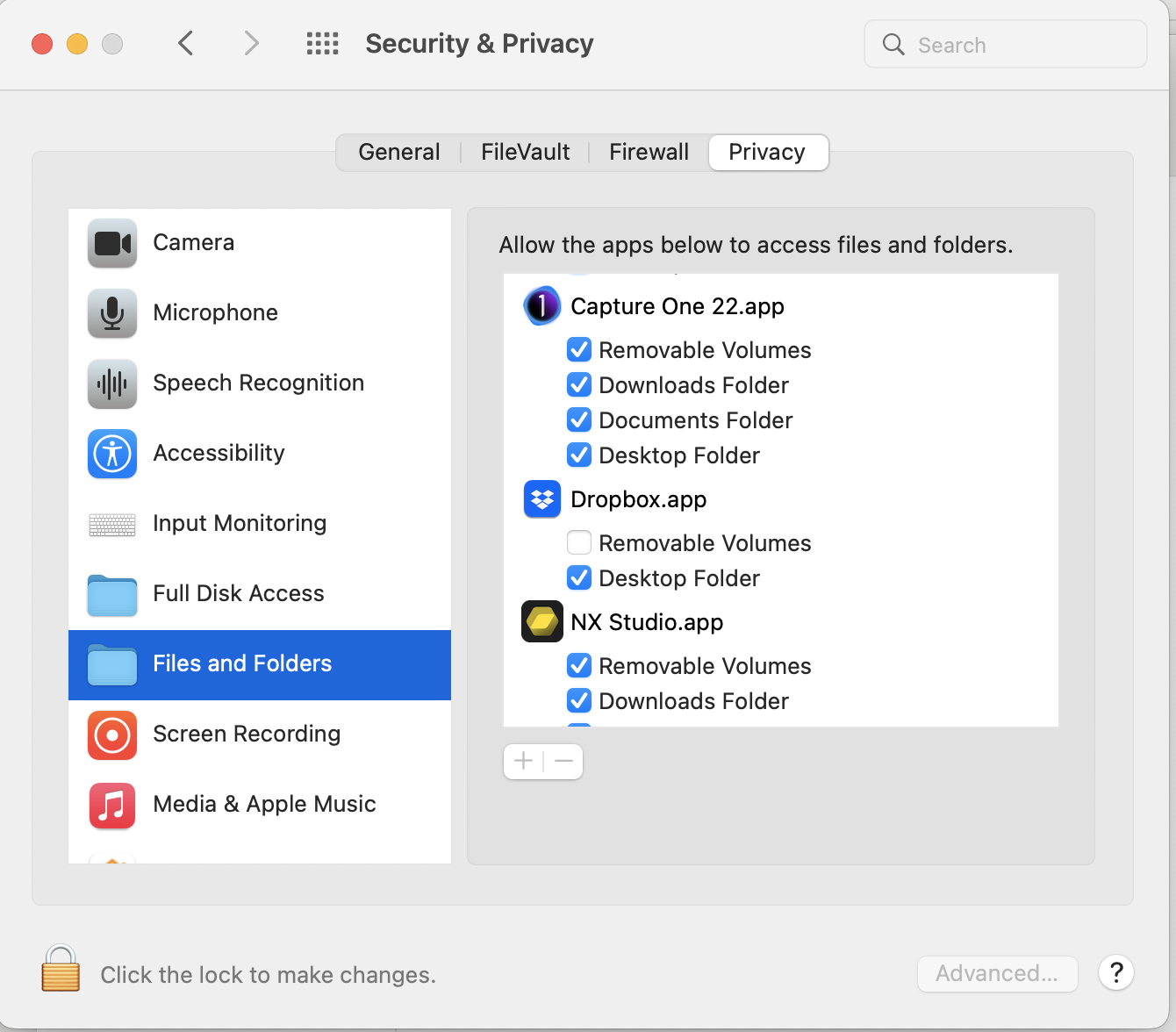
But also, if you really are on version 8 or version 7, the latest MacOS version that Capture One 8 worked with was El Capitan 10.11.6, and the latest version that Capture One 7 worked with was 10.9.5 Mavericks.
Ian
0

Post is closed for comments.
Comments
3 comments