CO exports problem in photoshop (camera raw opened for TIFF)

Hi,
I have to export variants in Tiff format (or PSD) so as to finalize them in Photoshop (5.5).
- Exports in TIFFs (8 bit, no compression, do not open in another software ..): photoshop opens Camera Raw ... (!!)
- Exports to PSD:
> sometimes photoshop opens the file with a message: "some information is unreadable and will be ignored" ..
> sometimes photoshop opens the file without message but differences appear in particular colors .. color temperature .. Although my presets treatment CO, exports and my PS workspace are in Adobe RGV (1998).
That's it, I do not understand what can happen (everything seems ok) and .. so I need your help (obviously I'm on an urgent job ..)
Capture One 12.1.0.106
Thank you !
Thomas
I have to export variants in Tiff format (or PSD) so as to finalize them in Photoshop (5.5).
- Exports in TIFFs (8 bit, no compression, do not open in another software ..): photoshop opens Camera Raw ... (!!)
- Exports to PSD:
> sometimes photoshop opens the file with a message: "some information is unreadable and will be ignored" ..
> sometimes photoshop opens the file without message but differences appear in particular colors .. color temperature .. Although my presets treatment CO, exports and my PS workspace are in Adobe RGV (1998).
That's it, I do not understand what can happen (everything seems ok) and .. so I need your help (obviously I'm on an urgent job ..)
Capture One 12.1.0.106
Thank you !
Thomas
0
-
Thank you very much Ian,
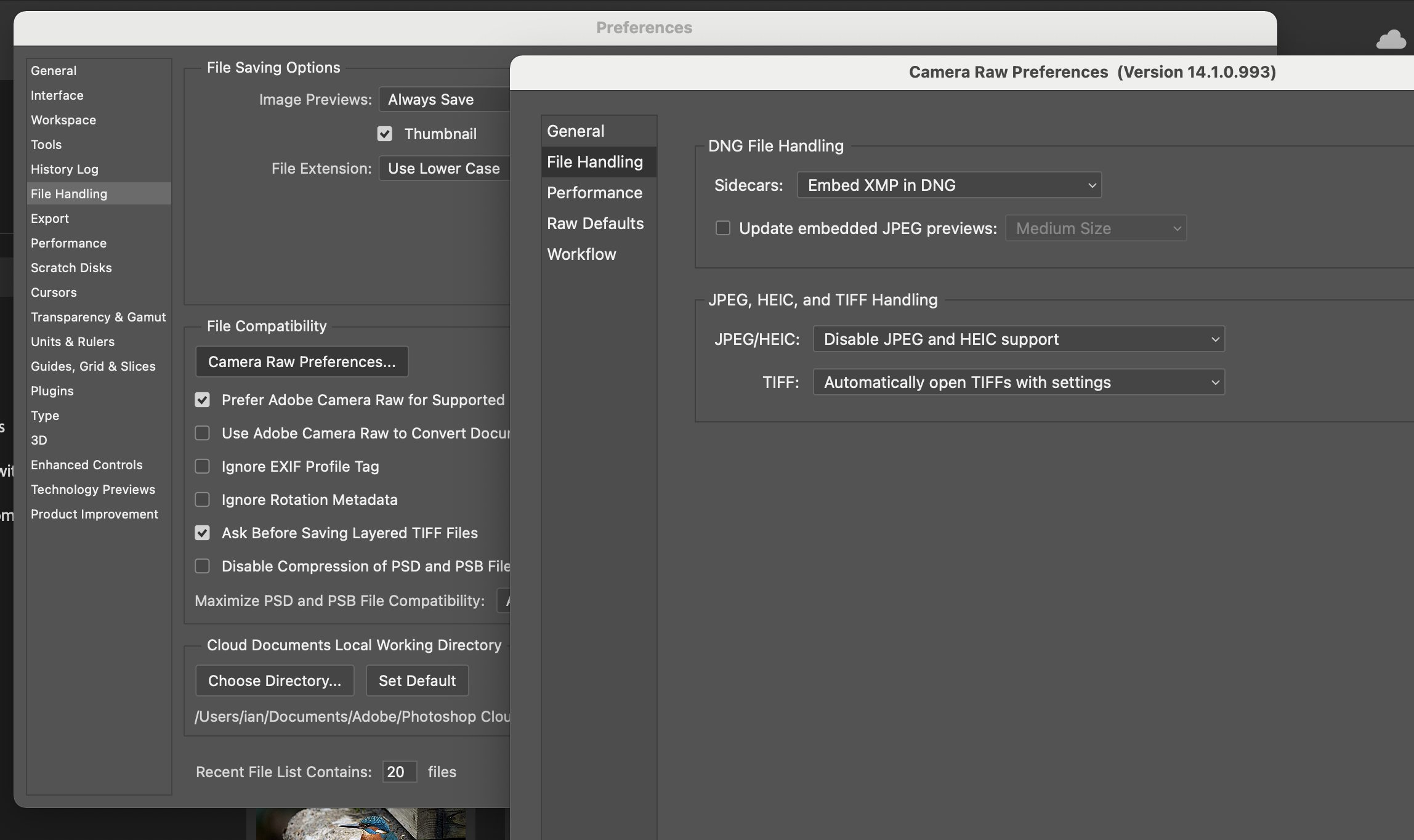
Indeed, I have disabled support for TIFF (and JPEG) files in Camera Raw preferences from PS preferences and now TIFFs open directly into PS.
I had not made these choices until now because PS opened all the tiffs that I presented ... Well, it remains for me a little strange but ... it works!
Thanks again.
Thomas0 -

There seems to be no link to the solution. Can you repost where the photoshop setting is? I'm having this trouble..
Thanks
0 -
You could look at this article from Capture One.
Also, I have now started using PS a bit since I wrote my response a couple of years ago. The exact location of the PS setting you need may depend on the version of PS you have. But in the latest version, which I have, it is here. Go to PS Preferences> File Handling, Click the button for Camera Raw Preferences, then in the second dialog box go for File Handling again and change the drop down for TIFFs to Disable TIFF support (like my screen shot has it for JPEG/HEIC).
 0
0 -
Thank you, Ian. Glad you were standing by.
Sean
0


Post is closed for comments.
Comments
6 comments